
As a business owner, one of the crucial skills to master is knowing how to respond to leads automatically. In today’s fast-paced digital environment, potential customers expect quick and efficient responses. If you’re always chained to your desk to answer inquiries, you’re missing out on the flexibility and efficiency that automation can offer. This is where Make.com, with its powerful automation capabilities, comes in handy. At La Maquina Studio, we specialize in creating workflows that allow you to respond instantly to leads, ensuring that you never miss an opportunity even when you’re away from your desk. Our WF1 workflow, the Smart Contact Form, is designed to tackle this very challenge by connecting a Webhook to OpenAI and then to email, providing an automated response system that feels personal and attentive.
Table of Contents
The Importance of Instantaneous Lead Response
In the realm of business, timing can be everything. Research indicates that businesses that respond quickly to inquiries can see a significant increase in lead conversion rates. The critical period after a potential customer reaches out is often referred to as the “golden hour.” During this time, your timely response can make the difference between winning a new client or losing them to a competitor. But how can you ensure prompt responses while juggling the many responsibilities of running a business?
The answer lies in learning how to respond to leads automatically. Automation not only saves time but also ensures that no lead is left unattended. Even the most diligent entrepreneurs can overlook an email or miss a phone call, but a well-designed automated system can mitigate these human errors. By setting up an automated workflow, you can handle inquiries efficiently and keep the sales funnel flowing without interruption.
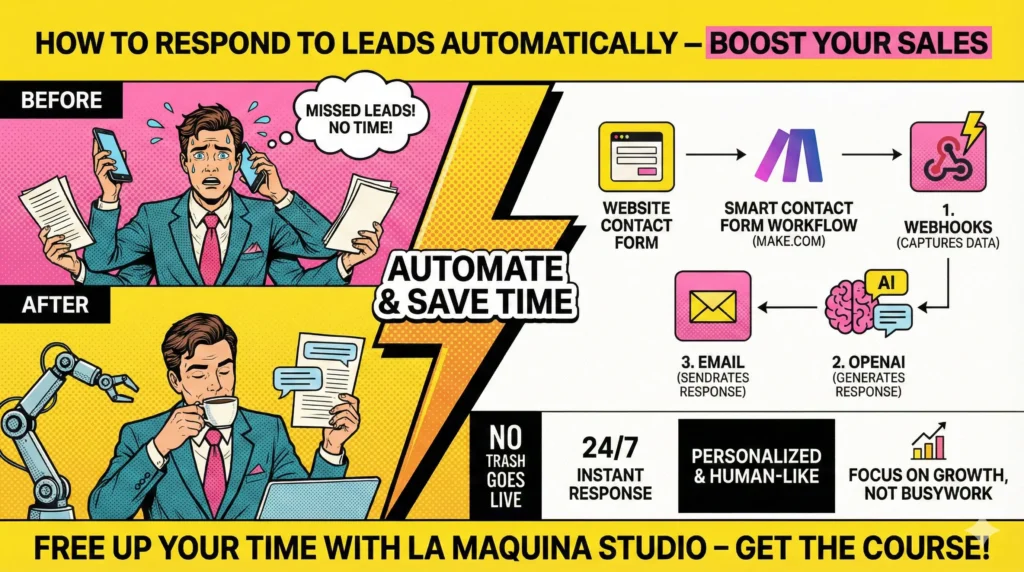
Our Smart Contact Form workflow on Make.com is crafted to provide such instant responses. It eliminates the need for manual follow-ups by integrating a Webhook that captures all form submissions. The data is then processed through OpenAI, which formulates a response based on the inquiry’s nature. Finally, this customized response is sent to the lead via email, ensuring the interaction feels personal and immediate. By automating these initial touchpoints, businesses can maintain engagement with leads while freeing up their time to focus on more strategic tasks.
Understanding the Workflow: Smart Contact Form
Before diving into the practicalities, let’s explore how the Smart Contact Form workflow functions behind the scenes. The process begins when a lead fills out a contact form on your website. This triggers a Webhook, a crucial component that acts as a middleman, capturing the lead’s information instantaneously. Think of a Webhook as a digital net that catches data and transfers it to other applications without delay.
Once the information is captured, it is sent to OpenAI, which is integrated into the workflow to analyze and generate a suitable response. This AI component is adept at understanding the context and tone required for different types of inquiries. It crafts messages that sound like they come from a human, maintaining the warmth and personal touch crucial for nurturing leads.
The final step involves sending the AI-generated response to the lead via email. This last piece of the puzzle ensures that the lead receives a timely and well-considered message, keeping your business at the forefront of their mind. The beauty of this workflow is its simplicity and effectiveness, requiring minimal technical knowledge to implement. However, understanding the nuances and configuring each step accurately is essential for seamless operation.
Here at La Maquina Studio, we believe in equipping business owners with the tools to set up these systems easily. Our course on Make.com covers the Smart Contact Form in detail, breaking down each module into digestible parts. We emphasize practical learning, ensuring that you can replicate and adapt the workflow to fit your specific business needs.
Overcoming Challenges in Automation Implementation
While the concept of automated lead response is appealing, the implementation can come with its own set of challenges. It’s important to approach this process with realistic expectations and a willingness to learn. One common hurdle is the initial setup of the Webhook, which can seem intimidating if you’re not tech-savvy. However, Make.com provides a user-friendly interface that simplifies the process significantly.
Another challenge lies in crafting responses that truly resonate with leads. While OpenAI is remarkably advanced, it requires precise input to generate high-quality outputs. This means spending time to understand how to phrase inputs effectively and testing multiple scenarios to ensure the AI delivers the desired results. It’s a learning curve, but with practice and experimentation, the system can be fine-tuned to perfection.
Moreover, there’s the question of maintaining personalization when automating responses. It’s a valid concern, as impersonal interactions can deter potential clients. The key is to strike a balance between automation and human touch. By using templates that allow for slight customization, or by programming OpenAI to include specific personal touches, you can keep your responses engaging and sincere.
At La Maquina Studio, we support our clients throughout this journey, offering insights and guidance to overcome these challenges. Our hands-on approach ensures that you not only learn how to respond to leads automatically but also how to refine your processes continuously.
Integrating Automation into Your Business Strategy
Integrating automation into your business strategy is not just about responding to leads; it’s about creating a cohesive system that enhances overall efficiency. Once you’ve mastered how to respond to leads automatically, you can begin exploring other areas of your business where similar efficiencies can be achieved. Automation can extend to customer service, scheduling, content creation, and even sales processes.
Imagine a scenario where your entire customer journey is seamlessly automated. From the initial inquiry to follow-ups and even feedback collection, each interaction is handled efficiently, allowing your team to focus on strategic growth initiatives. The time saved through automation translates into more opportunities to innovate and expand your business reach.
However, it’s crucial to remember that automation should complement, not replace, human interaction. While systems like the Smart Contact Form can handle the initial touchpoints effectively, there will always be a need for personal engagement, especially as leads move further down the sales funnel. Building relationships and closing deals often require a human touch, and automation should free up your time to focus on these high-value interactions.
Our automation kits, like the Smart Lead Qualifier and Instant Assessment Report, are designed to provide you with ready-to-use blueprints that can be easily integrated into your existing workflows. These kits allow you to build upon the foundation of automated lead responses, creating a robust and comprehensive business strategy.
In conclusion, learning how to respond to leads automatically is more than just a tactic; it’s an investment in the future efficiency of your business. By leveraging the capabilities of Make.com and the expertise of La Maquina Studio, you can create a streamlined system that not only captures and nurtures leads but also supports your broader business objectives. Automation empowers you to operate efficiently, even when you’re not at your desk, ensuring that no opportunity is missed and that your business continues to thrive.


Susana Toth
Make.com Certified Expert & Founder, La Maquina Studio
Susana Toth is a Make.com Certified Expert and the founder of La Maquina Studio, where she helps small businesses and consultants eliminate repetitive work through smart automation. With 20+ years of experience in web design, business consulting, and digital strategy, she builds practical AI-powered workflows that save hours every week — without writing a single line of code. She writes about Make.com automation, AI integration, and building systems that work while you don’t.
Learn more about me →