
Creating an automatic reply to website enquiries isn’t just about saving time—it’s a strategic move that can significantly enhance your customer engagement and conversion rates. In today’s fast-paced digital environment, consumers expect quick responses. If you’re running a business, especially a small one, every inquiry is a potential customer. Responding promptly can be the difference between winning a loyal client and losing a prospect to a competitor. However, managing these inquiries manually can become overwhelming. This is where automation tools, such as Make.com, come into play. By setting up an automated system using the Smart Contact Form workflow, you can respond instantly, ensuring that no lead slips through the cracks while maintaining a professional image.
The journey to mastering automatic replies isn’t a magic trick. It’s about understanding your business needs, setting up the right processes, and consistently refining them to meet your goals. While automation can seem daunting at first, it offers incredible flexibility and scalability once you’re past the initial learning curve. Whether you’re a seasoned business owner or new to the online world, learning how to create effective automatic replies can empower you to handle inquiries more efficiently and boost your business’s bottom line.
Table of Contents
Why Automatic Replies Matter for Your Business
Implementing an automatic reply to website enquiries is not just a technical upgrade; it’s a business necessity. In the era of instant gratification, people expect immediate acknowledgment of their queries. An automatic response serves as the first touchpoint in your communication strategy, setting the tone and pace for future interactions with potential customers. It’s crucial to understand that the initial response can significantly influence whether a lead turns into a customer.
Automatic replies offer several benefits. First, they provide instant confirmation to the customer that their inquiry has been received, which can build trust and reduce anxiety. Secondly, they allow you to set expectations about when a more detailed reply might follow. This is especially beneficial if your business has non-standard hours or if a response might require more than a few minutes. Lastly, a well-crafted automatic reply can provide additional information such as links to FAQs, product pages, or even special offers, keeping the customer engaged while they wait for a more personalized response.
Incorporating a smart response system can also alleviate the pressure on your team, allowing them to focus on more complex queries that require human intervention. This not only improves efficiency but also boosts team morale by reducing the mundane workload. The Make.com Smart Contact Form workflow is designed to streamline this process, offering a seamless way to integrate automatic replies into your current system without requiring extensive technical know-how.
Setting Up Your Automatic Reply System with Make.com
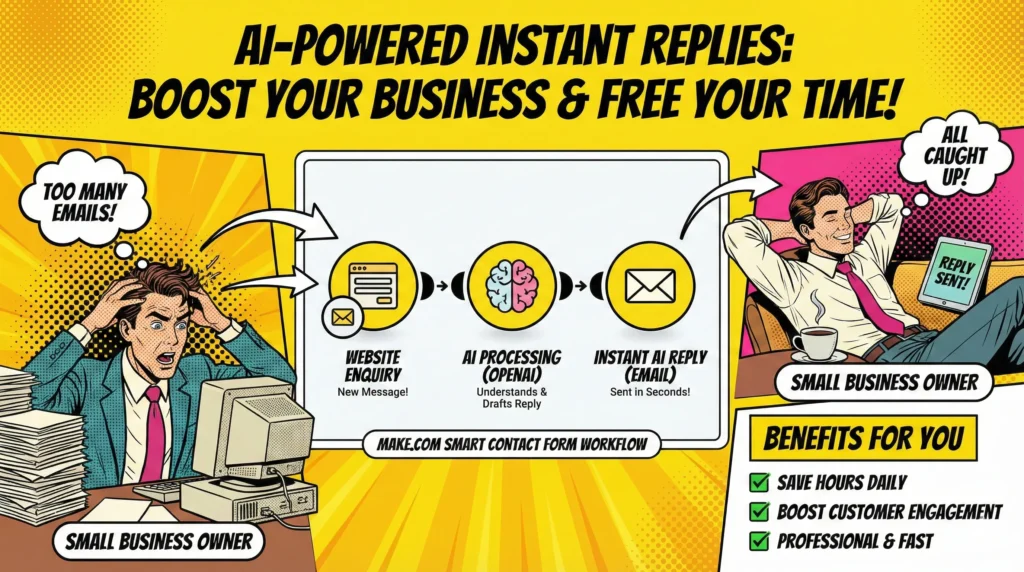
The automatic reply to website enquiries can be effectively handled using the Smart Contact Form workflow offered by Make.com. This beginner-friendly tool is tailored to address the common issue of manual email responses, enabling you to configure an intelligent response system quickly. The workflow is straightforward, comprising three modules and taking just about 20 minutes to set up, making it accessible even to those who might not consider themselves particularly tech-savvy.
The process begins with capturing the incoming enquiry through a webhook. Webhooks are essentially automated messages sent from apps when something happens. In this context, when a customer submits a form on your website, the webhook is triggered, sending the data to Make.com. From there, the data flows into OpenAI, where it can be used to generate a contextually appropriate response.
The final step in this workflow involves sending the pre-formulated email back to the customer. This ensures that each inquiry receives an immediate, well-structured reply, providing reassurance to the customer that their query is being handled. The response can include personalization elements such as the customer’s name or specific details about their inquiry, enhancing the professional touch of your communication.
This setup effectively bridges the gap between receiving an enquiry and the time it takes for a human to respond, thereby maintaining engagement. It streamlines the initial communication process, so your team can dedicate their efforts to crafting more detailed responses or handling other aspects of customer service.
Crafting Responses That Convert
An automatic reply to website enquiries should do more than just acknowledge receipt of a message. It should serve as a conversion tool, moving potential customers further along the sales funnel. Crafting such responses requires a strategic approach, blending personalization, value, and clear action steps for the customer.
First, personalization is key. Start your reply by addressing the customer by name. This simple touch can make your communication feel more personal and less robotic. Moreover, consider including specific details from their enquiry to show that the message is tailored to their needs, even if it’s generated by an AI.
Next, add value by including useful information in your automatic reply. This could be links to resources on your website, answers to frequently asked questions, or a brief overview of your services or products that might be relevant to the customer’s initial query. The aim is to keep the customer engaged and interested while they wait for a more detailed response.
Finally, include a clear call-to-action. Let the customer know what they can expect next, whether it’s a follow-up email, a call from a sales representative, or another form of communication. Encourage them to take the next step, such as visiting a particular page on your website or signing up for a newsletter.
By integrating these elements into your automatic responses, you transform a simple acknowledgment into an opportunity for engagement and conversion, turning a passive interaction into an active part of your sales strategy.
Troubleshooting and Improving Your Workflow
While setting up an automatic reply to website enquiries is relatively straightforward, the work doesn’t stop there. Ongoing monitoring and tweaking are essential to ensure that your automatic replies are functioning optimally and meeting the needs of your customers. Start by setting up metrics to track the performance of your automatic responses. This could include open rates, click-through rates, or even direct feedback from customers. Use these insights to identify areas for improvement.
If you notice that customers frequently follow up with questions that could be answered in the initial reply, consider expanding the information you provide. Alternatively, if your open rates are low, it might be worth revising the subject line or the opening sentence of your automatic emails to make them more engaging.
Another common issue is the risk of your automatic replies ending up in the spam folder. To combat this, ensure that your emails are correctly authenticated with SPF, DKIM, and DMARC settings. Additionally, keep your email list clean by regularly removing unengaged contacts.
Finally, remain flexible and open to changes. As your business grows and evolves, so will the nature of your enquiries. Regularly review and update your automatic replies to ensure they remain relevant and effective. With Make.com, adjustments to your workflow are straightforward, allowing you to make changes without disrupting your entire system.
By dedicating time to monitor and refine your automatic replies, you’re not just automating a process—you’re actively enhancing your customer service strategy, ensuring a seamless experience for anyone who interacts with your business.
Conclusion
Implementing an automatic reply to website enquiries is more than just a time-saver; it’s a strategic enhancement to your customer engagement toolkit. With Make.com’s Smart Contact Form workflow, you can efficiently manage initial customer interactions, setting a professional tone and providing immediate engagement. This automated approach not only satisfies your customers’ need for instant communication but also frees up your team to focus on more complex interactions that require a human touch.
As you begin to implement this system, remember that automation is not a ‘set it and forget it’ solution. Continuous monitoring and refining are key to ensuring your replies are not only timely but also engaging and effective in converting leads. By doing so, you can maintain a human touch in your automated responses, making each interaction feel personal and valuable.
Ultimately, a well-crafted automatic reply system can significantly enhance your business’s responsiveness and reputation, paving the way for improved customer relationships and increased conversions. With the right tools and approach, you can turn every inquiry into an opportunity for growth and success.


Susana Toth
Make.com Certified Expert & Founder, La Maquina Studio
Susana Toth is a Make.com Certified Expert and the founder of La Maquina Studio, where she helps small businesses and consultants eliminate repetitive work through smart automation. With 20+ years of experience in web design, business consulting, and digital strategy, she builds practical AI-powered workflows that save hours every week — without writing a single line of code. She writes about Make.com automation, AI integration, and building systems that work while you don’t.
Learn more about me →