
Creating an automated email response to new inquiry can be a game-changer for businesses constantly flooded with communication. Whether you’re a small business owner or a part of a larger enterprise, managing the influx of inquiries can feel like a never-ending task. That’s where automation comes in to save the day, offering solutions that are not only efficient but also consistently accurate in their execution. At La Maquina Studio, we’ve developed a workflow using Make.com that can help you build an AI-powered inquiry response system. This system intelligently handles initial communication, ensuring that potential clients receive timely and relevant information while freeing up valuable human resources for tasks that require a personal touch. In this article, we will explore this workflow, dissect its components, and provide you with actionable insights on how to implement it in your operations. We’ll be honest about the learning curves involved and give you a realistic view of the benefits and challenges of automation.
Table of Contents
Understanding the Need for Automation
In today’s fast-paced business environment, time is of the essence. Every moment you spend manually responding to inquiries is a moment lost on strategic activities that can drive growth. When customers reach out, they expect a prompt response, and failing to meet this expectation can result in lost opportunities. This is where the automated email response to new inquiry can play a pivotal role. Automation ensures that you provide a consistent and timely response to every inquiry that lands in your inbox.
Before diving into the technicalities of setting up an automated system, it’s important to understand the underlying need for such a system. Businesses that experience a high volume of daily inquiries often find themselves overwhelmed, leading to delayed responses and sometimes even missed emails. This can negatively impact customer satisfaction and the overall perception of your brand. By implementing an AI-powered response system, you ensure that each inquiry is acknowledged promptly, providing the customer with the initial information they need.
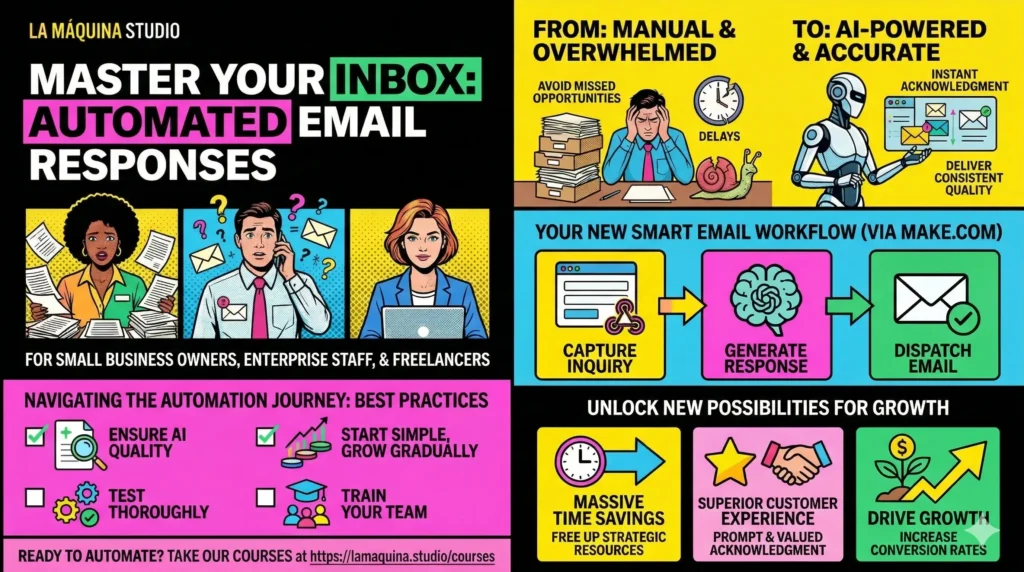
The Make.com workflow we refer to—WF1, the Smart Contact Form—effectively addresses this issue. It utilizes webhooks to capture incoming inquiries, employs OpenAI to generate appropriate responses, and sends them out via email. This simple yet powerful workflow not only boosts efficiency but also ensures accuracy in the responses delivered. Moreover, it can be tailored to suit specific business needs, allowing you to modify the responses based on the nature of the inquiry or the type of service offered.
Setting Up Your Automated Response System
Building an automated email response to new inquiry system requires a structured approach. The first step is to integrate a contact form on your website that connects to Make.com. This contact form will serve as the entry point for all inquiries. By setting up a webhook, you can capture every submission and begin the automation process.
Once a webhook captures the inquiry, the next step involves utilizing an AI model to craft a response. Make.com’s workflow WF1 incorporates OpenAI, a powerful tool that helps in generating contextually accurate email responses. By training the AI on a set of predefined templates and incorporating elements like the customer’s name and specific inquiry details, you can create personalized responses that feel authentic and human-like.
After generating the response, it’s essential to ensure it reaches the customer promptly. This is achieved by configuring your email service within the Make.com platform to automatically send out the generated response. The beauty of this system is its flexibility; you can easily tweak the workflow to add more complexity or adjust the response templates as your business evolves.
It’s important to highlight that while setting up this system may seem daunting initially, the benefits far outweigh the investment of time and effort. The key is to test the system thoroughly to ensure it functions smoothly and adjust the parameters to match your specific business requirements.
Managing Challenges and Ensuring Success
Implementing an automated email response to new inquiry system is not without its challenges. One of the primary concerns is ensuring that the AI-generated responses maintain a level of quality and professionalism that aligns with your brand. While AI technologies have advanced significantly, they may still require periodic adjustments and oversight to ensure they remain relevant and accurate.
Another potential challenge is the integration of various tools and platforms to create a seamless workflow. Depending on your existing infrastructure, you may need to invest time in ensuring compatibility and smooth data flow between your contact form, AI model, and email service provider.
To overcome these challenges, it’s crucial to have a clear understanding of your business processes and objectives. Regularly reviewing and refining the workflow will help you address any inconsistencies and optimize performance. At La Maquina Studio, we advise businesses to start with a basic setup and gradually add complexity as they become more comfortable with the system. This approach minimizes disruptions and allows for incremental improvements.
Additionally, maintaining an open line of communication with your team and providing adequate training is essential. This ensures that everyone is on the same page and understands how to make the most of the automated system, further enhancing its effectiveness.
Maximizing the Benefits of Automation
Once your automated email response to new inquiry system is up and running, you’ll begin to notice the tangible benefits it brings to your business. One of the most immediate advantages is the considerable time savings. By automating the initial response process, you free up resources that can be directed towards more strategic tasks, such as customer retention and business development.
Beyond time savings, automation also enhances the customer experience. The promptness of automated responses ensures that potential clients feel valued and acknowledged, which can significantly improve your brand’s image. Moreover, the ability to customize responses means that you can maintain a personalized touch, even in an automated setup.
However, to fully maximize these benefits, it’s important to continually assess and update your system. Customer expectations and business dynamics are constantly evolving, and your automated response system should be flexible enough to adapt to these changes. Gathering feedback from customers and your team can provide valuable insights into areas that may need improvement.
By leveraging the full potential of automation, you can create a competitive edge, driving efficiency and satisfaction across all touchpoints of your business. As you grow more familiar with the capabilities of Make.com, you can explore additional workflows and expand your automation strategy to encompass other areas of your operations.
In conclusion, building an automated email response to new inquiry system is a strategic move that can transform the way your business handles customer communication. While the initial setup may require some effort and patience, the long-term benefits are well worth it. By integrating a smart contact form, leveraging AI for response generation, and automating email dispatch, you’ll not only improve efficiency but also enhance the customer experience. At La Maquina Studio, we are committed to helping businesses navigate the complexities of automation, offering practical solutions that drive real results. If you’re ready to take the next step in automating your inquiry response process, we invite you to explore our courses and resources at https://lamaquina.studio/courses. Embrace the power of automation and unlock new possibilities for growth and success.
Check out the courses you can learn in just a few days and implement in your business! Need help? Get in touch with me!


Susana Toth
Make.com Certified Expert & Founder, La Maquina Studio
Susana Toth is a Make.com Certified Expert and the founder of La Maquina Studio, where she helps small businesses and consultants eliminate repetitive work through smart automation. With 20+ years of experience in web design, business consulting, and digital strategy, she builds practical AI-powered workflows that save hours every week — without writing a single line of code. She writes about Make.com automation, AI integration, and building systems that work while you don’t.
Learn more about me →