
When you decide to automate repetitive tasks business processes, you’re taking a significant step towards efficiency and growth. In a world where time equates to money, automating these mundane, repetitive tasks can free up valuable resources and allow your team to focus on more strategic initiatives. But with automation being such a broad concept, it can be overwhelming to determine which tasks should be your priority. From managing emails and scheduling appointments to content creation and lead nurturing, automation has the potential to transform the way your business operates. This article aims to guide you through the landscape of business automation, highlighting which tasks are most worth automating first and why.
Table of Contents
Email and Communication Management
Email and communication management is one of the most time-consuming aspects of modern business operations. It’s no surprise then that this is one of the first areas many businesses choose to automate. Whether it’s responding to inquiries, sorting through messages, or filing invoices, these tasks can drain your energy and productivity.
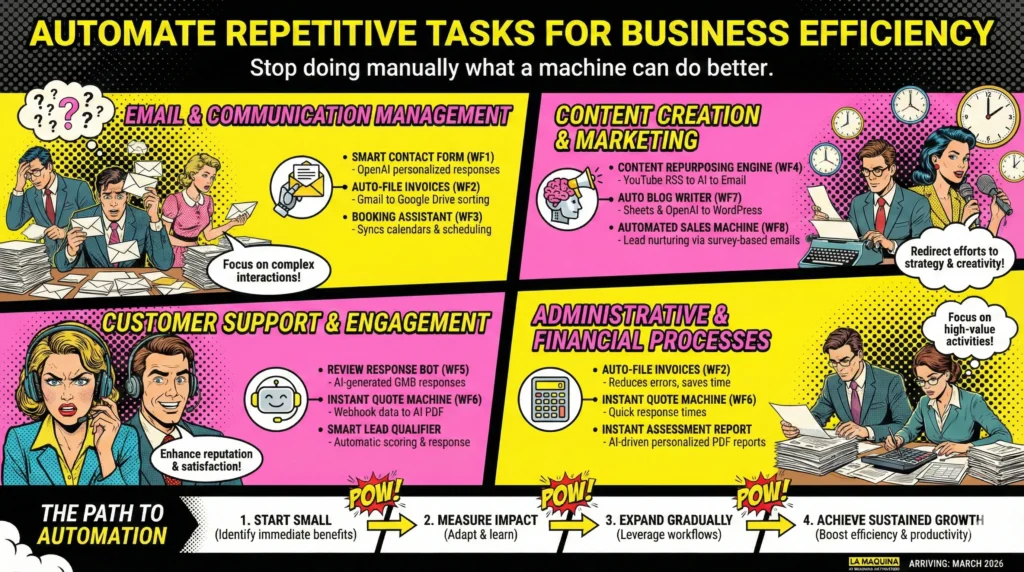
For starters, consider the Smart Contact Form (WF1) from our Make.com course. This workflow utilizes a webhook that triggers OpenAI to generate personalized email responses automatically. By integrating this workflow, businesses can eliminate the need for manually crafting responses to each inquiry, allowing you to focus on more complex customer interactions.
Another essential automation is the Auto-File Invoices (WF2) workflow. By connecting Gmail to Google Drive via a filter, incoming invoices are sorted and filed automatically. This not only saves time but also reduces the risk of errors associated with manual data entry.
These initial steps in automating email and communication management can have a profound impact on your business. By minimizing manual intervention, you’re not only freeing up time but also setting the stage for more complex automation down the line. As you become more comfortable with these processes, you can explore further capabilities, such as integrating your booking and calendar management through workflows like the Booking Assistant (WF3), which automatically syncs information across platforms and streamlines the entire scheduling process.
Content Creation and Marketing
If you’re in the business of creating content and marketing, you know how resource-intensive these tasks can be. Content creation involves brainstorming, writing, editing, and publishing, not to mention the ongoing task of repurposing content for various platforms. Marketing, on the other hand, requires generating leads, nurturing prospects, and engaging with your audience consistently.
To tackle these challenges, consider implementing the Content Repurposing Engine (WF4) from our automation course. This advanced workflow takes your YouTube RSS feed, processes it through Gemini AI, and then emails the repurposed content to your designated contacts. By automating the repurposing process, you can keep your content fresh and engaging across multiple platforms without the manual effort.
For those focused on content creation, the Auto Blog Writer (WF7) workflow is a must. This expert-level automation takes scheduling data, gathers content inputs from Sheets, processes them through OpenAI, and publishes directly to WordPress. While this may sound complex, the payoff is significant: you can maintain a consistent content schedule without dedicating hours to writing each post.
Moreover, businesses can leverage the Automated Sales Machine (WF8), which streamlines lead nurturing by generating personalized email sequences based on survey responses. By automating these marketing processes, your team can redirect their efforts towards strategic planning and creative development, leading to more innovative campaigns and better ROI.
Customer Support and Engagement
Maintaining stellar customer support and engagement is crucial for any business, yet it can be a daunting task when managed manually. Whether it’s handling customer inquiries, responding to reviews, or managing feedback, these tasks can quickly become overwhelming as your business grows.
The Review Response Bot (WF5) workflow can be a lifesaver in this regard. By integrating Google My Business with a router and AI, this workflow automatically generates responses to customer reviews. Not only does this save time, but it also ensures prompt and consistent communication with your customers, thereby enhancing your brand’s reputation.
Additionally, the Instant Quote Machine (WF6) automates the quote generation process. By gathering data through a webhook, processing it in Sheets, generating a PDF via OpenAI, and then emailing it to the client, this workflow eliminates the tedious task of manual quote creation. Quick response times to quote requests can significantly improve customer satisfaction and conversion rates.
Finally, consider implementing our Smart Lead Qualifier automation kit. This ready-to-use blueprint scores and responds to contact form leads automatically, ensuring that your sales team focuses only on high-quality leads. By automating these customer support and engagement tasks, your team can devote more time to developing meaningful relationships with clients, which is critical for long-term success.
Administrative and Financial Processes
Administrative and financial processes are often riddled with repetitive tasks, such as data entry, invoice filing, and report generation. These tasks, while essential, do not directly contribute to your business’s growth and can be prime candidates for automation.
The workflows we’ve discussed, like Auto-File Invoices (WF2) and Instant Quote Machine (WF6), already highlight some key financial processes that can be automated. By removing the manual work from these tasks, businesses can reduce errors and ensure timely completion.
Furthermore, you can consider automating assessment reports with the Instant Assessment Report kit. This tool generates AI-driven personalized PDF reports from survey responses, streamlining the reporting process and ensuring accuracy. By automating these administrative tasks, your business can operate more smoothly and allocate resources more effectively.
In the long term, automating administrative and financial processes can lead to significant savings, not just in terms of time but also in reducing overhead costs associated with manual labor. By freeing up your team from these routine tasks, they can focus on higher-value activities, such as strategic planning and financial analysis, contributing to the overall growth and sustainability of your business.
When considering which tasks to automate first, it’s essential to focus on those that will deliver immediate benefits and align with your business goals. While each business is unique, automating repetitive tasks business processes related to communication, content, customer support, and administration can offer a solid starting point. These areas are often rich with opportunities for automation due to their repetitive nature and the significant time savings they offer.
As you begin your automation journey, remember that the learning curve is real—it’s not magic. Each workflow and automation kit provided by La Maquina Studio requires some level of understanding and adaptation to your business’s specific needs. However, the investment in learning and implementing these automations is well worth the effort. Over time, you’ll find that these automated processes not only streamline operations but also enhance the overall efficiency and productivity of your business.
Ultimately, the key to successful automation lies in starting small, measuring impact, and gradually expanding your efforts. With the right approach and the practical automation workflows from La Maquina Studio, your business can effectively navigate the transition from manual to automated processes, paving the way for sustained growth and success.


Susana Toth
Make.com Certified Expert & Founder, La Maquina Studio
Susana Toth is a Make.com Certified Expert and the founder of La Maquina Studio, where she helps small businesses and consultants eliminate repetitive work through smart automation. With 20+ years of experience in web design, business consulting, and digital strategy, she builds practical AI-powered workflows that save hours every week — without writing a single line of code. She writes about Make.com automation, AI integration, and building systems that work while you don’t.
Learn more about me →