
In today’s fast-paced business environment, the ability to automate inquiry handling for small business operations has become a game-changer. As a small business owner, managing an influx of customer inquiries can be both a blessing and a curse. While more inquiries mean potential business growth, they can also overwhelm your small team or solo operation. This is where the magic of automation comes into play. Imagine handling up to ten times more inquiries without the need to hire additional staff. The secret? Leveraging automation tools like Make.com to streamline your response process, saving time and enhancing customer satisfaction. However, as promising as it sounds, automating inquiry handling involves a learning curve. It’s not a plug-and-play solution, but with the right tools and guidance, it can transform how your business operates.
Table of Contents
The Challenges of Manual Inquiry Handling
For most small businesses, the idea of automating inquiry handling is enticing, but the reality often involves a series of challenges. Handling inquiries manually can be a tedious process that is fraught with potential delays and errors. Each day, countless hours are spent sorting, responding to, and managing customer queries, which could otherwise be invested in more productive areas of the business. With limited resources, many small businesses struggle to keep up, resulting in slow response times and decreasing customer satisfaction.
Consider the scenario where your business experiences a sudden spike in inquiries due to a successful marketing campaign or a seasonal demand surge. Without adequate resources, it becomes nearly impossible to respond to each inquiry promptly. As a result, some inquiries may fall through the cracks, leading to lost sales opportunities and disgruntled customers. Moreover, the repetitive nature of responding to similar queries can lead to burnout and reduced efficiency among your team. This is where the benefits of automation become apparent.
Automating inquiry handling allows businesses to efficiently manage high volumes of queries without compromising on quality. By implementing a smart contact form automation workflow, such as the one offered by Make.com, you can streamline your inquiry process. This workflow, specifically the Smart Contact Form—Webhook → OpenAI → Email, is designed to automate the handling of customer inquiries. It addresses manual email responses, ensuring that each inquiry is responded to promptly and accurately. Through automation, businesses can maintain a high standard of customer service, even during peak periods of activity.
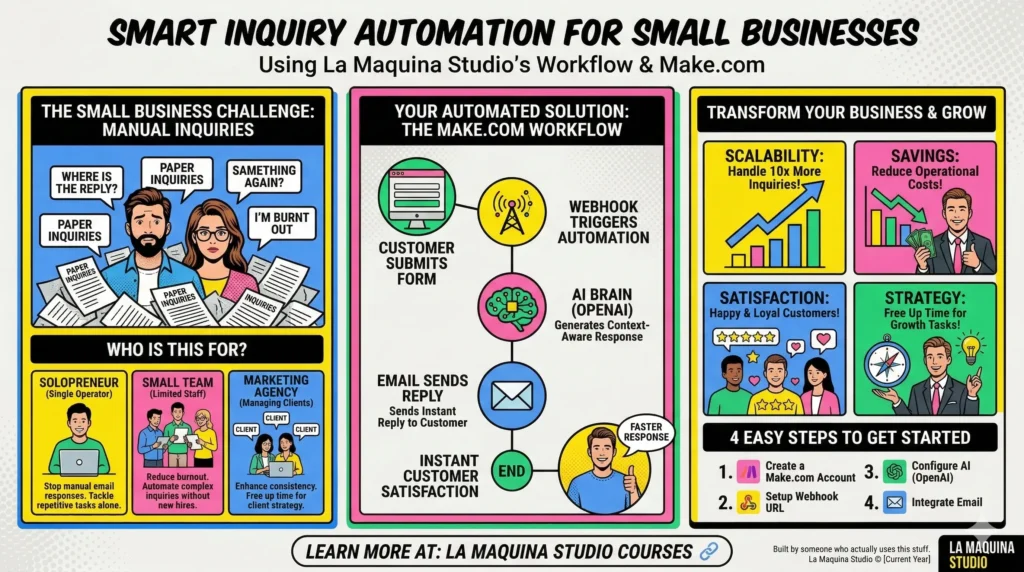
How Automation Transforms Inquiry Handling
So, how does automate inquiry handling for small business actually work in practice? Automation transforms inquiry handling by eliminating the mundane and repetitive tasks that consume time and resources. With an automation tool like Make.com, you can design workflows that automatically process, categorize, and respond to customer inquiries.
Let’s break down the workflow process: When a customer submits an inquiry through your website’s contact form, the automation tool immediately triggers a webhook. This webhook sends the inquiry data to an AI-powered service like OpenAI, which can generate contextually relevant responses based on predefined templates or historical data. Once the response is generated, it is automatically sent back to the customer via email. This entire process happens within seconds, ensuring that customers receive timely and accurate responses to their queries.
The benefits of such a system are twofold. First, it drastically reduces the response time, which is crucial for maintaining customer satisfaction and increasing the likelihood of conversion. Second, it frees up your team’s valuable time, allowing them to focus on more critical tasks that require human intervention, such as personalized customer service, strategic planning, and business development. By leveraging automation, small businesses can scale their operations effectively without the need for additional personnel, thereby reducing operational costs.
Implementing the Smart Contact Form Workflow
Implementing the automate inquiry handling for small business workflow may seem daunting at first, especially for those new to automation. However, with Make.com’s intuitive platform, setting up an automation workflow is achievable with a bit of effort and learning. The Smart Contact Form workflow is a perfect starting point for small businesses looking to dip their toes into automation.
The workflow consists of three main modules: Webhook, OpenAI, and Email. The Webhook module acts as the trigger, initiating the automation process when a new inquiry is received. The OpenAI module processes the inquiry and generates a response based on predefined criteria. Finally, the Email module sends the generated response to the customer.
To successfully implement this workflow, you’ll need to start by creating a Make.com account and setting up your Webhook URL. This URL will be linked to your website’s contact form. Next, configure the OpenAI module to process inquiries and generate responses. This involves defining the type of responses you want to deliver, which can be customized to match your business’s tone and style. Lastly, integrate your email service to automatically send the responses to your customers. Make.com provides comprehensive tutorials and support to guide you through each step of the process. The learning curve is well worth it for the time savings and enhanced customer experience you’ll gain.
Real-World Impact and Benefits of Automation
The decision to automate inquiry handling for small business operations can have a transformative impact on your business’s efficiency and growth. By removing the bottleneck often created by manual inquiry processing, automation allows you to handle more inquiries with ease, increasing your capacity to engage with potential customers.
One of the most significant benefits is the ability to offer a consistently high level of customer service. Automated inquiry handling ensures that every customer receives a timely response, which can significantly improve customer satisfaction and loyalty. In turn, satisfied customers are more likely to recommend your business to others, driving organic growth.
Additionally, automation reduces the risk of human error. Manual processes are susceptible to mistakes, such as sending incorrect information or failing to respond at all. Automated workflows minimize these risks by ensuring that every inquiry is processed according to your predefined criteria, maintaining accuracy and reliability.
For small businesses, the cost savings associated with automation are particularly advantageous. By automating routine tasks, businesses can operate more efficiently without the need to hire additional staff. This not only reduces payroll expenses but also allows existing team members to focus on high-impact activities that contribute to the business’s strategic objectives. Over time, the efficiency and cost savings gained through automation can lead to increased profitability and competitiveness in the market.
Conclusion: Embracing Automation for Business Growth
The journey to automate inquiry handling for small business is not without its challenges, but the rewards far outweigh the initial investment of time and effort. By embracing automation, small businesses can revolutionize their customer service operations, improve efficiency, and free up resources for growth-oriented activities. Make.com’s Smart Contact Form workflow provides a practical and achievable starting point for businesses looking to automate their inquiry handling processes.
As a business owner, it’s essential to recognize that automation is not about replacing human interaction but enhancing it. By automating routine tasks, you empower your team to focus on delivering personalized and high-quality service where it matters most. Ultimately, the decision to automate inquiry handling can lead to a more agile, responsive, and successful business, ready to thrive in an increasingly competitive landscape.
If you’re ready to explore the possibilities of automation for your small business, visit La Maquina Studio’s courses to find the right tools and guidance to get started. As your business scales, automation will become an invaluable ally in managing customer inquiries and driving sustainable growth.
Check out the courses you can learn in just a few days and implement in your business! Need help? Get in touch with me!


Susana Toth
Make.com Certified Expert & Founder, La Maquina Studio
Susana Toth is a Make.com Certified Expert and the founder of La Maquina Studio, where she helps small businesses and consultants eliminate repetitive work through smart automation. With 20+ years of experience in web design, business consulting, and digital strategy, she builds practical AI-powered workflows that save hours every week — without writing a single line of code. She writes about Make.com automation, AI integration, and building systems that work while you don’t.
Learn more about me →