
When a business owner comes back from a trendy AI conference and walks into the office the next morning thinking we’re automating everything with AI starting today, disaster is practically guaranteed. What I see with my international clients is that the AI-solves-everything hype is starting to fade. But in some markets, AI is still treated like a magic weight loss pill—you buy it and somehow everything gets better without any actual effort.
The technology can do amazing things. But is your business ready for it?
Here’s what I think: AI automation isn’t the future anymore – it’s the present. Most small businesses, though, approach it wrong. Not because they’re stupid, but because nobody explains it to them clearly. Instead, they get sold another software tool.
This article isn’t about that. This is about what to automate, how to do it, how much it costs—and what most AI gurus conveniently ignore.
What AI Automation Is—And What It Isn’t
Ask ten people what AI automation means and you’ll get ten different answers. So let me be direct: AI automation means letting artificial intelligence take over repetitive tasks that you or your team used to waste time on.
Not sci-fi. Not Terminator. More like this: a customer question comes in via email in the morning, and by the time you open your laptop, the AI has already answered it, categorized it, and logged it in your CRM.
Chatbot vs. AI Agent—What’s the Difference?
People confuse these all the time, and honestly, the market doesn’t help clarify it.
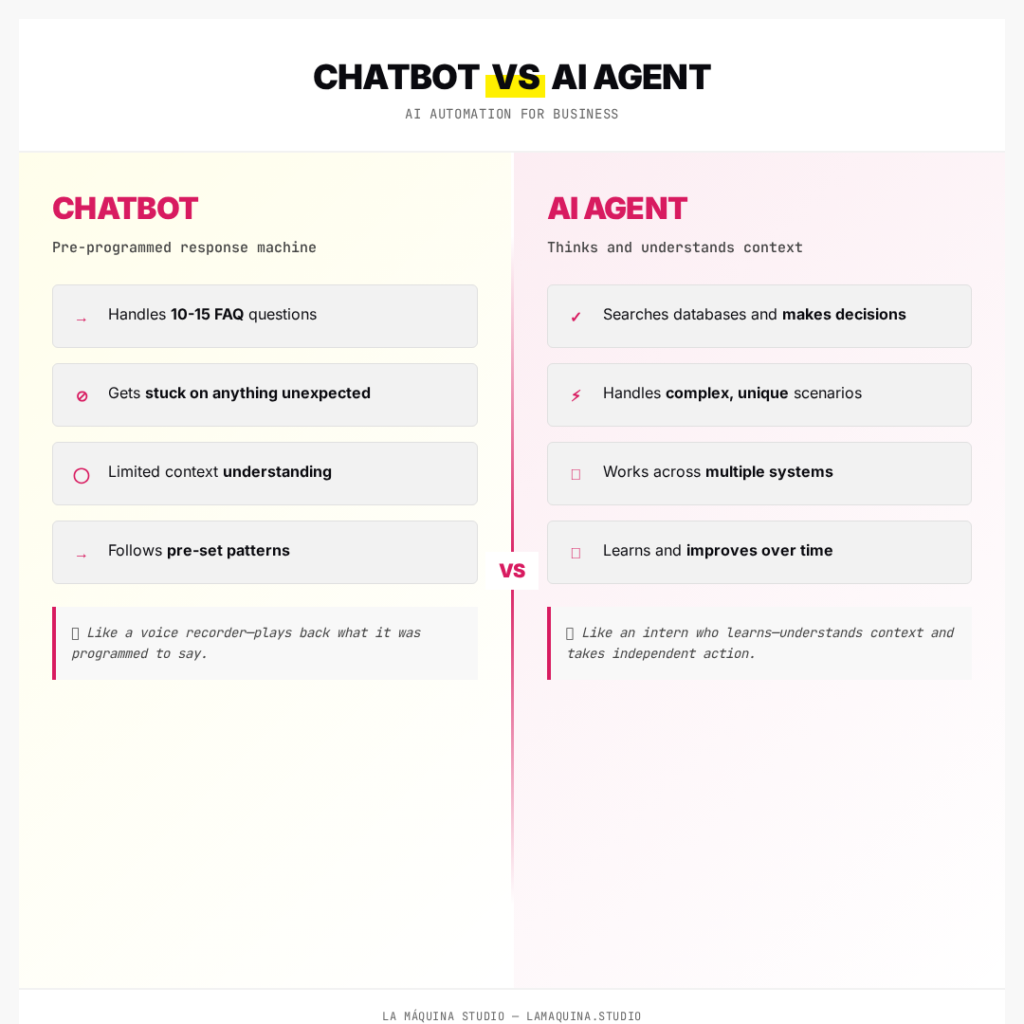
A chatbot is just a pre-programmed answer machine. You ask it when the store opens and it tells you. You ask something else—it stalls. Most websites have these.
An AI agent is something completely different. It thinks. It understands context. When your customer writes I ordered yesterday but didn’t get a confirmation, the AI agent checks your order system, finds the order, verifies the status, and responds—all without you lifting a finger.
The difference? A chatbot is a recording. An AI agent is an intern who learns.
When should you pick which one?
- Chatbot is enough if you need to answer 10–15 recurring questions (store hours, prices, shipping times)
- AI agent is necessary when answering a customer question requires pulling data, making decisions, or navigating multiple systems
What AI Won’t Fix
If your business has no systems—no documented processes, your CRM is a mess, emails scattered everywhere—then AI isn’t the solution. AI will just automate the chaos faster.
Whoever automates without fixing their systems first is just scaling their mistakes.
This is where most conference-fueled initiatives fail. The problem isn’t the tool. It’s that you didn’t prepare the ground first.
What to Automate First – Concrete Examples
The rule is simple: automate what repeats, follows a pattern, and is measurable. But don’t try to do everything at once. Pick ONE thing that’s eating most of your time.
1. Customer Question Chatbot on Your Website
I built this for my own site. An AI chatbot that answers questions about my courses and services—24/7, weekends included.
Before: 5–8 identical emails per day. When does the course start? How much does it cost? Are there payment plans? I answered every single one by hand.
After: The chatbot handles it. It only flags me when a question comes in that it doesn’t know how to handle. It manages 70–80% of questions on its own.
Tools: Make.com + Claude API + WordPress—all of it put together without writing a single line of code (well, Claude Code wrote the widget code for me, but that’s different).
2. Incoming Lead → Automatic Email Sequence
Someone fills out your web form. Then what? At most small businesses: nothing happens until the owner gets around to it.
Automated: 2 minutes after the form is filled out, a personalized email goes out. Another one the next day. A third one the day after that. The AI weaves in the lead’s name and interests too.
Tools: Make.com scenario—form webhook → AI copywriting → email dispatch. You can set this up in an afternoon.
3. Invoice Arrives → Processing → Goes to Bookkeeper
An invoice lands in your email. The AI reads the invoice number, amount, due date. Categorizes it. Uploads it to your accounting system. Sends a summary to your bookkeeper.
Before: 2–3 hours per week manually entering data.
After: Zero. Your only job is checking the weekly summary.
4. Social Media Content with AI
I’m not talking about using ChatGPT to write your posts (please don’t—you can spot it from a mile away). I mean AI helps you structure, schedule, and repurpose what you create.
You write a blog post → AI pulls 3 LinkedIn posts, 2 Instagram captions, and a newsletter outline from it. You review and add your voice.
How Much Does It Cost—In USD, Honestly
This is the question everyone asks but nobody answers straightforwardly. It’s easier to say it depends and then charge for a consultation.
I’ll be specific.
Monthly Tool Costs
Make.com (the automation platform I use and teach):
- Free plan: $0—2 active workflows, 5-minute run limit, perfect for testing
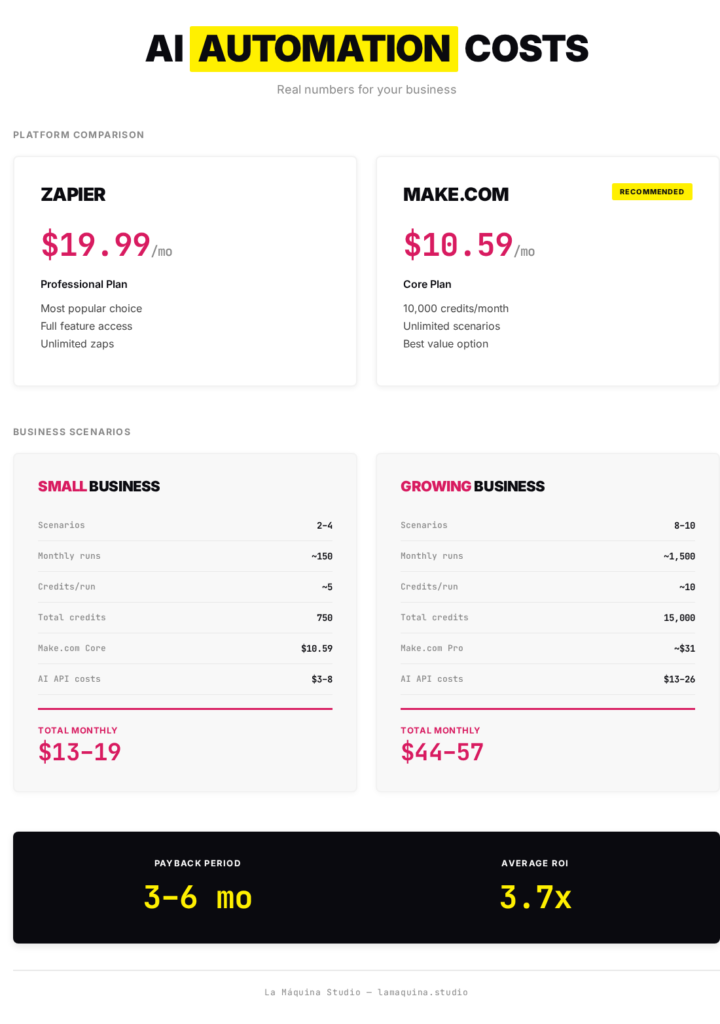
- Core plan: $10.59/month—unlimited active workflows, 10,000 credits, 40-minute runtime
- Pro plan: $18.82/month—10,000+ credits, scalable (150k, 300k, 500k credit options available)
AI API costs (Claude / ChatGPT):
- Roughly $0.003–0.01 per message ($0.002–0.01 total for most use cases)
- A chatbot handling 50 questions daily: ~$8–13/month
- Email automation generating 20 emails per day: ~$5–10/month
Comparison with alternatives:
- Zapier: the most well-known, but also the most expensive—Professional plan is $19.99/month, and you hit limits fast
- Make.com: best price-to-value ratio, visual editor, strong AI integrations—Core plan delivers the same features for roughly half the cost
- n8n: open source, free if you self-host—but you need technical skills
(If you want a deeper comparison, I wrote a separate article on this: Workflow Automation for SMBs: n8n, Make, or Zapier)
DIY vs. Expert Help
If you’ve got some technical comfort and you’re willing to learn: build it yourself. With a decent online course—like mine—you can set up your first automations in a few weeks.
If you don’t have the time or patience: an expert will set up your first 2–3 automations for $260–785. But afterwards, you still need to manage and modify them—so you’re not avoiding the learning curve.
The Realistic Budget
A small business can run functioning AI automation for $39–130 per month. That’s less than one day of a part-time assistant’s salary.
Industry data shows AI automation pays for itself in 3–6 months. From what I’ve seen with my clients, that’s realistic here too—if you do it right.
Systems Matter More Than Tools—How to Get Started
Don’t start by picking tools. Not Make.com vs. Zapier. Start here:
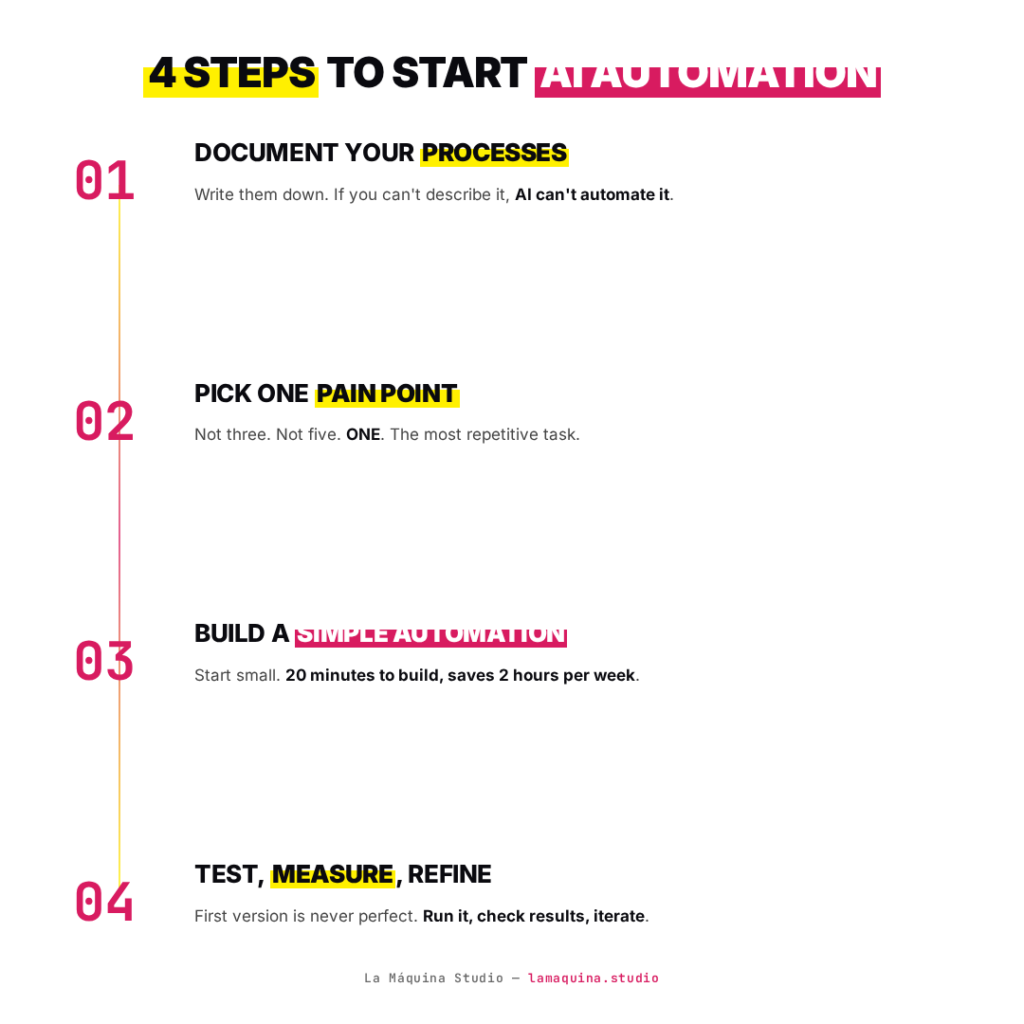
Step 1: Document Your Processes
Seriously. On paper or in a simple doc. What happens when a customer question comes in? Who responds? Where does it go? What’s next?
If you can’t describe it, AI can’t automate it. Because AI doesn’t think about your process. AI executes what you design.
Step 2: Pick Your ONE Biggest Pain Point
Not three. Not five. ONE. What’s the task stealing most of your time, that’s most boring, and most repetitive?
Usually it falls into one of three buckets:
- Customer communication (emails, questions)
- Administration (invoices, data entry)
- Content (social media, newsletters)
Step 3: Build a Simple Automation
It doesn’t need to be complicated. My first automation was: when someone filled out my web form, they automatically got an email and were added to a spreadsheet. That’s it. Took 20 minutes.
But that 20 minutes saved me 2 hours per week. Every week. For months.
Step 4: Test, Measure, Refine
Automation isn’t set-and-forget. The first version will never be perfect—and that’s fine. Run it, check the results, adjust what’s not working.
My approach is start with the process, not the tool. That’s what I teach in my courses too, because that mindset is what works long-term—not buying the latest AI software and hoping for the best.
The 5 Hidden Landmines—What the Hype Gurus Won’t Tell You
It wouldn’t be fair to show only the bright side. AI automation has real risks, and if you don’t handle them, you’ll cause more damage than you solve.
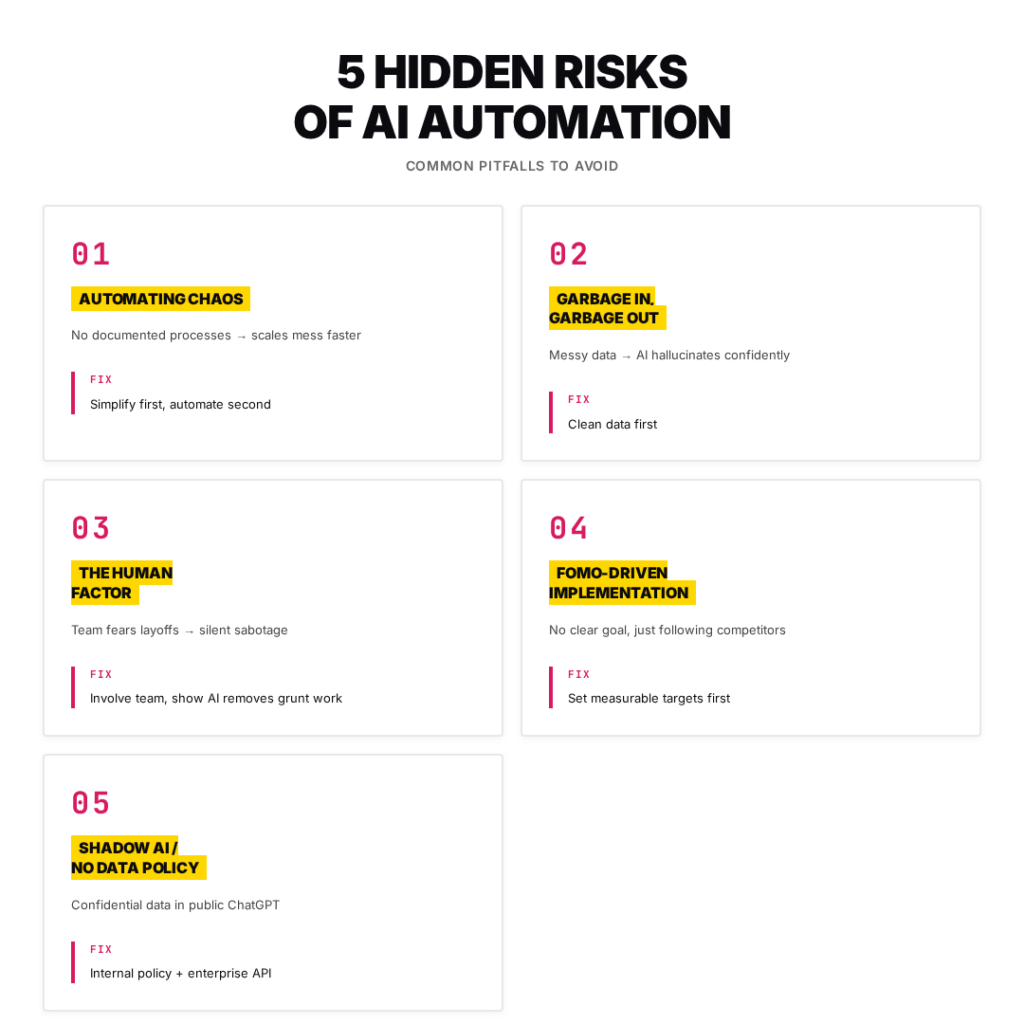
1. Automating Chaos—No Clear Processes
This is the most common mistake I see. The owner wants AI, but when I ask what their proposal process looks like, they say: well, it varies.
You can’t automate what isn’t clearly defined. If proposals are different for every customer, if your team improvises, if there are no written standards—the AI will get lost. Not because it’s dumb, but because you never told it what to do.
Warning sign: No documented processes, no flowcharts, everyone does the same task differently.
Fix: Simplify and optimize first. Only then automate. This order is non-negotiable.
2. Data Chaos—Garbage In, Garbage Out
AI runs on clean, structured data. If your CRM is full of duplicates, incomplete records, and stale information, and you plug in AI—that’s what it will work with.
Customer data is half in Excel, half in someone’s email, half on sticky notes. No proper CRM. Feed that to language models and the AI will make mistakes—it’ll hallucinate—and reach bad conclusions. Confidently.
Fix: Clean up first, automate second. Always in that order.
3. The Human Factor—The Biggest Hidden Landmine
This is what gets talked about least, yet it’s what derails most AI implementations.
Management forces the technology on the team without proper communication. The employee hears: we’re automating. They understand: I’m about to be fired.
What happens next is quiet sabotage. Nobody says they won’t use it. Instead they forget to turn it on, deliberately hunt for bugs, and when the AI makes one mistake, they announce triumphantly: See, boss? I told you this robot is useless!
Fix: Management transparency. Show that AI replaces tedious work—data entry, admin, repetitive emails—not the person. It frees them to do creative and human work. And involve them in testing so they feel ownership, not resentment.
4. FOMO-Driven Adoption—No Clear Goal
The company wants AI only because competitors are talking about it. Fear of missing out. But ask the owner what metric they want to improve and they can’t answer. They just want AI.
Like buying a Formula 1 engine when you don’t know where you’re going.
Fix: Set specific, measurable goals. Not we want AI. More like: reduce customer service response time from 24 hours to 2 hours. Or: cut invoice processing from 10 hours per week to 1 hour. Numbers create accountability.
5. No Data Security Protocol—The Shadow AI Threat
Plenty of employees are already using ChatGPT. The question is: does your company know what for?
If your employee uploads confidential client contracts or internal financial data to public ChatGPT to get it summarized—congratulations, you’ve just risked a serious data breach. And you might not even know it happened.
Fix: Closed, enterprise environment (API-based access where data isn’t used for training) and a strict internal policy. Doesn’t need legal jargon—2 pages on what’s allowed, what isn’t, where data doesn’t go, and which tools are approved.
The Overautomation Trap
One more thing nobody mentions: if you automate everything—including customer relationships—your clients will feel like nobody cares. They’ll leave.
AI supplements human work. It doesn’t replace human connection. Automate the background processes, but keep the personal touch.
EU AI Act 2026—What Every Business Owner Needs to Know
As of February 2, 2026, the EU AI Act isn’t optional—it’s a legal requirement. And it applies to businesses everywhere using AI tools.
Before you panic: most SMBs are deployers, not providers. That means you use AI tools—you don’t build them. Much lower compliance burden.
3 Things to Do Right Now
1. Inventory Your AI Tools
What AI tools are you using? ChatGPT, Copilot, Make.com AI modules, chatbots? List them. Takes 30 minutes.
2. Write an Internal AI Policy
No lawyer needed. 1–2 pages: what’s allowed, what isn’t, who’s responsible, what data doesn’t go into AI.
3. AI Literacy—Train Your Team
From August 2025 onward, this is mandatory. If your team uses AI, they need to understand its limits and risks. Not optional.
The Penalty
Worst case: 6% of global annual revenue. But the EU prescribes proportionate fines for SMBs—you’re not looking at a small company getting a seven-figure penalty.
Still, getting ahead now puts you ahead. Big enterprise partners are already demanding AI compliance proof from their suppliers. Get ready now and it’s not a burden—it’s a competitive advantage.
It’s Not Whether You Need AI—It’s How You Implement It
AI is a Formula 1 engine. Drop it into a rusted-out jalopy—broken processes, scared employees, data mess—and you won’t win the race. You’ll just crash faster.
Across the global SMB landscape, adoption is accelerating. The curiosity is there. The knowledge isn’t.
If you’re reading this right now, you’re probably at the point of I know I should, but I don’t know how. That’s completely normal.
The Zero-th Step
Before you hire an AI agency, before you buy software, before you automate anything—run an internal audit. Map your processes. Organize your data. Talk honestly with your team.
Once that’s done, AI implementation stops being a scary project and becomes a logical next step. And it pays for itself surprisingly fast.
If you want to learn systematically how to build AI-powered automation in your business—no coding, practical examples—check out my Done. Without You – Business automation for small business owners – built on Make.com course. That’s what it’s designed for.
Because the company that implements AI strategically right now won’t just be more efficient—it’ll have an advantage that competitors won’t catch up to for two years.


Susana Toth
Make.com Certified Expert & Founder, La Maquina Studio
Susana Toth is a Make.com Certified Expert and the founder of La Maquina Studio, where she helps small businesses and consultants eliminate repetitive work through smart automation. With 20+ years of experience in web design, business consulting, and digital strategy, she builds practical AI-powered workflows that save hours every week — without writing a single line of code. She writes about Make.com automation, AI integration, and building systems that work while you don’t.
Learn more about me →