
Last week I ripped out the “Subscribe to our newsletter” form on my landing page and replaced it with a quiz lead generator. A 5-question quiz that scores visitors, segments them automatically, and sends each person a completely different email – without me lifting a finger.
Why Your Newsletter Signup Isn’t Working
Let’s be honest: nobody wakes up thinking “I’d love to subscribe to another newsletter today.”
The classic email signup form has a conversion problem. You’re asking people to hand over their email address in exchange for… what exactly? A vague promise of “updates” and “tips”? That’s a terrible deal for the visitor – and a wasted opportunity for you.
Here’s what typically happens:
- Low conversion rate. Generic signup forms convert at 1-3%. That means 97 out of 100 visitors leave without giving you anything.
- No segmentation. Everyone gets the same welcome email, whether they’re a complete beginner or an advanced user ready to buy.
- No insight. You learn nothing about your new subscriber except their email address. You don’t know what they need, what they struggle with, or how ready they are.
An automated quiz funnel solves all three problems at once.
Table of Contents
Why a Quiz Lead Generator Changes Everything
An automated quiz funnel flips the dynamic. Instead of asking for something (“give me your email”), you’re offering something (“find out your score”). The visitor gets immediate value – a personalized result – and you get rich data about who they are.
Here’s what my automated quiz funnel – the Automation Readiness Quiz – does:
- 5 quick questions about how the visitor currently handles manual tasks, lead tracking, and repetitive work.
- A score from 0 to 100 calculated based on weighted answers.
- Three segments – Beginner, Ready to Automate, or Automation Emergency – each with different recommendations.
- An email capture before showing results (no skip option – the value exchange is clear).
- A personalized follow-up email with specific advice based on their segment.
The result? Instead of a flat “thanks for subscribing” email, each person gets content that actually matches where they are.
A beginner gets three quick-win automations they can start with today. Someone in the “Ready” segment gets told exactly which workflows would save them the most time. And someone scoring 80+ gets a direct message: “You’re the bottleneck in your business – here’s what to fix first.”
That’s not a newsletter. That’s a conversation starter.
How to Build a Quiz Lead Generator with Make.com (6 Modules)
The quiz itself is a self-contained HTML component embedded on the landing page. When someone completes it, a webhook fires and the entire automated quiz funnel backend runs automatically.
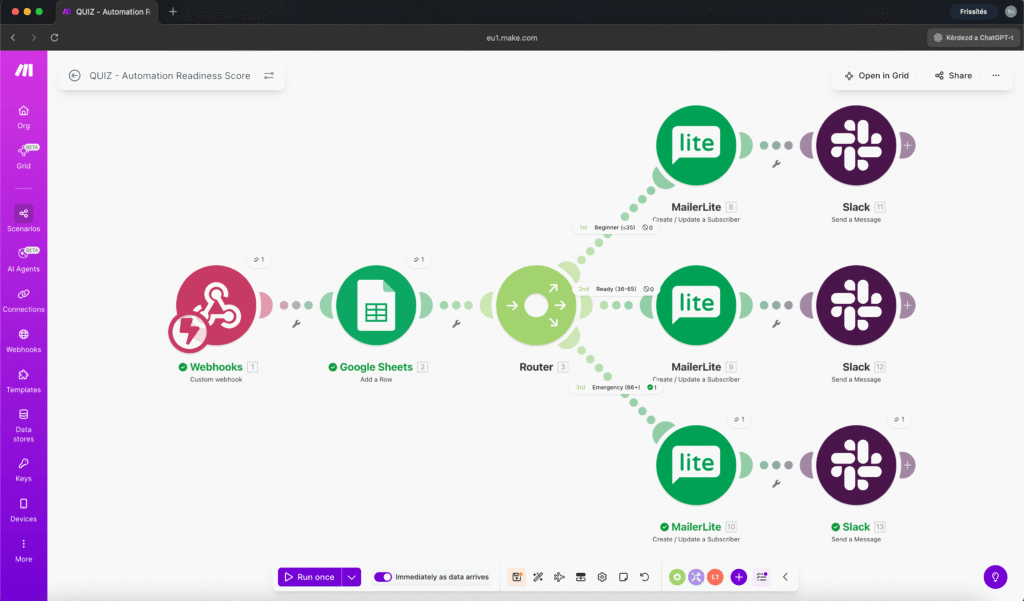
Here’s the workflow:
Webhook -> Google Sheets -> Router (3 branches) -> MailerLite (x3) -> Slack Module 1: Webhook receives the quiz data – email, score, segment, and all five individual answers.
Module 2: Google Sheets logs every submission with a timestamp. This becomes your automated quiz funnel database: who took the quiz, when, what they scored, and how they answered each question.
Module 3: Slack notification pings you in real time. You see the email, score, and segment instantly – so if a high-scoring lead comes in, you can follow up personally.
Module 4: Router splits the flow into three paths based on the segment value.
Modules 5-7: MailerLite (one per branch) adds the subscriber with the correct tag and custom fields. MailerLite then handles the actual email sending – including proper unsubscribe links for GDPR compliance.
Six modules. That’s it. The entire automated quiz funnel runs from submission to personalized email in under 10 seconds.
Why MailerLite handles the emails (not SMTP)
This is a detail worth calling out. My first instinct was to send the follow-up emails directly through Make.com using an SMTP module. It works – technically. But it’s the wrong approach for an automated quiz funnel.
Here’s why: if you send marketing emails through SMTP, you’re responsible for managing unsubscribe links, tracking opens, maintaining deliverability, and staying GDPR-compliant. That’s a headache you don’t need.
By using MailerLite (or any proper email marketing platform), you get all of that handled automatically. Make.com does what it’s good at – routing and segmentation – and the email platform does what it’s good at – actually sending emails people want to open.
Quiz Lead Generator vs. Full Sales Funnel
If you’ve seen the La Maquina automation course, you might notice this automated quiz funnel looks similar to the AI Sales Funnel workflow (Workflow 8). They share some DNA – both use webhooks, routers, and email segmentation – but the Quiz Lead Generator is its own thing.
The course workflow is a full sales funnel with Data Stores, AI Agents, PDF generation, and Sleep sequences for timed follow-ups. It’s 45+ modules and takes over an hour to build.
This automated quiz funnel kit is intentionally lean: 6 modules, focused on one job – capture quiz leads and route them to the right email sequence. You can set it up in 20 minutes and have it running the same day.
Think of it as a standalone entry point. The course teaches you the building blocks. This kit gives you a working automated quiz funnel you can observe in action – because the quiz on our landing page runs this exact workflow.
Best Quiz Lead Generator Platforms Compared
Every automated quiz funnel needs a frontend. You have several choices depending on your technical comfort level.
Custom HTML (What I Used)
I built my automated quiz funnel as a self-contained HTML/CSS/JavaScript component that embeds directly on the page. No external dependencies, no third-party branding, full control over design and behavior.
Pros: Matches your site design perfectly, no monthly fee, loads instantly, complete control over the webhook payload.
Cons: You need to be comfortable editing HTML, or have someone who is.
Tally
Tally is excellent for building an automated quiz funnel without code. It has a generous free tier, supports conditional logic, and can send webhook data directly to Make.com.
Pros: Free, easy to use, native webhook support, embeddable.
Cons: Limited design customization, Tally branding on free tier.
Typeform
The market leader for interactive forms and quizzes. Beautiful, conversational interface. More expensive than alternatives but polished.
Pros: Great user experience, logic jumps, native integrations with Make.com (dedicated module available).
Cons: Paid plans start at $25/month, limited responses on free tier.
Interact
Purpose-built for quiz lead generation. Designed specifically for the “take a quiz -> get results -> capture email” flow.
Pros: Built-in scoring, branching, email capture gates. Templates for different industries.
Cons: Starts at $27/month, can feel heavy for a simple quiz.
Outgrow
Another quiz-specific platform with calculators, assessments, and recommendation engines.
Pros: Advanced calculation logic, A/B testing built in, many templates.
Cons: Starts at $14/month, can be overkill for a simple scoring quiz.
Which Quiz Lead Generator Tool Should You Choose?
If you’re technical enough to embed HTML, a custom automated quiz funnel gives you the most control and zero ongoing costs. If not, Tally is the best free starting point – you can wire it to Make.com in minutes with a webhook.
The expensive platforms (Typeform, Interact, Outgrow, ScoreApp) make sense if the automated quiz funnel is your primary lead generation tool and you need advanced analytics. For most small businesses, a simple form + Make.com automation does the same job at a fraction of the cost.
7 Quiz Lead Generator Mistakes to Avoid
Building an automated quiz funnel isn’t hard, but there are a few things that can trip you up.
1. Keep the quiz short
Five questions is the sweet spot. Three feels too shallow to give meaningful results. Seven or more and people start dropping off. Every additional question costs you completions.
2. Make the scoring meaningful
Random point values produce random results. Think about what each answer actually signals. Someone who manually tracks leads in their head (instead of a CRM) is in a very different place than someone who already uses automation tools. Weight your questions accordingly.
3. Gate the results, not the quiz
Let people answer all the questions before asking for their email. They’ve invested time and attention – they want the result now. That’s the moment of highest motivation to share their email. Asking for the email at the start kills the automated quiz funnel experience.
4. Segment meaningfully
Three segments is usually enough. Fewer than that and you’re not really personalizing. More than four and you’re creating complexity without adding value. Each segment should get genuinely different advice – not the same email with a different greeting.
5. Use your email platform for sending
Don’t send marketing emails through SMTP from Make.com. Use MailerLite, ConvertKit, ActiveCampaign, or whatever email platform you prefer. Let Make.com handle the routing, let the email tool handle deliverability and compliance.
6. Log everything
Store every quiz submission in Google Sheets (or your preferred database). You’ll want this data later – for analyzing which segments are most common, which questions people struggle with, and what your average score looks like. A quiz lead generator that also builds market research? That’s a double win.
7. Test all segments
Before going live, submit the quiz multiple times with different answers to trigger each segment. Verify that the right tag gets applied in your email platform, the right email goes out, and the Sheets row looks correct. A broken quiz lead generator is worse than no quiz lead generator.
Quiz Lead Generator Results So Far
This quiz lead generator has been live on our landing page for a short time, but the early signals are clear: people engage with it. It’s not a passive “enter your email” box – it’s an experience. Visitors click through, think about their answers, and actually want to see their score.
The data is already useful too. I can see that most visitors score in the “Ready” segment (36-65 points), which tells me our audience already knows they need automation – they just don’t know where to start. That insight shapes everything from blog content to course positioning.
A newsletter signup form would never tell you that.
Build Your Own Quiz Lead Generator
The Quiz Lead Generator is available as an Automation Kit – a standalone, ready-to-use workflow you can import into your Make.com account.
If you want to understand the deeper concepts – routers, Data Stores, AI Agents, multi-step email sequences – those are covered in the full La Maquina automation course. The course takes you from zero to building complex systems like AI-powered sales funnels with 45+ modules.
But this quiz lead generator kit? It’s six modules and a genuine business improvement you can deploy in an afternoon.
Stop asking people to subscribe. Build a quiz lead generator that asks them the right questions.


Susana Toth
Make.com Certified Expert & Founder, La Maquina Studio
Susana Toth is a Make.com Certified Expert and the founder of La Maquina Studio, where she helps small businesses and consultants eliminate repetitive work through smart automation. With 20+ years of experience in web design, business consulting, and digital strategy, she builds practical AI-powered workflows that save hours every week — without writing a single line of code. She writes about Make.com automation, AI integration, and building systems that work while you don’t.
Learn more about me →