
For any service business looking to streamline operations, a make.com blueprint for service business can be a game changer. Imagine reducing the hours spent on mundane tasks, allowing your team to focus on delivering exceptional customer service. That’s the promise of automation. However, it’s crucial to understand that it’s not a magic button; there’s a learning curve involved. But once you overcome that initial hurdle, the benefits are substantial. At La Maquina Studio, we specialize in these transformations, providing businesses with the right tools to automate key processes effortlessly. Whether it’s handling bookings, managing content, or nurturing leads, our make.com workflows have you covered. The challenge for most business owners lies in selecting the right workflows and implementing them effectively. Thankfully, with our expertise, we guide you every step of the way, ensuring your service business operates smoothly and efficiently with minimal manual intervention. By investing time in understanding and applying these blueprints, you position your business for enhanced productivity and growth.
Table of Contents
Understanding Make.com Blueprints
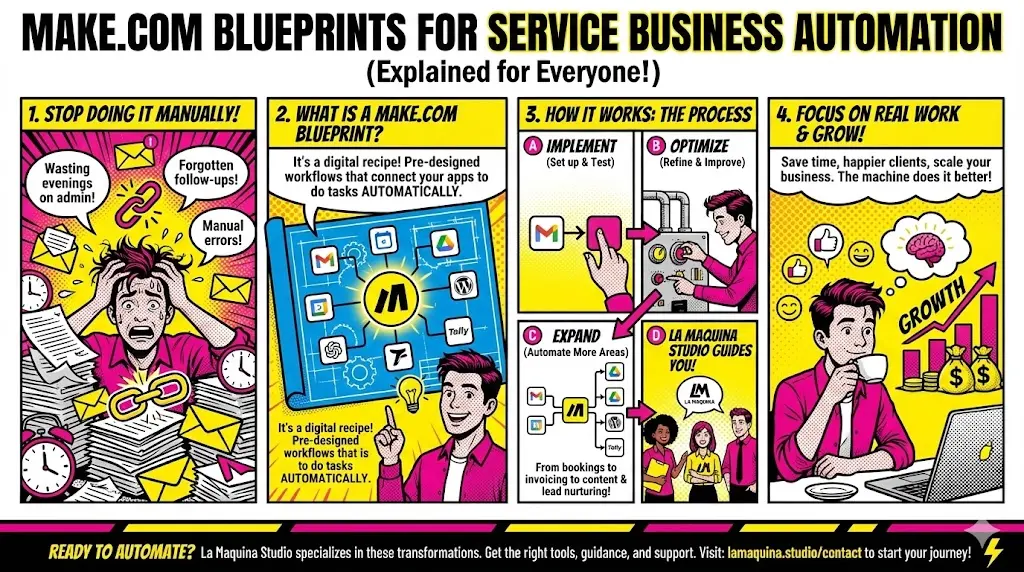
A make.com blueprint for service business serves as a roadmap, guiding you through the automation process. Each blueprint is a pre-designed workflow that automates specific tasks, tailored to meet the unique needs of service-oriented businesses. At La Maquina Studio, we offer a comprehensive range of these blueprints, each designed to tackle different operational challenges. From basic tasks like automating email responses to complex procedures like lead nurturing, our blueprints cover it all.
For instance, our Smart Contact Form blueprint is perfect for businesses overwhelmed by the volume of customer inquiries. This workflow integrates a webhook, OpenAI, and email to automate responses, ensuring timely and accurate communication with clients. It not only saves time but also enhances customer satisfaction by providing quick resolutions.
On the other hand, the Auto-File Invoices blueprint is ideal for those tired of manually filing invoices. By integrating Gmail, a filter, and Google Drive, this workflow ensures that all incoming invoices are automatically sorted and stored in the correct folders, reducing clerical errors and saving valuable time.
Understanding these blueprints and how they apply to your business is the first step toward effective automation. It’s about identifying the tasks that consume the most time and resources and finding the right blueprint to automate them. While the initial setup might seem daunting, the long-term gains in efficiency and productivity are well worth the effort.
Implementing Your First Make.com Blueprint
Once you’ve chosen the appropriate make.com blueprint for service business, the next step is implementation. This phase requires a careful approach, balancing between understanding the workflow’s components and integrating them seamlessly into your existing processes. At La Maquina Studio, we emphasize the importance of testing and iteration during this stage.
Take the Booking Assistant workflow, for example. It’s designed to automate the entire booking process, from capturing appointments via Calendly to sending confirmation emails and updating your calendar. This blueprint not only simplifies booking management but also ensures no appointment is missed or double-booked. However, successful implementation requires attention to detail, such as configuring your Calendly settings and ensuring email templates are personalized and accurate.
Another example is the Content Repurposing Engine, which automates content repurposing from YouTube RSS feeds through Gemini AI to email. Implementing this blueprint involves understanding how each component interacts and ensuring the AI’s output meets your quality standards. This might involve tweaking AI settings or adjusting email delivery schedules to align with your content strategy.
As with any new process, expect to encounter challenges. Be prepared to iterate and adjust settings as necessary. The key is to remain patient and persistent. With each iteration, the workflow becomes more aligned with your business needs, eventually leading to a smooth and efficient operation.
Optimizing Automated Workflows for Better Results
After setting up and implementing a make.com blueprint for service business, the focus shifts to optimization. This phase is about refining workflows to ensure they deliver the best possible results consistently. Optimization involves regularly reviewing workflows, identifying bottlenecks, and making data-driven adjustments.
Consider the Review Response Bot blueprint, which automates responses to Google My Business reviews. Initially, the AI’s responses might be generic, but through optimization, you can tweak the AI’s settings to generate more personalized responses. This not only improves customer engagement but also enhances the business’s online reputation.
Similarly, the Instant Quote Machine requires periodic reviews to ensure pricing information and templates remain current. It involves analyzing the data collected from various quote requests, adjusting the AI algorithms to better assess client needs, and refining the output to match evolving pricing strategies.
Optimization is an ongoing process. Regularly scheduled reviews allow you to identify areas of improvement and implement changes before they become issues. It’s about maintaining a proactive approach, ensuring workflows evolve alongside your business requirements. At La Maquina Studio, we assist businesses by providing insights and recommendations for optimizing their automated processes, ensuring they continue to deliver maximum value.
Expanding Automation Across Your Business
Once initial workflows are optimized, it’s time to explore other areas of your business that could benefit from a make.com blueprint for service business. This expansion phase involves identifying additional processes that can be automated, further reducing manual effort and increasing efficiency.
For instance, the Auto Blog Writer blueprint caters to businesses needing regular content updates. This workflow automates content creation from scheduling to publication on WordPress, significantly reducing the time spent on blog writing. As your business grows, maintaining a consistent online presence becomes crucial, and automation ensures you can keep up with content demands without exhausting resources.
Another area ripe for automation is lead nurturing, made easy with the Automated Sales Machine blueprint. This complex workflow automates the entire lead nurturing process, from capturing leads via Tally to sending personalized email sequences. It’s designed to boost conversion rates by ensuring timely and relevant communication with potential clients.
Expanding automation requires a strategic approach, prioritizing processes that offer the highest returns on automation investment. At La Maquina Studio, we work closely with businesses to identify these opportunities, ensuring every new workflow aligns with broader business goals. This proactive approach not only enhances operational efficiency but also positions your business for sustainable growth.
In conclusion, adopting a make.com blueprint for service business is a strategic move towards achieving operational efficiency and growth. While the journey involves a learning curve, the long-term benefits of automation—time savings, reduced errors, and improved customer service—are undeniable. At La Maquina Studio, we’re committed to guiding businesses through this transformation, providing the expertise and support needed to implement, optimize, and expand automation across various operations. By embracing automation, service businesses can shift focus from mundane tasks to strategic growth initiatives, ensuring they stay competitive in an ever-evolving marketplace. Whether you’re just starting with automation or looking to expand existing processes, our team is here to help you design and implement workflows that drive your business forward. Visit https://lamaquina.studio/contact to learn more or start your automation journey with us today.
Check out the courses you can learn in just a few days and implement in your business! Need help? Get in touch with me!


Susana Toth
Make.com Certified Expert & Founder, La Maquina Studio
Susana Toth is a Make.com Certified Expert and the founder of La Maquina Studio, where she helps small businesses and consultants eliminate repetitive work through smart automation. With 20+ years of experience in web design, business consulting, and digital strategy, she builds practical AI-powered workflows that save hours every week — without writing a single line of code. She writes about Make.com automation, AI integration, and building systems that work while you don’t.
Learn more about me →