
When running a business, one of the most frequent questions you’ll likely ask yourself is, “Can I automate my appointment reminders?” The good news is, yes, you absolutely can—and doing so can save you a significant amount of time and hassle while ensuring your clients never miss an appointment again. Automating appointment reminders not only streamlines your operations but also enhances client satisfaction by keeping them informed and punctual. In today’s fast-paced world, automation has become a key tool for businesses striving to maintain efficiency and customer satisfaction without overburdening their staff with repetitive tasks.
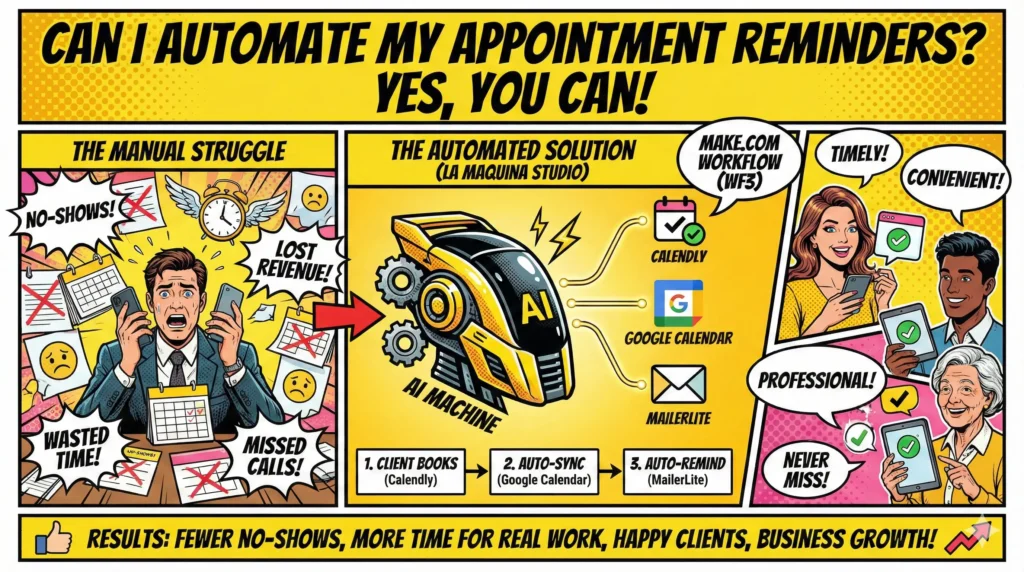
At La Maquina Studio, we specialize in helping businesses like yours navigate the complexities of automation with practical, real-world solutions. Our Make.com workflow, specifically the Booking Assistant (WF3), is designed to tackle the challenges of manual booking management. By integrating tools like Calendly, Google Calendar, and MailerLite, this workflow automates the process from appointment scheduling to reminder notifications, ensuring that both you and your clients are always on the same page.
While the idea of automation might seem intimidating at first, especially if you’re new to it, the benefits are well worth the initial learning curve. From reducing no-shows to freeing up time for more critical tasks, automating appointment reminders is a step toward a more efficient, organized, and successful business. So, if you’re pondering whether you can automate your appointment reminders, rest assured that not only is it possible, but it’s also a crucial move for the modern entrepreneur.
Table of Contents
Why Automate Appointment Reminders?
Before diving into how to automate appointment reminders, it’s essential to understand why this automation is a critical component of modern business operations. Firstly, automating appointment reminders significantly reduces the number of no-shows and last-minute cancellations. These missed appointments can be costly, leading to lost revenue and wasted time. By sending timely reminders, you ensure that clients are aware of their upcoming appointments, giving them the opportunity to reschedule if necessary, thus optimizing your schedule and maximizing your income.
Moreover, automation streamlines your workflow, allowing you to focus on what truly matters—serving your clients and growing your business. Manually sending reminders takes time, especially if you have a large client base or a busy schedule. This repetitive task can easily be automated, freeing up valuable time for other essential tasks. In fact, according to studies, businesses that automate their appointment reminders experience a significant increase in efficiency and a reduction in the workload for administrative staff.
Additionally, automated reminders enhance client satisfaction. In today’s digital age, clients expect convenience and timely communication. Automated reminders ensure that clients receive the information they need promptly, enhancing their experience with your business. They appreciate the attentiveness and professionalism that comes with timely reminders, which can also boost their loyalty and likelihood to recommend your services to others.
Finally, automating reminders can help streamline your record-keeping and communication processes. With systems in place to automatically log appointments and reminders, you have a clear trail of communication which can be invaluable for resolving disputes or misunderstandings. It also provides a more organized way to track client interactions over time, allowing for better personalization and improved customer service.
How to Automate Appointment Reminders Using Make.com
Now that we’ve established the importance of automating appointment reminders, let’s explore how you can achieve this using Make.com and the Booking Assistant workflow from La Maquina Studio. This workflow is designed to integrate with popular scheduling and communication tools such as Calendly, Google Calendar, and MailerLite, making it a versatile solution for any business.
The process begins with Calendly, a widely-used scheduling tool that allows clients to book appointments directly based on your availability. Once an appointment is scheduled, the next step is to ensure it is automatically added to your Google Calendar. This ensures you always have a clear view of your schedule and can plan your day accordingly.
Next, the workflow triggers an automated reminder sequence through MailerLite. This email marketing platform allows you to customize and schedule reminder emails to go out at predetermined intervals before the appointment. These reminders can be tailored to fit your brand voice and include essential details such as the date, time, and any necessary preparations the client needs to make before the appointment.
One of the key advantages of using Make.com for this automation is its ease of use. While it might take some time to set up initially, the platform provides a user-friendly interface that guides you through the process step-by-step. Moreover, once the workflow is in place, it runs seamlessly in the background, requiring minimal maintenance and adjustments.
Incorporating the Booking Assistant workflow not only simplifies your appointment management but also significantly reduces the risk of errors or oversights that can occur with manual processes. By using Make.com, you can ensure your appointment reminders are sent out consistently and reliably, allowing you to provide a professional and organized service to your clients.
Overcoming Common Automation Challenges
While the benefits of automation are clear, it’s important to acknowledge the challenges that can arise during the implementation process. Many business owners hesitate to automate appointment reminders because they fear the complexity of the setup or the possibility of technical issues. However, understanding these challenges and how to overcome them can make the transition to automation much smoother.
One common challenge is the initial setup of the automation workflow. It can be daunting to configure the various tools and integrations needed to automate appointment reminders. Fortunately, platforms like Make.com offer intuitive interfaces and comprehensive guides to help you through the process. Take advantage of resources like our automation course to gain a deeper understanding of the setup and ensure you’re using the tools most effectively.
Another issue businesses might encounter is ensuring that the automated reminders are personalized and relevant to each client. Generic reminders may not resonate as well as personalized messages. To address this, leverage the customization options available in tools like MailerLite to tailor your messages based on client preferences and appointment details.
Data privacy and security concerns are also top of mind for many businesses. When automating appointment reminders, it’s crucial to ensure that your client’s information is handled securely. Make.com provides robust security measures and complies with data protection regulations to safeguard your data. As a business owner, it’s also important to be transparent with clients about how their information will be used and to obtain their consent when necessary.
Finally, ongoing maintenance and troubleshooting might seem like a daunting task, but with the right tools and resources, it’s manageable. Regularly review and update your automation workflow to accommodate any changes in your business processes or tools. Additionally, stay informed of updates and improvements to the tools you’re using to keep your automation running smoothly.
Enhancing Your Business with Automation
Integrating automation into your business processes, especially for appointment reminders, can lead to significant improvements in efficiency, client satisfaction, and overall business growth. By taking the leap to automate your appointment reminders, you position your business for success in a competitive market where time and attention to detail are critical.
Beyond just saving time, automation introduces a level of professionalism and reliability that manual processes simply cannot match. Clients appreciate the consistency and accuracy of automated reminders, which can help reinforce your reputation as a dependable service provider. This reliability can also lead to increased client retention rates and more positive online reviews, further boosting your business’s credibility.
Additionally, automating appointment reminders allows you to scale your operations without a proportional increase in workload. As your business grows and you handle more clients, keeping up with manual reminders can become overwhelming. Automation ensures that no matter how large your client base becomes, you can maintain the same level of service without overextending your resources.
Furthermore, automation opens up opportunities for integrating other advanced features into your business operations. For instance, you can expand your automation to include client follow-ups, feedback collection, and even marketing campaigns, all of which can be managed seamlessly alongside your appointment reminders. This holistic approach to automation can lead to a more cohesive and efficient business model.
Ultimately, embracing automation is not just about convenience; it’s about positioning your business for long-term success. By leveraging tools like Make.com and the workflows offered by La Maquina Studio, you can navigate the complexities of automation with confidence and transform your business into a more agile, efficient, and competitive entity in your industry.
Conclusion
In conclusion, if you’ve been pondering the question, “Can I automate my appointment reminders?” the answer is a resounding yes. Automating appointment reminders is not only feasible but essential for any business looking to improve efficiency, client satisfaction, and overall productivity. By utilizing platforms like Make.com and following the practical guidance provided by La Maquina Studio, you can implement an effective automation strategy that meets the unique needs of your business.
While there may be a learning curve involved, the benefits of automation far outweigh the initial investment of time and effort. By automating appointment reminders, you free up valuable time, reduce the risk of errors, and provide a seamless experience for your clients. The tools and workflows available today make it easier than ever to integrate automation into your business processes, allowing you to focus on what truly matters: growing your business and serving your clients with excellence.
Remember, automation is not a one-size-fits-all solution. Tailor your approach to fit your business’s specific needs and continuously monitor and refine your processes for optimal results. As you embrace automation, you’ll find that it becomes an invaluable asset in your business toolkit, helping you achieve greater success and efficiency in your operations. So, take the leap and start automating your appointment reminders today.
Check out the courses you can learn in just a few days and implement in your business! Need help? Get in touch with me!


Susana Toth
Make.com Certified Expert & Founder, La Maquina Studio
Susana Toth is a Make.com Certified Expert and the founder of La Maquina Studio, where she helps small businesses and consultants eliminate repetitive work through smart automation. With 20+ years of experience in web design, business consulting, and digital strategy, she builds practical AI-powered workflows that save hours every week — without writing a single line of code. She writes about Make.com automation, AI integration, and building systems that work while you don’t.
Learn more about me →