
Do I need coding to automate my business? This is a question many business owners ponder as they seek to streamline operations and increase efficiency. The good news is, with the advent of visual automation platforms like Make.com, the answer is a resounding no. You don’t need a coding background to automate your business processes effectively. Instead, you can leverage a visual approach where workflows are constructed using intuitive drag-and-drop interfaces. This paradigm shift empowers business owners to automate tedious and repetitive tasks without delving into lines of code. As the founder of La Maquina Studio, I’ve seen firsthand how automation can transform businesses, and I can assure you that learning curves are manageable and the rewards substantial. In this article, we’ll explore how you can automate your business without any coding knowledge, using powerful visual tools and workflows that address real-world problems.
Table of Contents
The Rise of No-Code Automation Platforms
The technology landscape is evolving, and no-code automation platforms like Make.com are at the forefront of this transformation. Traditionally, automation was the domain of developers who wrote complex scripts and code to automate tasks. However, the rise of no-code solutions has democratized automation, making it accessible to a broader audience, including business owners who are not tech-savvy. Do I need coding to automate my business? With these platforms, the answer is no. These tools provide a visual interface where you can create workflows by simply connecting different modules, which represent various apps and services, to automate processes.
No-code platforms like Make.com offer a user-friendly environment that allows you to harness the power of automation without needing to write a single line of code. You can create complex workflows that integrate multiple applications, set up triggers and actions, and manage data flows seamlessly. The visual nature of these platforms means that you can see how your workflow operates at a glance, making it easier to understand and modify as needed.
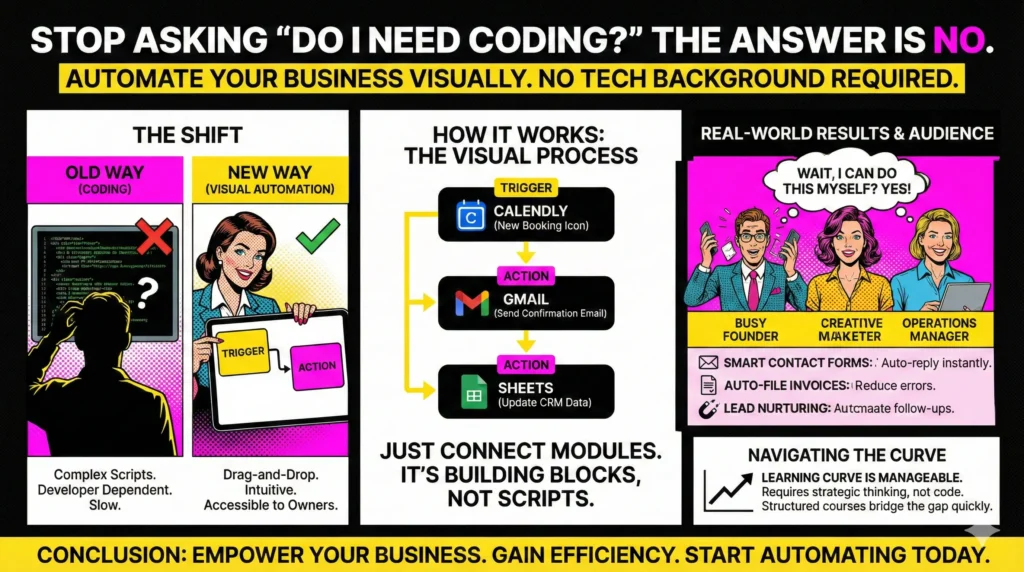
At La Maquina Studio, we offer a range of courses that leverage Make.com to address common business challenges. For example, the Smart Contact Form workflow uses a simple visual setup to automate email responses, replacing the need for manual email handling. Similarly, the Auto-File Invoices workflow uses visual automation to streamline the way invoices are filed, saving time and reducing errors. These workflows demonstrate how no-code platforms can eliminate the need for coding, making it feasible for anyone to automate their business processes.
Building a Workflow: The Visual Process
One of the most significant advantages of visual automation platforms like Make.com is the ability to build workflows without any coding. Imagine creating a workflow where you want to automatically schedule meetings, send follow-up emails, and update your calendar. Do I need coding to automate my business? Again, the answer is no, thanks to the intuitive visual process these platforms offer.
The process begins with identifying the tasks you want to automate. Let’s take the Booking Assistant workflow as an example. This workflow automates booking management by integrating Calendly, your calendar, and email services. You start by dragging and dropping modules to represent each step of the process. The visual interface lets you connect these modules, specifying triggers (like a new booking) and actions (such as sending a confirmation email) without writing any code.
Each module in the workflow acts as a building block that performs specific functions. You can customize these modules to fit your needs by simply adjusting settings in a user-friendly interface. The visual representation of the workflow means you can easily follow the data flow, ensuring that everything is set up correctly. This approach not only simplifies the creation of workflows but also allows for quick modifications and troubleshooting.
At La Maquina Studio, we guide users through this process in our courses, such as the Booking Assistant workflow, which illustrates how to manage bookings efficiently without coding. By leveraging the visual capabilities of Make.com, you can automate complex tasks with ease, freeing up time to focus on growing your business.
Advantages of No-Code Automation
Now that we’ve established that you don’t need coding to automate your business, let’s delve into the advantages of embracing no-code automation. The primary benefit is accessibility. No-code platforms like Make.com open up automation to a wider audience, allowing business owners and teams without technical expertise to build and maintain automated workflows. This accessibility leads to faster implementation and reduces the reliance on developers, who can then focus on more complex projects.
No-code automation also brings flexibility. You can quickly adapt to changing business needs by modifying existing workflows or creating new ones. For instance, if you need to automate content repurposing, our Content Repurposing Engine workflow at La Maquina Studio demonstrates how you can transform YouTube RSS feeds into email content using Make.com’s visual tools. This adaptability is crucial in today’s fast-paced business environment, where agility can be a significant competitive advantage.
Moreover, no-code solutions promote collaboration across different teams within an organization. Since the platforms are easy to understand and use, teams from marketing, sales, operations, and more can collaborate on automation projects. This cross-functional collaboration fosters innovation and ensures that automation solutions meet the diverse needs of the business.
Finally, no-code automation is cost-effective. By reducing the need for custom coding, businesses can save on development costs and allocate resources more efficiently. Our Automated Sales Machine workflow, for example, automates lead nurturing with sophisticated sequences, yet requires no coding expertise to set up or maintain, ensuring a high return on investment.
Navigating the Learning Curve
While no-code platforms significantly lower the barrier to entry for automation, it’s important to acknowledge that there is still a learning curve. As with any new tool, it takes time to become familiar with the interface and capabilities. Do I need coding to automate my business? No, but you do need to invest some time in understanding how to use the platform effectively.
At La Maquina Studio, we recognize this and have structured our courses to help users navigate this learning curve efficiently. Our courses, such as the Auto-File Invoices and Smart Lead Qualifier, are designed to introduce users to basic concepts first, gradually advancing to more complex workflows as confidence and understanding grow. We provide practical, real-world examples that demonstrate how to apply automation to solve everyday business challenges.
One common misconception is that no-code means no effort. While you don’t need to code, you do need to think strategically about the processes you wish to automate and how best to configure workflows to achieve your goals. Our Instant Quote Machine workflow, for example, automates quote creation by integrating multiple services. It requires thoughtful setup but pays dividends in time saved and accuracy achieved.
Ultimately, no-code platforms like Make.com are powerful tools that, with a bit of investment in learning, can drastically improve business efficiency. Our commitment at La Maquina Studio is to guide you through this journey, ensuring that you can harness the full potential of automation without the need for coding.
Conclusion
In conclusion, the question of “Do I need coding to automate my business?” can be answered with confidence: no, you do not. Thanks to platforms like Make.com, business owners can embrace automation without the technical knowledge traditionally required. By utilizing visual interfaces and intuitive workflows, you can automate a wide range of tasks, from email responses to lead nurturing, without writing a single line of code.
At La Maquina Studio, we are passionate about empowering businesses to utilize automation effectively. Our courses and workflows are designed to demystify the process, showing you how to implement automation solutions that address your specific needs. We believe that with the right tools and guidance, any business can achieve greater efficiency and productivity through automation.
As you consider the potential of automation for your business, remember that the learning curve is surmountable, and the benefits are substantial. Whether you’re looking to improve booking management, automate content repurposing, or enhance lead qualification, no-code platforms offer the resources you need to succeed. It’s time to explore the possibilities and transform your business with automation—no coding required.
Check out the courses you can learn in just a few days and implement in your business! Need help? Get in touch with me!


Susana Toth
Make.com Certified Expert & Founder, La Maquina Studio
Susana Toth is a Make.com Certified Expert and the founder of La Maquina Studio, where she helps small businesses and consultants eliminate repetitive work through smart automation. With 20+ years of experience in web design, business consulting, and digital strategy, she builds practical AI-powered workflows that save hours every week — without writing a single line of code. She writes about Make.com automation, AI integration, and building systems that work while you don’t.
Learn more about me →