
How long does it take to set up automation? This is a common question that business owners often ask when considering the shift towards streamlining their operations. The allure of automation lies in its potential to transform tedious manual tasks into efficient, repeatable processes that save both time and resources. Yet, understanding the time investment required to set it up is crucial for realistic planning and expectations. While tools like Make.com offer robust solutions, the timeframe for setting up automation can vary significantly depending on several factors, including the complexity of workflows, the user’s familiarity with automation tools, and the specific needs of the business. It’s important to recognize that automation is not a magic wand that instantaneously fixes problems; there’s a learning curve and a setup period involved. In this article, we’ll delve into the various stages of setting up automation, using examples from practical workflows taught at La Maquina Studio, and consider the factors that influence the time required to achieve a fully operational automated system.
Table of Contents
Understanding Initial Setup Time
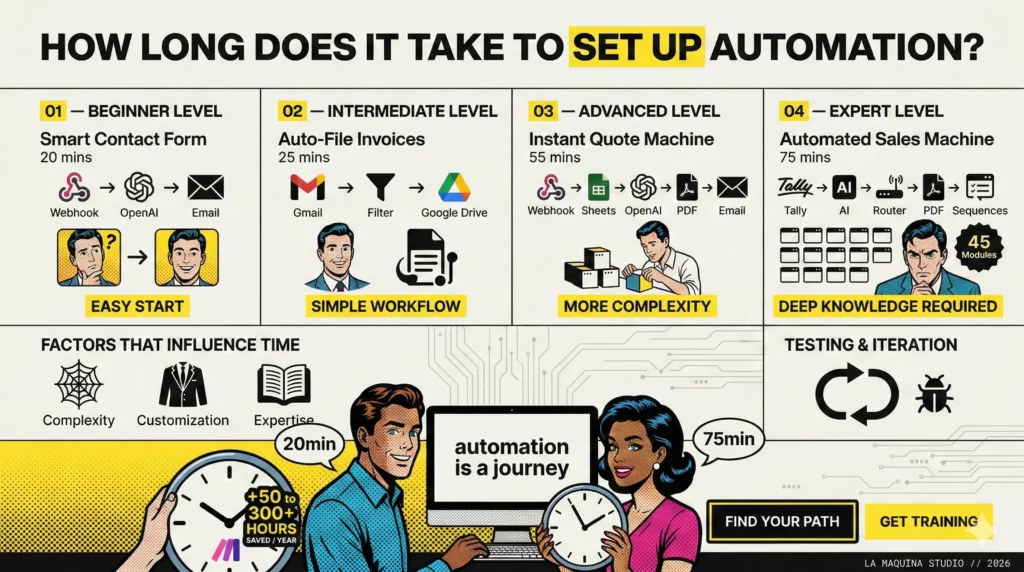
The initial setup time for automation can range from a few hours to several weeks, depending on the complexity of the tasks you’re looking to automate. For beginners, starting with simple workflows can provide a quick win and a confidence boost. At La Maquina Studio, we recommend starting with workflows like the Smart Contact Form, which takes around 20 minutes to set up. This beginner-level workflow is designed to automate responses to contact form submissions using a webhook, OpenAI, and email integration. It addresses the common issue of manual email responses, providing immediate benefits for those new to automation.
However, as you move to more complex automations, such as the Instant Quote Machine, the setup can become more involved. This workflow, which automates the creation and delivery of quotes using webhooks, Sheets, OpenAI, PDF, and email, is classified as advanced and typically takes around 55 minutes to set up. The increased time investment is due to the additional components and logic that need to be customized to fit specific business needs.
It’s also important to consider the learning curve associated with understanding the tools and technologies involved in automation. For those who are new to platforms like Make.com, there may be an initial period of exploration and trial and error. This is a natural part of the learning process and should be accounted for in your planning.
Factors Influencing Setup Time
Several factors can influence how long it takes to set up automation. One of the primary considerations is the complexity of the workflow. Simple tasks, such as automating email responses or filing invoices, can be set up relatively quickly, as seen in our Auto-File Invoices workflow, which takes about 25 minutes. This intermediate workflow integrates Gmail, Filter, and Google Drive to streamline the process of manual invoice filing.
On the other hand, more complex automations, such as the Automated Sales Machine, can take significantly longer. This expert-level workflow involves around 45 modules and takes approximately 75 minutes to set up. It automates lead nurturing using Tally, AI, Router, PDF, and email sequences, requiring a deeper understanding of both the business process and the tools involved.
Another critical factor is the level of customization required. Off-the-shelf solutions may fit some businesses, but others may require tailored automation to meet their specific needs. Customization often involves additional setup time, testing, and iteration to ensure that the workflow functions correctly and delivers the desired outcomes.
The Role of Expertise and Experience
Experience with automation tools significantly impacts how long it takes to set up automation. Experienced users who have navigated similar workflows before can often set up complex automations more quickly, as they are familiar with the platform’s intricacies and potential pitfalls. For example, setting up a workflow like the Auto Blog Writer might take less time for someone familiar with scheduling, Sheets, OpenAI, and WordPress integrations. This expert workflow, which automates content creation, typically takes 50 minutes, but seasoned users may be able to streamline the process further.
Moreover, formal training or courses can expedite the learning curve. At La Maquina Studio, we offer comprehensive courses that guide users through real business workflows. These courses, such as our Make.com automation course, are designed to equip users with the necessary skills and confidence to tackle even the most complex automations.
For those who are self-taught, there might be additional time needed to troubleshoot and refine workflows. While this can be a valuable learning experience, it may also extend the overall setup time.
Testing and Iteration: An Ongoing Process
Once you’ve set up your automation, the process doesn’t end there. A critical aspect of automation is testing and iteration. It’s essential to thoroughly test workflows to ensure they function as intended and to identify any potential areas for improvement. This stage can take additional time depending on the complexity of the workflow and the variables involved.
For instance, in advanced workflows like the Review Response Bot, which automates responses to Google My Business reviews using AI, it’s crucial to test the AI’s responses for tone and accuracy. This workflow, taking approximately 35 minutes to set up, may require ongoing adjustments to maintain quality and relevance as business needs evolve.
Iteration is a key part of the automation journey. As your business grows and changes, your automation needs may evolve as well. This requires revisiting and potentially reconfiguring existing workflows to better align with new objectives. Embracing a mindset of continuous improvement can help ensure that your automations remain effective and valuable over time.
Conclusion: Planning for Success
In conclusion, how long does it take to set up automation is a question with no one-size-fits-all answer. The time required can vary widely based on the complexity of the tasks, the level of customization, the user’s experience, and the need for ongoing testing and iteration. However, with careful planning and a commitment to learning, businesses can successfully navigate the setup process and reap the benefits of automation.
At La Maquina Studio, we emphasize a practical approach to automation, recognizing that it’s not an overnight transformation but a journey that requires time and effort. By leveraging our resources, such as our automation courses and ready-to-use automation kits, businesses can equip themselves with the tools and knowledge needed to set up effective and sustainable automation workflows.
Ultimately, the time invested in setting up automation is well worth it, as it can lead to significant time savings, increased efficiency, and the ability to focus on more strategic aspects of the business. By understanding the factors that influence setup time and planning accordingly, businesses can set realistic expectations and achieve successful automation outcomes.
Check out the courses you can learn in just a few days and implement in your business! Need help? Get in touch with me!


Susana Toth
Make.com Certified Expert & Founder, La Maquina Studio
Susana Toth is a Make.com Certified Expert and the founder of La Maquina Studio, where she helps small businesses and consultants eliminate repetitive work through smart automation. With 20+ years of experience in web design, business consulting, and digital strategy, she builds practical AI-powered workflows that save hours every week — without writing a single line of code. She writes about Make.com automation, AI integration, and building systems that work while you don’t.
Learn more about me →