
In the fast-paced world of small business, understanding how to automate booking for small business can be a game-changer. From managing appointment scheduling to handling cancellations and reminders, the manual workload can quickly become overwhelming. That’s where automation steps in as your silent business partner, simplifying processes, saving time, and enhancing customer satisfaction. With tools like Make.com and its versatile WF3 Workflow, small business owners can transform their booking process into a seamless, efficient machine. This guide will walk you through the essential steps, share practical insights, and set you on the path to mastering booking automation.
Table of Contents
The Significance of Automation in Booking
For small business owners, time is money. Every moment spent manually scheduling appointments, responding to client inquiries, or dealing with cancellations is a moment not spent growing your business. This is where the power of automation can make a significant difference. Automating your booking system allows you to streamline operations, minimize human error, and provide a consistent, reliable service to your clients.
Imagine a world where your bookings are managed without your constant supervision. Clients visit your website, select their preferred time slots, and receive confirmations and reminders without your intervention. That’s the promise of booking automation. With Make.com’s WF3 Workflow, all of this becomes possible. By integrating Calendly with your calendar and email system, you create a smooth flow of information that keeps you and your clients informed at every step.
Automation doesn’t just save time—it also reduces stress. Knowing that your booking process is running smoothly in the background allows you to focus on what truly matters: providing exceptional service and growing your business. Additionally, an automated system can offer a level of professionalism and efficiency that sets your business apart from competitors still grappling with manual booking tasks.
It’s important to acknowledge the learning curve involved. Implementing any new system requires time and effort, but the long-term benefits far outweigh the initial setup challenges. By investing in automation now, you’re setting your business up for a future of streamlined operations and improved customer satisfaction.
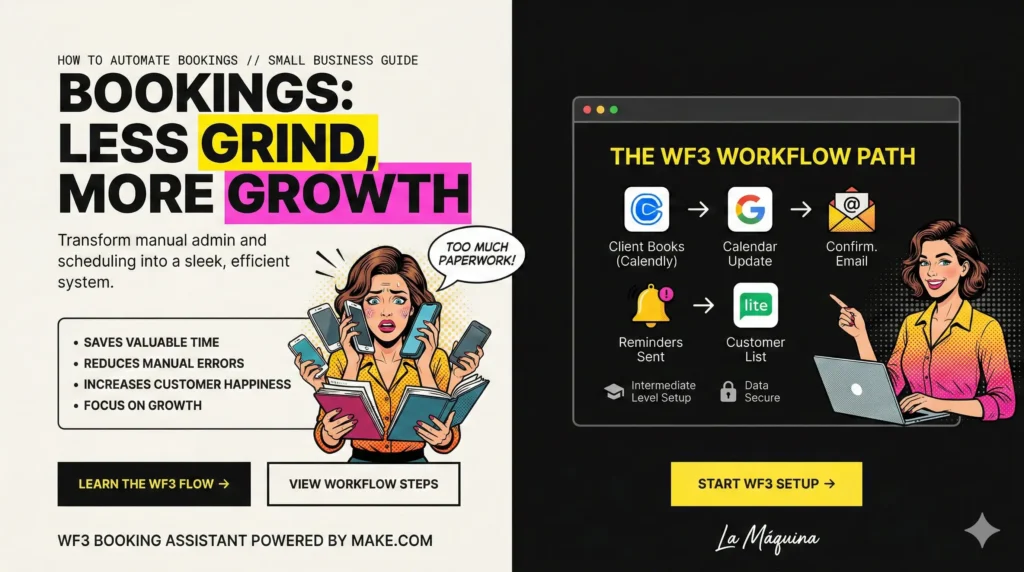
Understanding the Make.com WF3 Workflow
The WF3 Workflow on Make.com is specifically designed for small businesses looking to automate their booking processes. It integrates various tools such as Calendly, Calendar, Email, and MailerLite to create a cohesive booking assistant. This workflow is ideal for business owners who want to reduce manual labor and enhance their customer communication flow.
Here’s how it works: once a client books an appointment through Calendly, the WF3 Workflow automatically updates your calendar, ensuring there are no scheduling conflicts. Simultaneously, a confirmation email is sent to the client, providing them with all the necessary details. As the appointment approaches, automatic reminders are sent out, reducing the likelihood of no-shows and last-minute cancellations.
Moreover, this workflow can be customized to suit your specific business needs. Whether you need to integrate additional tools like payment gateways or CRM systems, Make.com offers the flexibility to adapt the workflow to your requirements. This customization is crucial for businesses with unique operational needs that go beyond standard booking processes.
The WF3 Workflow is an intermediate-level automation solution, meaning it’s accessible for those with a basic understanding of automation tools but still offers advanced features for more experienced users. By investing time in learning and setting up this workflow, business owners can unlock a new level of efficiency in managing their bookings.
Steps to Implement Booking Automation
Implementing booking automation for your small business involves several key steps. Each step requires careful planning and execution to ensure a successful transition from manual to automated systems. Here’s a breakdown of the process:
- Assess Your Current Process: Before diving into automation, take a close look at your existing booking system. Identify pain points, such as frequent scheduling conflicts or high no-show rates, to understand where automation can offer the most value.
- Choose the Right Tools: Based on your assessment, select tools that align with your business needs. Make.com’s WF3 Workflow is a great starting point, but you may also consider integrating additional platforms like payment processors or customer relationship management (CRM) systems.
- Set Up the Workflow: Once you’ve chosen your tools, it’s time to set up the workflow. Follow Make.com’s detailed guides to integrate your chosen platforms. During this phase, configure settings such as notification preferences and calendar integrations to suit your business operations.
- Testing and Tweaking: After setup, thoroughly test the system to ensure it functions as expected. Simulate bookings, confirm notifications, and adjust settings as needed. This step is crucial to iron out any issues before going live.
- Launch and Monitor: With the system tested and operational, it’s time to launch your automated booking process. Monitor its performance closely, gathering feedback from clients and making adjustments to enhance its effectiveness.
Challenges and Solutions in Booking Automation
While the benefits of booking automation are clear, it’s important to acknowledge the challenges that may arise during implementation. By being aware of these challenges and their solutions, you can navigate the automation journey more smoothly.
One common challenge is resistance to change. Employees or clients accustomed to manual processes may be hesitant to adopt new systems. To overcome this, provide comprehensive training and clear communication about the benefits of automation. Demonstrating the efficiency and reliability of the new system can alleviate concerns and foster acceptance.
Technical difficulties can also pose a hurdle. Whether it’s integration issues or software bugs, technical challenges are part of the automation landscape. To mitigate these, leverage the support offered by platforms like Make.com. Their resources and community forums are invaluable for troubleshooting and finding solutions.
Another potential issue is data security. With personal and business information flowing through automated systems, ensuring data protection is paramount. Choose reputable software providers with strong security measures and compliance with data protection regulations to safeguard your information.
Finally, customization needs can complicate the process. While Make.com offers flexible solutions, complex business requirements may necessitate additional customization. In such cases, consulting with experts or hiring a developer can help tailor the workflow to your business’s unique needs.
Conclusion: Embracing the Future of Booking
In conclusion, understanding how to automate booking for small business is not just a valuable skill—it’s an investment in the future of your business. By embracing automation, small business owners can reduce manual workload, enhance customer satisfaction, and gain a competitive edge. Although the journey involves a learning curve and potential challenges, the rewards of a streamlined, efficient booking process are well worth the effort.
Make.com’s WF3 Workflow provides a practical, accessible solution for those ready to embark on this automation journey. By integrating tools like Calendly, Calendar, and Email, it offers a comprehensive system that caters to various business needs. With the right approach, patience, and commitment, you can transform your booking process into a well-oiled machine, freeing up time to focus on what truly matters: growing your business and serving your clients.
As you navigate this transformation, remember that you’re not alone. Resources, support, and a community of like-minded business owners are available to assist you. With determination and the right tools, embracing booking automation can lead your small business into a new era of efficiency and success.
Check out the courses you can learn in just a few days and implement in your business! Need help? Get in touch with me!


Susana Toth
Make.com Certified Expert & Founder, La Maquina Studio
Susana Toth is a Make.com Certified Expert and the founder of La Maquina Studio, where she helps small businesses and consultants eliminate repetitive work through smart automation. With 20+ years of experience in web design, business consulting, and digital strategy, she builds practical AI-powered workflows that save hours every week — without writing a single line of code. She writes about Make.com automation, AI integration, and building systems that work while you don’t.
Learn more about me →