
Implementing an AI auto reply to customer emails can significantly streamline your business communications, especially if you’re dealing with a high volume of inquiries. As a business owner, you understand the importance of prompt responses, but you may not always have the time or resources to reply to every email personally. That’s where automation comes to the rescue. By leveraging technology like Make.com, you can set up a system that not only acknowledges customer emails instantly but also provides them with relevant information, improving customer satisfaction and freeing up your time for other critical tasks. In this guide, we’ll explore the steps necessary to set up an efficient AI auto-reply system for your customer emails, referencing the Smart Contact Form workflow from our Make.com automation course as a valuable resource.
Table of Contents
Understanding the Basics of AI Auto Reply to Customer Emails
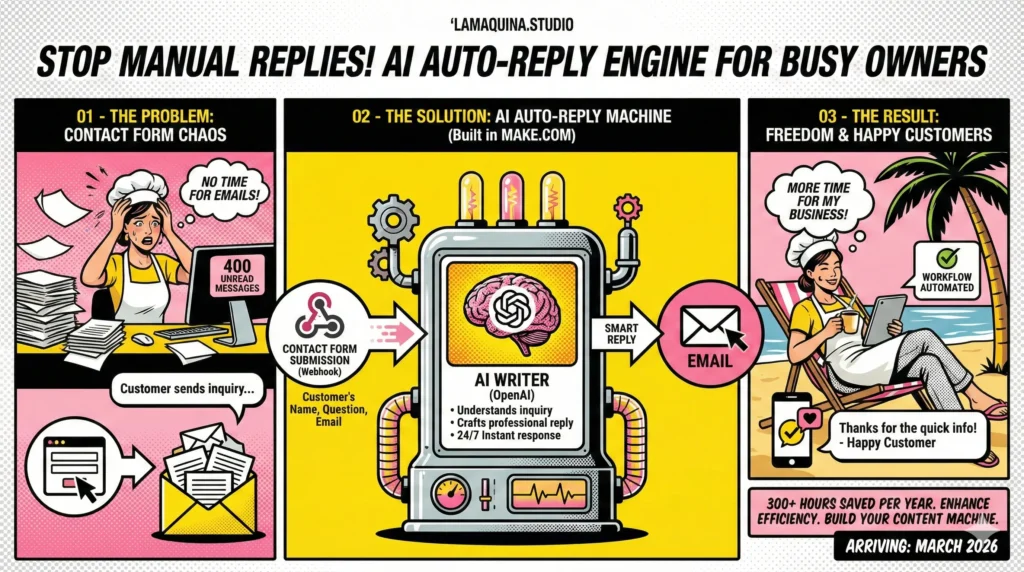
Before diving into the nitty-gritty of setup, it’s crucial to understand what an AI auto reply to customer emails entails. Essentially, it’s a programmed response generated by artificial intelligence to engage with customer emails automatically. The setup typically involves integrating a webhook to capture incoming emails, utilizing AI to draft relevant responses, and then sending those replies back to the customer via email. This kind of automation can be a game-changer in managing customer interactions efficiently, but it does require some initial setup and a learning curve to get everything right.
One of the fears business owners often have is the impersonal nature of automated messages. However, with advances in AI, you can craft responses that feel personalized and genuine. By feeding your AI system specific rules and templates, it can learn to adapt its responses based on the content of the incoming email. The goal is to mimic the conversational tone you would naturally use, ensuring that customers feel valued even when interacting with a machine.
Implementing AI auto-replies also requires an understanding of your current workflow. For example, how do customer emails currently flow through your business? Are they centralized or scattered across various platforms? Answering these questions will help you determine the best approach to integrating AI into your email management process.
In the Make.com Smart Contact Form workflow, we demonstrate a beginner-friendly approach to setting up this system. It involves three main modules: capturing the email data, processing it through OpenAI for response generation, and finally, delivering the response via email. This streamlined process takes manual email responses out of your daily to-do list, allowing your team to focus on more strategic tasks.
Setting Up Your AI Auto Reply System
Setting up an AI auto reply to customer emails system requires a few strategic steps. First and foremost, you need to choose the right tools that integrate smoothly with your existing email setup. Make.com offers a versatile platform that connects with many email services, making it an ideal choice for building your AI-based workflow.
Begin by setting up a webhook in Make.com to capture incoming email data. This involves creating a scenario where your email service feeds new email data into Make.com. The webhook acts as an intermediary, ensuring that every email sent to your designated address triggers the automation process. It’s akin to having a virtual receptionist ready to serve your customers 24/7.
Next, you’ll configure AI modules within Make.com to analyze incoming emails and generate appropriate responses. This is where the creativity of your templates comes into play. By pre-defining certain keywords and expected inquiries, the AI can tailor its responses to address customer concerns accurately. It’s important to test various templates to find the one that resonates best with your audience.
After generating a response, the next step is to deliver it back to the customer. This is done by integrating an email module in Make.com, which automates the sending process. The system can be configured to send the AI-generated reply instantly, ensuring that your customers receive timely communication, thus enhancing their overall experience with your brand.
While the initial setup may seem daunting, the key is to take it one step at a time, as illustrated in our Smart Contact Form workflow. Each module serves a purpose, and when connected efficiently, they create a seamless process that functions with minimal oversight. This kind of automation not only saves time but also ensures consistency in your customer communication.
Customizing Your AI Responses
Customization is the secret sauce of an effective AI auto reply to customer emails system. While it’s tempting to use generic responses, personalized replies can significantly enhance customer satisfaction and brand loyalty. To achieve this, you’ll need to invest time in crafting and refining your response templates.
Start by analyzing common customer inquiries and issues. What are the frequently asked questions your support team encounters? Use these insights to create template responses that address these concerns directly. The more accurately you can predict and answer customer queries, the more efficient your AI system becomes.
Additionally, consider the tone and style of your emails. Maintaining a consistent voice that aligns with your brand identity is crucial. Whether your brand is professional, casual, or somewhere in between, your AI responses should reflect that persona. This consistency fosters a connection with your audience, making automated interactions feel more human.
Another aspect to consider is the personalization of responses. This involves using customer-specific data, such as their name or past interactions, within the email. Personal touches, even if automated, can make a significant impact on how your communication is perceived.
In the Make.com workflow, we emphasize the importance of testing and iteration. As you gather data from customer interactions, use this feedback to refine your AI responses. Automation is not a set-it-and-forget-it solution; it requires ongoing optimization to ensure it meets your evolving business needs.
Overcoming Challenges with AI Auto Reply Systems
Implementing an AI auto reply to customer emails system comes with its own set of challenges. One common concern is the potential for AI to misinterpret customer inquiries, leading to inappropriate or irrelevant responses. To mitigate this risk, it’s essential to continually monitor the system and provide it with feedback for improvement.
Another challenge is ensuring your AI system can handle complex queries. While the technology is advancing, there are still limitations to what AI can understand and respond to. In these cases, it’s crucial to have a fallback mechanism that directs more intricate issues to a human representative. This ensures that no customer query goes unresolved, maintaining the quality of your customer service.
Privacy and data security are also major considerations. When setting up an AI system, ensure that all data is handled in compliance with relevant regulations. Make.com provides secure integrations, but as a business owner, you must remain vigilant about data protection practices.
Finally, the initial setup and maintenance of an AI system can be resource-intensive. It’s important to weigh the time and effort involved against the potential benefits. The learning curve might be steep initially, but the long-term gains in efficiency and customer satisfaction are worth the investment.
In our Smart Contact Form workflow, we guide you through these challenges, providing practical solutions to optimize your AI responses and ensure a smooth implementation process. Remember, automation is a tool meant to enhance human effort, not replace it. By addressing these challenges head-on, you can leverage AI to improve your customer communication effectively.
Conclusion
Incorporating an AI auto reply to customer emails system into your business can lead to significant improvements in efficiency and customer satisfaction. While the setup may require an initial investment of time and resources, the long-term benefits make it a worthwhile endeavor. By leveraging tools like Make.com and following the structured approach outlined in our Smart Contact Form workflow, you can automate your email responses effectively.
Remember that the key to successful automation lies in customization and continuous optimization. Tailoring your AI responses to reflect your brand voice and customer needs will set your business apart. Don’t shy away from the challenges that come with implementing AI systems; instead, view them as opportunities to enhance your skills and better serve your customers.
As you embark on this journey, stay committed to learning and adapting. Automation is a rapidly evolving field, and staying informed about the latest advancements will ensure your business remains competitive. With the right mindset and tools, you can transform your approach to customer communication, allowing you to focus on what truly matters: growing your business and delighting your customers.


Susana Toth
Make.com Certified Expert & Founder, La Maquina Studio
Susana Toth is a Make.com Certified Expert and the founder of La Maquina Studio, where she helps small businesses and consultants eliminate repetitive work through smart automation. With 20+ years of experience in web design, business consulting, and digital strategy, she builds practical AI-powered workflows that save hours every week — without writing a single line of code. She writes about Make.com automation, AI integration, and building systems that work while you don’t.
Learn more about me →