
The topic of Zapier vs Make.com comparison is particularly relevant for small businesses aiming to optimize their operations through automation. As a business owner, you need tools that simplify processes, save time, and ultimately increase productivity. Both Make.com and Make.com promise to deliver these benefits, but each has its unique strengths and weaknesses. In this article, we will explore the differences between these two platforms, helping you decide which is the better fit for your small business. Understanding the nuances of each tool can significantly impact how efficiently you can automate tasks such as email responses, invoice filing, booking management, and more. Whether you’re looking to alleviate manual quote creation with Make.com’s Instant Quote Machine or streamline your content repurposing with Zapier, knowing the strengths and limitations of each platform is crucial. Throughout this article, I’ll draw on real-world examples and workflows, such as the Smart Contact Form and Automated Sales Machine from Make.com, to illustrate how each platform operates. By the end, you should have a clearer understanding of whether Zapier or Make.com aligns better with your business goals, technical skill level, and budget.
Table of Contents
Understanding the Basics
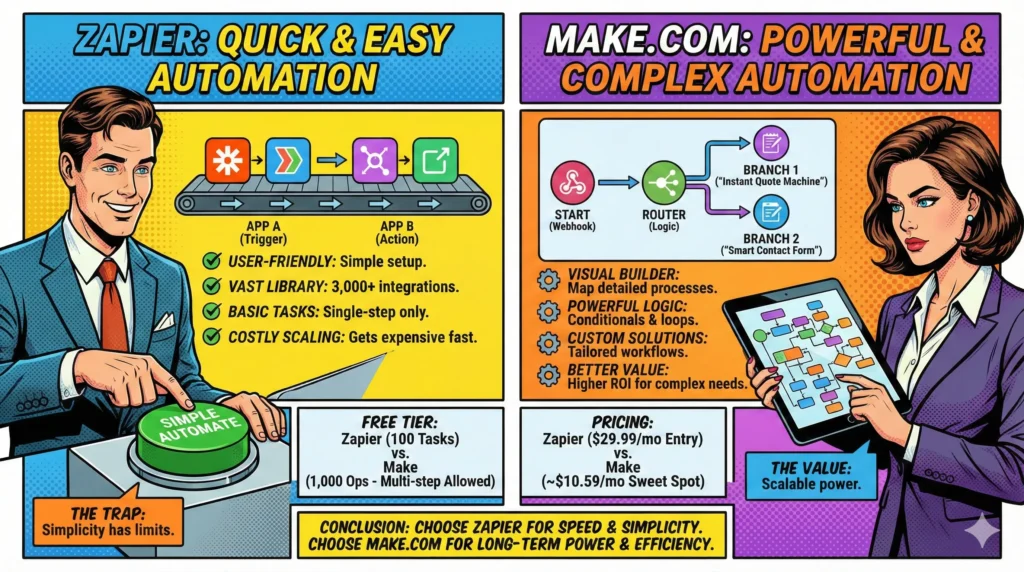
When considering a zapier vs make.com comparison, it’s essential to understand what each platform offers at a fundamental level. Zapier has long been recognized for its user-friendly interface and its ability to connect a wide variety of apps with ease. For small businesses, this means you can automate simple tasks without needing extensive technical know-how. Zapier’s “Zaps,” which are essentially automated workflows, can handle straightforward processes like sending a notification when you receive a new email or adding new leads to a CRM. Its simplicity, however, can come at the expense of more complex automation needs.
Make.com, formerly Integromat, is known for its versatility and powerful features that cater to more complex workflows. While it also connects a wide range of apps, the platform is particularly suited for businesses that require more detailed process automation. Make.com shines when automations require multiple steps and intricate logic. For instance, its Smart Contact Form uses webhooks to process form submissions with OpenAI and send customized email responses, offering a more dynamic and intelligent solution than a simple Zapier automation might provide.
The learning curve for Make.com can be steeper for small business owners who are not technically inclined, but the effort often pays off in terms of the powerful automation capabilities it unlocks. With its visual interface and ability to create multi-step scenarios, Make.com becomes a strong contender for businesses needing more than just basic task automation.
Features and Functionalities
Digging deeper into the zapier vs make.com comparison, let’s examine the core features and functionalities that each platform brings to the table. Zapier is renowned for its ease of use, making it ideal for small business owners who want to quickly get started with automation. It offers a vast library of app integrations, allowing users to connect over 3,000 apps. This extensive connectivity makes Zapier highly attractive for businesses with diverse software stacks. Additionally, its straightforward “If X happens, then do Y” approach simplifies the creation of workflows, commonly referred to as “Zaps.”
Make.com, on the other hand, provides a more robust set of features tailored for complex workflows. Its visual scenario builder allows users to map out detailed automation processes with ease, going beyond the basic trigger-action model of Zapier. For instance, Make.com’s Booking Assistant workflow integrates tools like Calendly, Google Calendar, and MailerLite, automating the entire booking process from start to finish, something that would require multiple, more complex Zaps in Zapier.
One standout capability of Make.com is its ability to handle conditional logic, loops, and iterations within a single scenario. This allows for more sophisticated data processing and decision-making, such as the Instant Quote Machine that uses Sheets and OpenAI to generate PDF quotes, which are then emailed to clients. These advanced functionalities make Make.com a compelling choice for businesses looking to automate complex, multi-step processes that are not easily handled by Zapier.
Usability and Learning Curve
The zapier vs make.com comparison wouldn’t be complete without addressing the usability and learning curve of each platform. Zapier is often touted for its user-friendly interface, designed to make automation accessible even to those without technical expertise. Its drag-and-drop functionality and clear step-by-step process guide users through creating Zaps effortlessly. This ease of use makes Zapier a popular choice among small business owners who want to automate basic tasks quickly and efficiently.
Make.com, in contrast, appeals to users willing to invest time in learning a more complex system. Its visual scenario builder is powerful but can be daunting for first-time users. However, once mastered, it unlocks a level of customization and control that Zapier cannot match. The learning curve is steep, but the return on investment is significant for businesses needing tailored automation solutions. To aid users, Make.com offers a range of educational resources, including the Auto Blog Writer workflow that demonstrates how to schedule content creation using Sheets, OpenAI, and WordPress.
Ultimately, the choice between Zapier and Make.com often comes down to the complexity of your automation needs and your willingness to engage with the platform’s learning materials. Small business owners who prioritize simplicity and speed may lean towards Zapier, while those who desire more control and customization may find Make.com to be the better long-term investment.
Pricing and Value for Small Businesses
In the context of a zapier vs make.com comparison, pricing is a critical factor for small businesses to consider. Both platforms offer tiered pricing structures, making them accessible to various business sizes and budgets. Zapier’s pricing model is straightforward, with plans ranging from free to premium options that unlock more Zaps, tasks, and features. For small businesses with limited automation needs, Zapier’s free plan may suffice, offering a cost-effective way to begin automating without financial commitment.
Make.com also provides a range of pricing options, from free to advanced plans with higher operational limits and features. Its pricing is based on the complexity and volume of scenarios rather than the number of tasks, which can be advantageous for businesses with intricate workflows. The platform’s flexibility in handling complex scenarios, like the Automated Sales Machine, allows for more significant value extraction from higher-tier plans.
The “Free Forever” Battle: Which Starter Plan Actually Works?
For many small businesses, the decision starts with the free tier. In 2026, both platforms offer a “Free Forever” plan, but they serve very different purposes. If you are just testing the waters or have a single, low-volume task, the choice depends on complexity.
| Feature | Zapier Free | Make.com Free |
| Monthly Allowance | 100 Tasks | 1,000 Operations |
| Complexity | Single-step only (1 Trigger + 1 Action) | Multi-step (Unlimited modules) |
| Update Interval | 15 Minutes | 15 Minutes (Instant via Webhooks) |
| AI Access | Zapier Copilot (limited) | Make AI Agents (limited) |
| Premium Apps | Not included | Included (most apps) |
Why “1,000” isn’t always more than “100”
The biggest trap for beginners is the “Task vs. Operation” math.
Zapier Free (100 Tasks): You can only build “Two-step Zaps.” For example: If I get a new lead in a Facebook Form, add it to a Google Sheet. That’s it. You cannot add a third step (like sending an email) without upgrading. However, 100 tasks mean 100 successful leads processeMake.com Free (1,000 Operations): You can build a 10-step scenario with filters, routers, and AI logic for free. But remember: every module consumes an operation. If your Smart Contact Form has 5 steps, one single run will cost you 5 operations. Your 1,000-operation limit actually allows for about 200 successful runs of that specific workflow.
The 2026 Verdict for Free Users: If you need a simple, reliable bridge between two apps, Zapier Free is the easiest to set up. But if you want to experiment with complex AI logic (like the Instant Quote Machine) without paying a dime, Make.com is the only platform that allows multi-step workflows on their free tier.
2026 Pricing Comparison: The Final Verdict on Value
Choosing between Zapier and Make.com in 2026 often comes down to a simple math problem: how many “steps” does your business perform monthly? While both platforms have introduced AI-centric billing, their entry-level costs remain worlds apart.
| Plan Tier | Make.com (10k Credits) | Zapier (Professional / Team) |
| Monthly Billing | $10.59 /mo (Core) | $29.99 /mo (Professional) |
| Annual Billing | $9.00 /mo (Core) | $19.99 /mo (Professional) |
| Monthly Billing | $18.82 /mo (Pro) | $103.50 /mo (Team) |
| Annual Billing | $16.00 /mo (Pro) | $69.00 /mo (Team) |
| Monthly Billing | $34.12 /mo (Teams) | $103.50+ /mo (Team) |
| Annual Billing | $29.00 /mo (Teams) | $69.00+ /mo (Team) |
Understanding the Cost of Ownership
The gap between $10.59 (Make Core) and $29.99 (Zapier Professional) for monthly users is nearly 3x, but the real “sticker shock” happens at the Team level.
Make.com Scaling: Moving from a solo user to a small team on Make.com costs as little as $34.12/mo (Monthly). This plan includes role management and shared team templates, making it highly accessible for growing startups.
Zapier Scaling: Zapier’s jump to the Team plan at $103.50/mo (Monthly) is a significant hurdle for many small businesses. While it offers 2,000+ tasks and unlimited users, it is strictly a “premium” choice for those who prioritize the 8,000+ app integrations over raw cost efficiency.
Why the $10.59 plan is the “Sweet Spot”: For most users starting with an Automated Sales Machine, the $10.59/mo Core plan on Make.com provides 10,000 operations. To get a similar volume of “work” out of Zapier, you would likely need to upgrade your Professional plan, easily pushing your monthly bill above $60.
When comparing costs, it’s essential to consider not just the immediate expenses but also the long-term value. Make.com’s ability to automate complex processes can lead to substantial efficiency gains, potentially justifying higher upfront costs. For small businesses with modest automation needs, Zapier’s simplicity and cost-effectiveness are appealing. However, for those aiming to scale operations and requiring advanced automation, Make.com may offer better value for money, especially when considering the potential return on investment from streamlined, tailored workflows.
In conclusion, the Zapier vs Make.com comparison reveals that both platforms have unique strengths catering to different business needs. Zapier is ideal for small businesses seeking quick, easy-to-implement solutions for basic automation tasks, while Make.com excels in handling complex, multi-step scenarios. The decision ultimately hinges on your business’s specific requirements, technical capabilities, and budget. Whether you’re looking to implement simple workflows like the Smart Contact Form or more sophisticated systems like the Instant Quote Machine, understanding each platform’s capabilities will guide you in selecting the right tool. By carefully evaluating your automation needs, you can choose the platform that aligns best with your business goals, ensuring a more efficient, productive operation.


Susana Toth
Make.com Certified Expert & Founder, La Maquina Studio
Susana Toth is a Make.com Certified Expert and the founder of La Maquina Studio, where she helps small businesses and consultants eliminate repetitive work through smart automation. With 20+ years of experience in web design, business consulting, and digital strategy, she builds practical AI-powered workflows that save hours every week — without writing a single line of code. She writes about Make.com automation, AI integration, and building systems that work while you don’t.
Learn more about me →