
How much does business automation cost? This is a question many business owners ponder as they contemplate the transition from manual processes to a more streamlined, automated approach. While the promise of increased efficiency and reduced human error is enticing, the financial implications can be daunting. At La Maquina Studio, we understand that diving into the world of automation comes with its fair share of questions and concerns. As a Make.com Level 5 Expert, I’ve seen firsthand the profound impact automation can have on businesses, and I’ve also witnessed the learning curves involved. It’s not a magic switch; it’s a strategic investment that requires careful consideration of both free and paid options. In this article, we’ll explore the various costs associated with business automation, comparing free versus paid solutions, and how they align with the workflows we teach at La Maquina Studio.
Table of Contents
Understanding Free Business Automation Solutions
When you first ask yourself “how much does business automation cost?” it’s natural to gravitate toward free solutions, especially if you’re a small business owner or just starting your automation journey. Free tools offer a low-risk entry point into the world of automation, allowing you to experiment without financial commitments. They are often limited in scope but can be a great way to test the waters.
For instance, many free automation tools allow you to set up simple workflows like the Smart Contact Form workflow we have at La Maquina Studio. This beginner-level workflow integrates a webhook with OpenAI to manage email responses automatically. With free tools, you get a taste of how automation can save you time by eliminating mundane tasks like manual email handling. However, these tools often come with limitations, such as caps on the number of automations you can run per month or restrictions on integrations with other apps.
The primary advantage of free automation solutions is their accessibility. You can sign up and start automating basic tasks almost immediately. This is particularly appealing for startups or small businesses operating on tight budgets. However, it’s crucial to remember that free tools might not offer the scalability or advanced features required for more complex business needs. As your business grows, you may quickly outgrow the capabilities of free options, leading to a potential disruption in your automation processes.
In terms of learning curve, free tools can be both a blessing and a curse. While they offer a risk-free environment to learn the basics of automation, they often lack comprehensive support or advanced tutorials. As a result, you might spend more time troubleshooting issues or searching for resources to maximize the tool’s potential. In contrast, paid solutions often come with robust support and extensive documentation, which can significantly shorten the learning curve.
Exploring Paid Business Automation Solutions
When considering how much does business automation cost, paid solutions present a different set of advantages and challenges. These options typically offer more features, better integrations, and enhanced support, making them ideal for businesses with more advanced automation needs. At La Maquina Studio, we often recommend paid solutions for workflows that require complex integrations and scalability.
Take, for example, the Automated Sales Machine workflow, one of our expert-level courses. This comprehensive workflow involves multiple steps, from collecting lead information via Tally to nurturing those leads with AI-generated content and automated email sequences. The complexity of this workflow necessitates a robust automation platform with the ability to handle multiple integrations and a high volume of transactions. Paid solutions are designed to accommodate such needs, providing the reliability and scalability that businesses require to run these sophisticated processes smoothly.
Paid automation solutions often come with tiered pricing models, allowing businesses to choose a package that best fits their current needs. This flexibility is crucial as it enables you to start small and scale up as your automation demands increase. Additionally, paid services usually include premium support, ensuring that any issues can be swiftly addressed by a team of experts. This can be a significant time-saver, allowing your team to focus on strategic tasks rather than troubleshooting technical problems.
However, it’s essential to weigh the cost of these solutions against the potential return on investment. While the upfront cost might seem high, the long-term benefits of increased efficiency, reduced error rates, and enhanced data management can far outweigh the initial expenditure. Businesses should consider conducting a cost-benefit analysis to understand the full impact of paid automation solutions on their operations.
The Engine of Automation: AI API Costs (2026 Estimates)
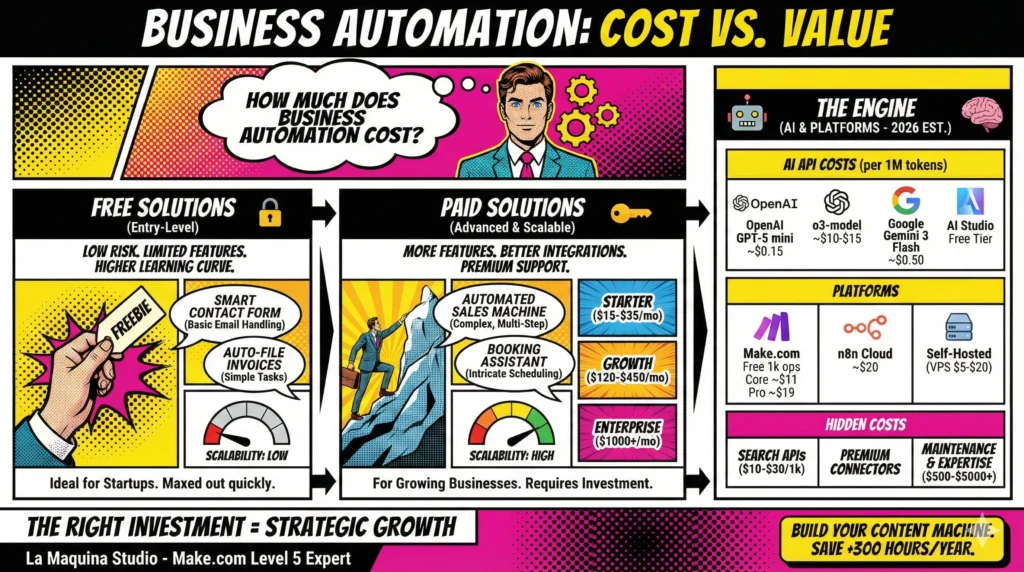
In 2026, the cost of automation is heavily tied to “Intelligence Credits” – the API fees you pay to providers like OpenAI or Google Gemini. These are typically billed per 1 million tokens (roughly 750,000 words).
- OpenAI (GPT-5 & o-series): * For high-volume, simple tasks (like our Smart Contact Form), GPT-5 mini is the gold standard, costing approximately $0.15 per 1M input tokens.
- For strategic reasoning (like the Automated Sales Machine), the o3-model costs significantly more, roughly $10.00 – $15.00 per 1M output tokens, reflecting its deep “thinking” capabilities.
- Google Gemini (Gemini 3 Series):
- Gemini 3 Flash is incredibly cost-effective for processing large documents, priced at about $0.50 per 1M input tokens.
- Google AI Studio still offers a generous free tier (up to 1,000 requests/day with rate limits), which is perfect for beginners testing the waters.
The Infrastructure: Automation Platforms
To connect your apps, you need a “glue” platform. Prices in 2026 have stabilized, offering clear paths for growth.
Make.com (Cloud-Based Ease)
Make remains the most intuitive visual builder. Their 2026 pricing scales with your “Operations” (each step in a workflow):
- Free: 1,000 operations/month (Great for our Auto-File Invoices workflow).
- Core: Starting at ~$11/month (10,000 operations).
- Pro: Starting at ~$19/month (For priority execution and complex branching).
n8n (The Power of Choice)
For businesses prioritizing data sovereignty or lower long-term costs:
- n8n Cloud: Starts at ~$20/month (2,500 executions).
- Self-Hosted: The software is free, but you must factor in a Virtual Private Server (VPS) (e.g., DigitalOcean or Hetzner), which costs between $5 and $20/month.
Hidden Costs: Beyond the Subscription
When calculating “how much does business automation cost,” don’t forget the peripheral expenses that ensure a smooth operation:
- Data Storage & Searching: If your AI needs to browse the live web (e.g., for a Review Response Bot), search APIs like Serper.dev or Google Search API cost roughly $10 – $30 per 1,000 searches.
- Premium Connectors: Some software (like high-end CRMs or ERPs) requires “Premium” connectors or higher-tier API access from the software itself (e.g., Salesforce or HubSpot API limits).
- Maintenance & Expertise: Automation isn’t “set it and forget it.” As platforms update, workflows need maintenance. Investing in a Make.com Level 5 Expert for setup can range from $500 to $5,000+ depending on complexity, but it saves thousands in “trial and error” costs.
Summary
| Tier | Monthly Cost (Est.) | Best For |
| The Starter | $15 – $35 | Basic email & file automation (Free AI tiers + Make Core) |
| The Growth Business | $120 – $450 | Full lead nurturing & AI content (Paid API + Make Pro + Search APIs) |
| The Enterprise | $1,000+ | High-volume data processing & custom self-hosted n8n clusters |
Comparing Free vs. Paid Automation: What’s Right for Your Business?
Deciding between free and paid automation solutions is a critical step in understanding how much does business automation cost for your specific business context. Both options have their merits, and the right choice largely depends on your business size, complexity of workflows, and growth trajectory.
Free tools are best suited for small businesses or startups with straightforward automation needs. They provide a low-cost entry into automation, allowing businesses to handle basic tasks like invoice filing or contact form responses without financial strain. For example, our Auto-File Invoices workflow can often be managed with a free tool, especially if the volume of invoices is manageable.
On the other hand, paid solutions offer a breadth of features that can support more advanced workflows. Businesses with intricate processes, such as those needing complex booking management as seen in our Booking Assistant workflow, will benefit significantly from paid platforms. These solutions offer the stability and advanced functionalities required to automate complex, multi-step processes with ease.
It’s also worth considering the time and resources you’ll need to invest in learning and maintaining these systems. Free tools can be restrictive and may require more manual intervention to achieve desired outcomes. Meanwhile, paid solutions, though costlier, often provide better support and resources to help optimize your automation efforts quickly and efficiently.
Ultimately, the choice between free and paid automation solutions should align with your business goals and operational needs. Consider the immediate and future demands of your business and choose a solution that offers the best balance of cost, functionality, and scalability.
Real-Life Examples: Calculating the Cost of Automation
To put the question of how much does business automation cost into perspective, let’s delve into some real-life examples drawn from La Maquina Studio’s experiences. These examples illustrate how businesses have balanced costs with benefits to achieve successful automation outcomes.
Consider a small digital marketing firm that initially relied on free tools to automate its email marketing efforts. The firm’s team set up a basic workflow using a free tool to schedule and send email campaigns, similar to our Auto Blog Writer workflow. While this setup worked initially, the business soon faced limitations in customization and integration with other marketing platforms, which stunted their growth. By transitioning to a paid solution, the firm unlocked advanced features that enabled them to execute more personalized campaigns, ultimately increasing their conversion rates and customer satisfaction.
Another example involves a medium-sized e-commerce company looking to automate its customer service operations. Initially, the company utilized a free tool to manage customer inquiries but soon realized the tool couldn’t handle the volume and complexity of their needs. By investing in a paid solution, they were able to implement a comprehensive Review Response Bot workflow. This allowed them to automate responses to customer reviews efficiently, maintaining high levels of customer engagement without overwhelming their support team.
These examples highlight the importance of assessing not just the immediate cost but also the long-term value and scalability of automation solutions. While free tools can offer a quick fix, paid solutions often provide the infrastructure needed for sustainable growth and efficiency improvements.
Conclusion: Making the Right Automation Investment
In conclusion, determining how much does business automation cost involves more than just evaluating price tags. It’s about understanding your business’s unique needs, evaluating the capabilities of free and paid solutions, and making an informed decision that aligns with your strategic objectives. Both free and paid options have their place in the automation landscape, and the right choice depends on factors like business size, workflow complexity, and growth aspirations.
At La Maquina Studio, we advocate for a thoughtful approach to automation, one that considers both the immediate benefits and long-term impacts on your business operations. Whether you’re taking your first steps with a free tool or investing in a robust paid platform, the key is to ensure that your automation efforts are aligned with your overall business strategy. By carefully weighing the costs and benefits, you can make an informed decision that not only streamlines your operations but also positions your business for future success.
For more insights and guidance on automating your business processes, feel free to explore our courses and resources at La Maquina Studio. Whether you’re a beginner or an expert, we offer practical automation solutions tailored to your needs, helping you navigate the journey from manual to automated with confidence.


Susana Toth
Make.com Certified Expert & Founder, La Maquina Studio
Susana Toth is a Make.com Certified Expert and the founder of La Maquina Studio, where she helps small businesses and consultants eliminate repetitive work through smart automation. With 20+ years of experience in web design, business consulting, and digital strategy, she builds practical AI-powered workflows that save hours every week — without writing a single line of code. She writes about Make.com automation, AI integration, and building systems that work while you don’t.
Learn more about me →