
When it comes to leveraging workflow automation, small business owners are often confronted with a mixture of excitement and trepidation. The promise of enhanced efficiency, reduced manual errors, and increased productivity can be compelling. However, the fear of diving into the unknown, coupled with the potential technical barriers, can keep many business owners from taking the leap. In this guide, we aim to demystify workflow automation for small businesses, providing a practical roadmap to understanding and adopting this powerful tool. Whether you’re a solopreneur juggling multiple hats or a small team aiming to streamline operations, workflow automation can serve as a game-changer in your business arsenal.
At La Maquina Studio, we’ve worked with numerous small businesses, helping them harness the power of Make.com to automate routine tasks and processes. Our approach is grounded in real-world applications, and we emphasize that while automation isn’t a magic bullet, it can significantly augment your business operations when implemented thoughtfully. We’ll explore a variety of workflows that tackle common pain points, from managing emails to nurturing leads, each designed with the small business owner in mind. So, if you’re ready to explore how workflow automation can revolutionize your business, read on for a comprehensive 101 guide.
Table of Contents
Understanding the Basics of Workflow Automation
Workflow automation is a concept that involves using technology to automate repeatable tasks and processes within a business. For small businesses, this means setting up systems that can handle everything from sending emails to updating spreadsheets without human intervention. The goal is to free up time spent on routine tasks so you can focus on more strategic activities.
One of the foundational elements of workflow automation is the integration of various software tools that a business already uses. For instance, using Make.com, small business owners can connect disparate systems to work together seamlessly. Imagine a scenario where your contact form submissions are automatically logged into a CRM system, followed by an automatic email response and a calendar update for follow-up calls. This level of integration eliminates the need for manual data entry and ensures that no potential customer slips through the cracks.
To put this into context, let’s consider the “Smart Contact Form” workflow from La Maquina Studio’s course offerings. This workflow utilizes webhooks to connect a contact form on your website to OpenAI and email platforms. As a result, inquiries are not only captured but also intelligently responded to, enhancing customer experience without additional effort from your side.
It’s crucial to understand that while automation can significantly streamline your operations, it requires an initial investment of time to set up and test. However, once in place, these systems can run independently, providing a continuous return on investment as they handle routine tasks efficiently and accurately.
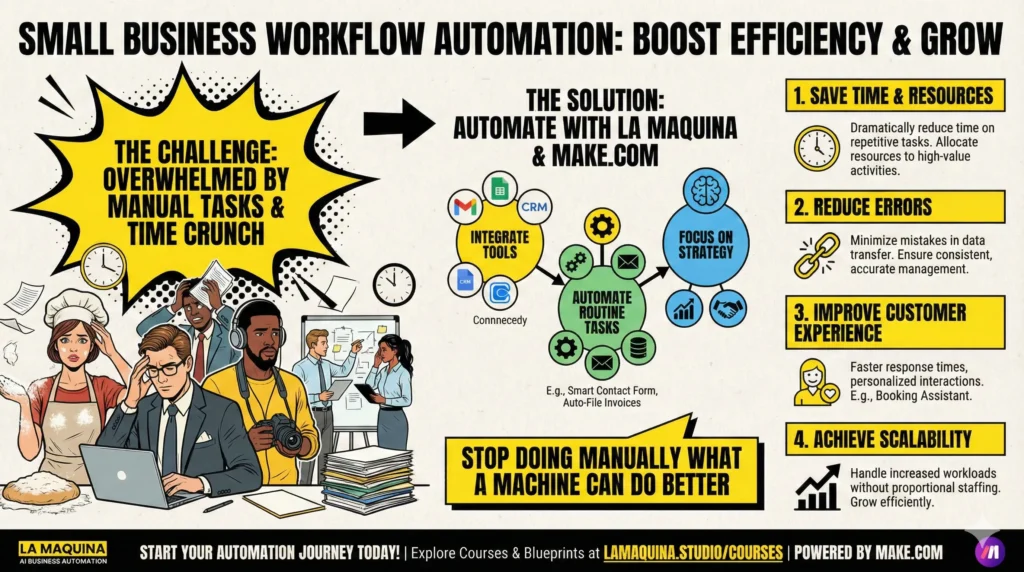
Benefits of Workflow Automation for Small Businesses
The benefits of workflow automation for small business owners are manifold. Firstly, it dramatically reduces the time spent on repetitive tasks, allowing you to focus on growing your business. By automating mundane processes, you’re able to allocate your resources toward strategic planning, customer engagement, and other high-value activities.
Another significant advantage is the reduction in errors. Manual processes are prone to mistakes, especially when data is being transferred between multiple systems. Automation minimizes these errors by ensuring that data is consistently and accurately managed across platforms. For instance, the “Auto-File Invoices” workflow, which integrates Gmail with Google Drive through filters, ensures that your invoices are stored correctly without manual oversight.
Moreover, workflow automation can improve customer satisfaction by allowing for faster response times and more personalized interactions. The “Booking Assistant” workflow is a great example of this, as it manages bookings through Calendly, updates your calendar, sends emails, and even integrates with MailerLite for marketing follow-ups. This kind of streamlined customer interaction can set your business apart from competitors.
Finally, automation can lead to better scalability. As your business grows, the systems you put in place can handle increased workloads without the need for a proportional increase in staffing. This makes expanding your business more viable and less stressful, knowing that the operational side is handled efficiently.
Challenges and Considerations in Implementing Automation
While the advantages of workflow automation are clear, small business owners should be aware of the potential challenges involved. One of the most significant hurdles is the learning curve associated with adopting new technologies. It’s not uncommon for business owners to feel overwhelmed by the jargon and complexity of automation tools. At La Maquina Studio, we always emphasize that patience and persistence are key. The initial setup might seem daunting, but breaking it down into manageable steps can make the process more approachable.
Another consideration is the cost associated with implementing automation systems. While there are free tools available, more robust solutions often come with subscription fees. However, it’s essential to view these costs as investments rather than expenses. The time and resources saved through automation will often outweigh the initial financial outlay.
Furthermore, it’s crucial to tailor automation workflows to fit your specific business needs. Not every workflow is suitable for every business, and what works for one company may not work for another. For example, the “Content Repurposing Engine” workflow is ideal for businesses with a strong online presence looking to maximize their content’s reach without additional effort. In contrast, if your priority is lead management, the “Automated Sales Machine” might be more aligned with your goals.
Lastly, continuous monitoring and optimization of automation workflows are necessary to ensure they function correctly and adapt to evolving business needs. Automation is not a set-it-and-forget-it solution; it requires regular reviews and adjustments to stay effective and relevant.
Getting Started with Workflow Automation
For small business owners ready to embark on the automation journey, the most critical step is to start small and build incrementally. Begin by identifying the most time-consuming and repetitive tasks in your operations, and consider how automation could alleviate these burdens. For example, if managing bookings is eating into your day, the “Booking Assistant” workflow could be a perfect starting point.
It’s also beneficial to educate yourself on the available tools and platforms that can facilitate automation. Make.com is a powerful tool that offers a range of integrations and functionalities, suitable for businesses of various sizes. At La Maquina Studio, our courses cover a spectrum of workflows from beginner to expert levels, providing a structured learning path for business owners at any stage of their automation journey. You can explore our course offerings at https://lamaquina.studio/courses.
Another practical step is to engage with a consultant or expert in business automation. This can significantly shorten the learning curve and provide tailored guidance suited to your business’s unique needs. As a Make.com Level 5 Expert, I’m always open to discussing how automation can be applied within your business context. Feel free to reach out via our contact page at https://lamaquina.studio/contact.
Finally, remember that automation is an ongoing process. As your business evolves, so too should your automation strategies. Regularly reassess your workflows to ensure they continue to meet your objectives and adapt them as needed to better serve your business goals.
Conclusion
In the ever-competitive landscape of small business operations, workflow automation stands out as a highly effective means of enhancing efficiency and driving growth. By automating routine tasks, small business owners can reclaim valuable time, reduce errors, and focus on strategic initiatives that propel their businesses forward. However, it’s essential to approach automation with a realistic mindset, understanding both its potential and its challenges.
By starting with manageable tasks and gradually expanding your automation efforts, you can build a powerful system that supports your business in the long term. Remember, the goal of automation is not to replace the human touch but to augment your capabilities and enable you to serve your customers better.
If you’re considering automating aspects of your business, take some time to explore the workflows available through Make.com and La Maquina Studio. Our courses and ready-to-use blueprints are designed to guide you through the process, providing practical and actionable insights tailored to small businesses. To learn more, visit our website at https://lamaquina.studio/courses and start revolutionizing your business today.


Susana Toth
Make.com Certified Expert & Founder, La Maquina Studio
Susana Toth is a Make.com Certified Expert and the founder of La Maquina Studio, where she helps small businesses and consultants eliminate repetitive work through smart automation. With 20+ years of experience in web design, business consulting, and digital strategy, she builds practical AI-powered workflows that save hours every week — without writing a single line of code. She writes about Make.com automation, AI integration, and building systems that work while you don’t.
Learn more about me →