
A simple competitor price monitoring setup that costs $5/month and takes an hour to build. Probably not. Because you were busy running your business. And that’s exactly the problem.
There’s a moment every service business owner knows. You’re browsing a competitor’s website, maybe a client mentioned them, maybe you’re just curious, and you see it. They raised their prices. Or dropped them. Or added a new package you’ve never seen before. And your first thought isn’t about strategy. It’s: how long ago did this happen?
Could have been yesterday. Could have been three months ago. You have no idea. Because nobody told you.
This is the blind spot most service businesses have. E-commerce companies obsess over competitor price tracking. They have entire teams and software stacks dedicated to monitoring every change across thousands of SKUs. But if you’re a consultant, a designer, a coach, an agency owner? You check your competitors’ pricing pages once every few months, if you remember at all.
And yet your pricing decisions are just as important. Maybe more so, because in service businesses, pricing signals expertise, positioning, and confidence. When a competitor raises their rates, it changes the market. When they launch a new tier, it creates new expectations. When they run a promotion, it pressures everyone around them.
You just don’t find out until it’s too late.
The tools that exist aren’t built for you
If you google “competitor price monitoring,” you’ll find Prisync, Priceva, Price2Spy, Competera, Visualping. They start at $49/month and scale into the thousands. They track thousands of SKUs across marketplaces, handle dynamic repricing, and integrate with Shopify and Magento.
They’re built for online retailers managing product catalogs. Not for a marketing consultant who wants to know if the agency down the street changed their website package pricing.
And this is the frustrating part: you don’t need any of that. You don’t have SKUs. You don’t need repricing algorithms. You have 3 to 10 pricing pages you’d like to keep an eye on. That’s it.
So you’re stuck between $99/month enterprise software that does a hundred things you don’t need, and checking competitor websites manually whenever you remember. Most people choose the second option. Which means most people are flying blind on one of the most important strategic inputs their business has.
Table of Contents
You can build your own competitor price tracking system in an hour
Here’s what most small business owners don’t realize: this is automatable. Not with expensive software. Not by hiring a developer. With a simple Make.com workflow that you can set up yourself, even if you’ve never automated anything before.
The idea is straightforward. You maintain a Google Sheet with your competitors’ names and pricing page URLs. A Make.com workflow checks those pages automatically, daily or weekly, however often you want. AI reads the pricing page (so it works on any website, regardless of how it’s built), extracts the data, and compares it against what it found last time. If something meaningful changed, an actual price increase, a new plan, a removed feature, you get an email. If nothing changed, silence.
No dashboard to check. No software to log into. Just an email in your inbox when something actually matters.
The whole thing runs on 14 Make.com modules and costs roughly $5 to $15 per month. That’s the AI processing fees plus your Make.com plan. Compare that to $49 to $99/month for tools that weren’t designed for your use case anyway.
What “meaningful change” means (and why it matters)
The biggest problem with simple website monitoring tools is noise. Websites change constantly. A word gets rephrased. Features get listed in a different order. A comma moves. If you set up a basic page-change alert, you’ll get notified every day about things that don’t matter, and within a week you’ll start ignoring the alerts entirely.
This is why the workflow uses two AI calls, not one.
The first call reads the pricing page and extracts the data as structured information: plan names, prices, features, billing terms. The second call compares today’s extraction with yesterday’s, but intelligently. It knows that “$29/mo” and “$29 per month” are the same thing. It knows that features listed in a different order isn’t a real change. It only flags what matters to you as a business owner: price increases or decreases, new or removed plans, changed features, modified billing terms.
The result: you only hear about it when something actually changed. No false alarms, no alert fatigue, no daily emails you learn to ignore.
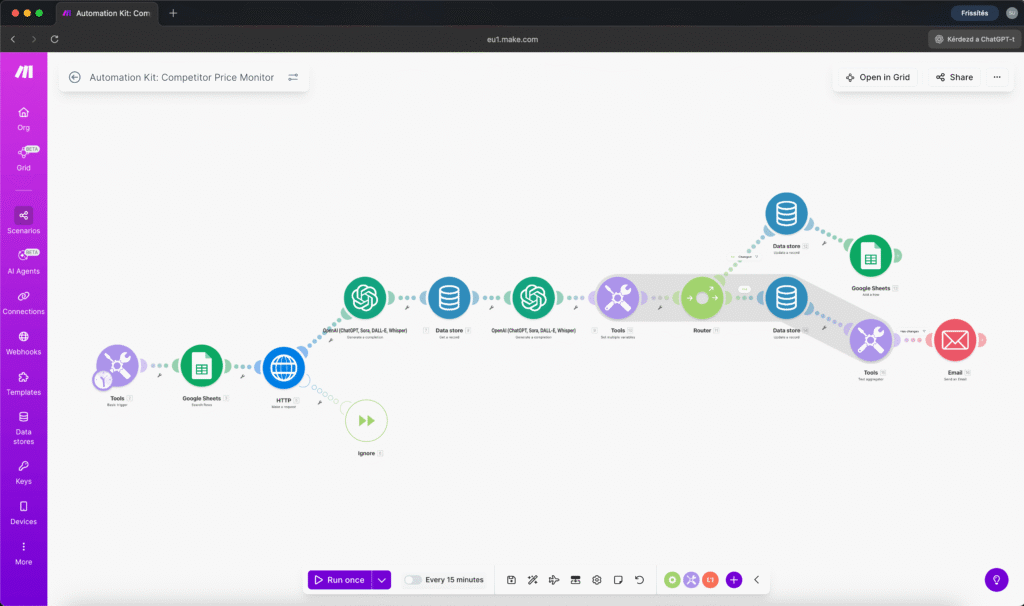
How it works, step by step
Your Google Sheet has two columns that matter: competitor name and pricing page URL. You can add as many competitors as you want. Five is a good starting point.
Every day (or week), the workflow fires. It reads your sheet, visits each URL, and downloads the page content.
AI extracts the pricing data. OpenAI reads the raw HTML the same way you would, and pulls out the plan names, prices, features, and billing terms as clean, structured data. This works on almost any pricing page because the AI understands content, not just HTML structure.
The system compares. It pulls the previous scan from storage and hands both snapshots to a second AI call. This comparison is contextual, not just string matching. It filters out noise and only flags genuine business changes.
If something changed, you get an email. Plain language, human-readable. Not JSON, not technical data. Something like: “Mailchimp raised their Essentials plan from $11/mo to $13/mo. Standard plan increased from $17/mo to $20/mo.” If multiple competitors changed, they’re all in one email.
If nothing changed, you get nothing. No news is good news.
Everything is logged. A Google Sheet tab records every change with timestamps, so over time you build a competitor pricing history without lifting a finger. When did your main competitor last raise prices? How often does that agency adjust their packages? The data accumulates automatically.
Competitor price monitoring: $5/month vs. $49/month
The Make.com approach: With 5 competitors monitored daily, the workflow uses roughly 33 to 38 Make.com credits per run. That’s about 1,000 to 1,150 credits per month, which fits inside Make.com’s free tier if you’re careful, or comfortably within the $10/month Core plan. AI costs (OpenAI) run $2 to $5 per month depending on how complex the pricing pages are.
Total: approximately $5 to $15 per month for daily competitor price monitoring of 5 competitors.
The SaaS alternative: The cheapest dedicated competitor price tracking tools start at $49/month and quickly go higher. And they’re designed for product catalogs, not service pricing pages. The general website change detection tools can work, but they detect any change, including irrelevant formatting tweaks, and don’t understand pricing context.
What you’re actually doing now: Nothing. Or rather, manually checking competitor websites every few weeks, with no historical record, no consistency, and no guarantee you’ll notice a change.
The Make.com workflow isn’t competing with enterprise pricing software. It’s competing with “I’ll check their website when I remember.” And compared to that, it’s infinitely better.
The limitations (being honest)
JavaScript-heavy websites don’t work. If a competitor’s pricing page is built entirely in React or Vue and renders client-side, the HTTP fetch returns an empty shell. Most small business and SaaS pricing pages are server-rendered and work fine, but some modern SPAs won’t. You’ll know immediately during your first test.
AI extraction isn’t 100% accurate. The extraction is remarkably good at reading pricing pages, but it occasionally misreads fine print or interprets ambiguous formatting differently across runs. The comparison layer catches most of these, but expect the occasional false positive, maybe one every few weeks.
Login-protected pages won’t work. If a competitor hides their pricing behind a signup wall, the workflow only sees what a public request would see. This covers the vast majority of pricing pages, but not all.
Rate of change matters. If competitors change prices daily, you’d want a more sophisticated setup. If they change quarterly (most service businesses), daily monitoring is overkill and weekly is plenty. Adjust the schedule to your reality.
Who needs competitor price tracking (and who doesn’t)
This makes the most sense for people who sell services, expertise, or software to other businesses:
Agencies and studios watching what other agencies charge for similar services. When a competitor raises their web design packages from $3,000 to $4,500, that’s a signal. Maybe the market is moving. Maybe you’re undercharging.
Consultants and coaches tracking competitors’ coaching packages, course pricing, or session rates. Knowing when a competitor moves from hourly to package pricing tells you something about market maturity.
SaaS founders monitoring competitor pricing tiers. When the tool you compete with drops their starter plan price or adds a free tier, you need to know, and you need to know quickly.
Freelancers who compete on value, not just price. Understanding the pricing landscape helps you position your services more confidently. Hard to charge premium rates when you don’t know what “premium” means in your market.
In all these cases, you’re tracking 3 to 10 competitors, not thousands of SKUs. The existing enterprise tools are massive overkill. But doing nothing means missing signals that directly affect your revenue.
Build it yourself or use the kit
You can build this workflow from scratch in Make.com if you’re comfortable with the platform. The logic is straightforward: scheduled trigger, Google Sheets, HTTP requests, two OpenAI calls, a Data Store for snapshots, a Router for branching, and an email module.
If you’d rather skip the trial-and-error, I packaged the entire system as a ready-made automation kit:

The kit includes:
- Importable Make.com blueprint (JSON), the complete 14-module workflow
- Tested AI prompts, pricing extraction + intelligent comparison
- Google Sheets template, Competitors tab + Change Log tab
- Data Store structure for snapshot storage between runs
- Setup guide from configuration to your first test run
- Troubleshooting guide covering the 9 most common issues and their fixes
Setup time: 45 to 60 minutes. You need a Make.com account, an OpenAI API key, and a Google account. All services have free tiers that are sufficient for getting started.
Your competitors’ pricing pages are public information. The only question is whether you check them manually once a quarter, or let a system check them every day and tell you when something changes.


Susana Toth
Make.com Certified Expert & Founder, La Maquina Studio
Susana Toth is a Make.com Certified Expert and the founder of La Maquina Studio, where she helps small businesses and consultants eliminate repetitive work through smart automation. With 20+ years of experience in web design, business consulting, and digital strategy, she builds practical AI-powered workflows that save hours every week — without writing a single line of code. She writes about Make.com automation, AI integration, and building systems that work while you don’t.
Learn more about me →