
Understanding how to automate your business is critical in today’s fast-paced digital landscape. As a business owner, you’re likely juggling numerous tasks daily; from responding to emails and managing bookings to creating content and nurturing leads. Fortunately, with the right tools and strategies, many of these tasks can be automated, freeing up your valuable time to focus on growth and innovation. Automation is not just about replacing manual processes with technology; it’s about creating efficient workflows that enhance productivity. It’s important to approach automation thoughtfully, as it’s not a one-size-fits-all solution. Different businesses have unique needs, and what works for one may not work for another. At La Maquina Studio, we specialize in crafting tailored automation solutions via Make.com, providing the expertise needed to navigate the learning curves involved. In this article, we’ll provide a practical roadmap on how to automate your business effectively, referencing key workflows that can transform your operations.
Table of Contents
Identifying Opportunities for Automation
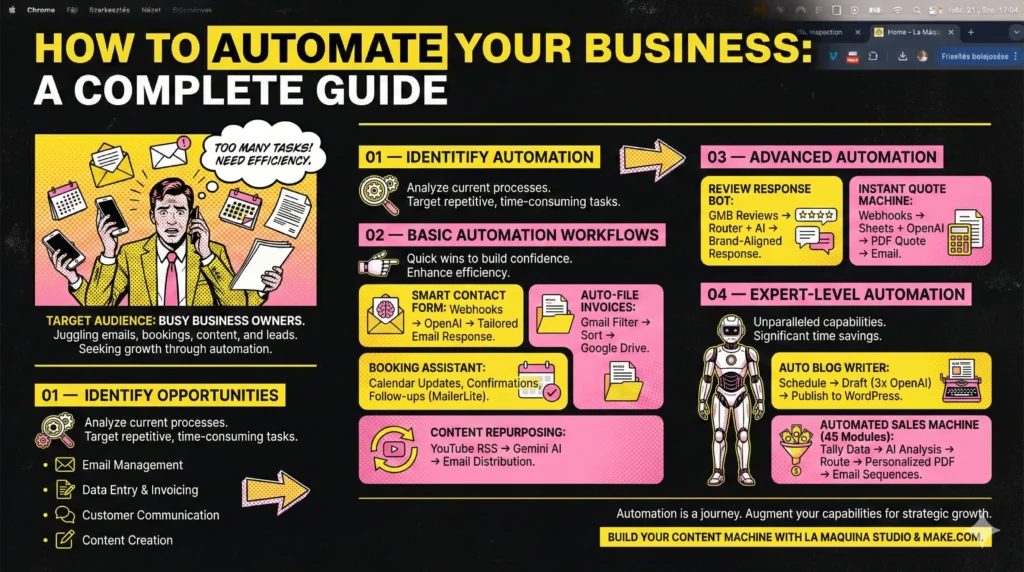
Before diving into automation tools and workflows, it’s essential to identify which areas of your business are ripe for automation. Start by analyzing your current processes and pinpointing tasks that are repetitive, time-consuming, or prone to human error. Common areas ripe for automation include email management, data entry, invoicing, customer communication, and content creation.
For instance, if you’re spending countless hours responding to emails, implementing a Smart Contact Form workflow could significantly improve efficiency. This beginner-friendly workflow uses a webhook to capture form submissions, routes them through OpenAI for analysis, and generates a tailored email response automatically. It solves the common issue of manual email responses, allowing you to maintain a professional communication standard without consuming your entire day.
Another area worth automating is invoice management. Manual filing of invoices is not only tedious but also increases the risk of errors. By employing the Auto-File Invoices workflow, you can automate this process. This intermediate-level workflow filters emails in Gmail, sorts invoices, and files them neatly in Google Drive. This ensures that your documents are consistently organized and easily accessible.
Understanding these opportunities for automation not only saves time but also minimizes the risk of mistakes, allowing you to deliver a higher quality of service to your clients.
Implementing Basic Automation Workflows
Once you’ve identified areas of your business that can benefit from automation, it’s time to implement basic workflows that can quickly add value. Starting with simple yet effective automation can provide immediate benefits and build confidence to tackle more complex processes in the future.
The Booking Assistant is a solid intermediate journey, automating the management of appointments. Using MailerLite, this workflow automatically updates your calendar, sends confirmations to clients, and integrates with MailerLite to manage follow-ups. By streamlining booking management, you can focus on delivering your services rather than getting caught up in the logistics.
Another essential workflow to consider is the Content Repurposing Engine. Content creation is integral to business success, but it can be incredibly time-consuming. This advanced workflow uses YouTube RSS feeds and Gemini AI to automatically analyze content, repurpose it, and send it via email for distribution. This not only maximizes the utility of your content but also extends its reach without additional effort on your part.
Implementing these basic automation workflows is about enhancing efficiency and laying the groundwork for more sophisticated automation solutions as your business grows.
Advanced Automation for Enhanced Productivity
With the foundation of basic automation in place, it’s time to explore more advanced workflows that tackle intricate processes. These require a deeper understanding of your needs and a willingness to engage with more complex setups.
An example of such sophistication is the Review Response Bot. Managing customer reviews is crucial for any business, and this advanced workflow ensures that each review is addressed promptly and professionally. The workflow filters Google My Business reviews through a router and AI, generating suitable responses that maintain your brand’s voice and increase customer satisfaction.
For businesses involved in sales, the Instant Quote Machine is indispensable. This workflow uses webhooks to pull in requests, integrates with Sheets and OpenAI to generate quotes, converts them into PDF format, and sends them directly to clients. This end-to-end automation not only speeds up the quote process but also enhances accuracy and professionalism.
By embracing these advanced automation workflows, you can dramatically increase productivity, ensuring your business operates smoothly even as tasks become more complex.
Mastering Expert-Level Automation
For those ready to take their automation to the ultimate level, expert-level workflows offer unparalleled capabilities. While these setups are more intricate, the payoff in terms of time savings and improved efficiencies can be significant.
The Auto Blog Writer is a cornerstone of expert automation, ideal for businesses needing ongoing content generation. This workflow schedules posts, drafts content using three OpenAI modules, and publishes directly to WordPress. It’s a powerful tool for maintaining an active online presence without the constant grind of content creation.
Another game-changer is the Automated Sales Machine. With its 45-module structure, this workflow automates the lead nurturing process from start to finish. It begins with data collection via Tally, analyzes through AI, routes the information, compiles it into personalized PDFs, and manages email sequences. This comprehensive automation ensures you’re engaging potential clients effectively, increasing conversion rates without manual intervention.
Mastering these expert-level workflows requires patience and a willingness to continuously learn. However, the rewards include a streamlined business operation that can adapt and grow with minimal friction.
Conclusion
Understanding how to automate your business is a journey that begins with identifying opportunities and implementing basic workflows and progresses to more advanced and expert-level solutions. Automation is not about eliminating the human element but about augmenting your capabilities to focus on strategic growth and innovation. As you explore and implement these workflows, you’ll find that the right setup can significantly enhance your business’s efficiency and productivity. The key is to remain flexible and open to learning, as the landscape of automation is ever-evolving. At La Maquina Studio, we’re committed to guiding you through this journey, offering practical insights and tailored solutions that meet the unique needs of your business. Whether you’re just starting or ready to scale, automation can be a powerful ally in achieving your business goals.


Susana Toth
Make.com Certified Expert & Founder, La Maquina Studio
Susana Toth is a Make.com Certified Expert and the founder of La Maquina Studio, where she helps small businesses and consultants eliminate repetitive work through smart automation. With 20+ years of experience in web design, business consulting, and digital strategy, she builds practical AI-powered workflows that save hours every week — without writing a single line of code. She writes about Make.com automation, AI integration, and building systems that work while you don’t.
Learn more about me →