
When you’re just starting with automation, you might find yourself wondering, what tasks should I automate first? This is a common question among business owners who are eager to streamline their operations but aren’t sure where to begin. Automation can be a powerful tool, but like any tool, it works best when applied strategically. The key is to identify tasks that, when automated, deliver immediate value to your workflow, saving you time and reducing errors. In this article, we’ll explore the concept of the automation priority matrix—a framework designed to help you decide which tasks to automate first. Whether you’re handling customer inquiries, managing invoices, or nurturing leads, this matrix will guide your automation journey by focusing on tasks that are time-intensive and prone to human error.
Here at La Maquina Studio, we understand the complexities of kicking off your automation journey. From our experiences with numerous clients, we’ve learned that identifying which tasks to automate first is crucial for achieving quick wins and maintaining momentum. Implementing automation might require an initial learning curve, but the long-term benefits far outweigh the early challenges. With practical examples and workflows from our Make.com automation course, you’ll see how a structured approach helps in prioritizing automation efforts effectively.
So, if you’re ready to embark on your automation journey, let’s dive into the automation priority matrix and explore the types of tasks that should be your primary focus. By the end of this guide, you’ll have a clear roadmap for integrating automation into your business operations, paving the way for increased efficiency and productivity.
Table of Contents
Understanding the Automation Priority Matrix
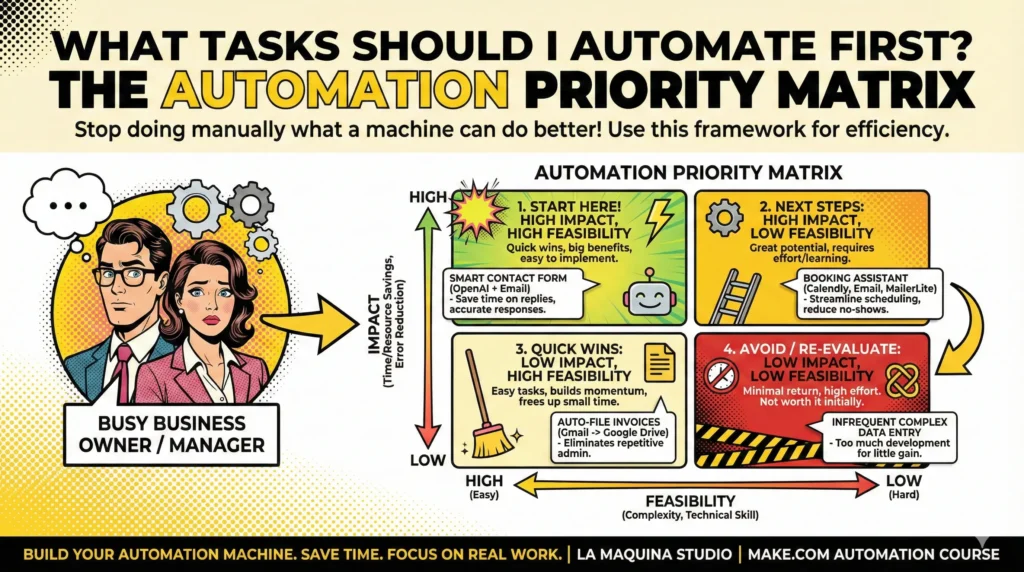
The automation priority matrix is an invaluable tool for anyone asking, “What tasks should I automate first?” It’s a structured approach that helps you evaluate tasks based on their impact and feasibility. By using this matrix, you can focus your efforts on automating the tasks that will bring the most significant benefits to your business right from the start.
The matrix comprises two key axes:
- Impact: How much time and resources will be saved if the task is automated? Does automating this task significantly reduce errors or improve service delivery?
- Feasibility: How complex is it to automate the task? Does it require advanced technical skills or can it be handled with accessible tools like Make.com?
Tasks that fall into the high-impact, high-feasibility quadrant are your sweet spot—these are the tasks you should prioritize automating first. They offer the most substantial return on investment in terms of time saved and error reduction, and they are relatively straightforward to implement.
For instance, the Smart Contact Form workflow from our course is an excellent example of a high-impact, high-feasibility task. By automating responses to contact form submissions using a webhook that connects OpenAI and email, businesses can save significant time on customer communications, while ensuring timely and accurate responses.
As you evaluate tasks using the automation priority matrix, keep in mind that your business needs and resources will guide your decisions. What might be a high-impact task for one business may not hold the same weight for another. Therefore, personalization in assessing tasks is essential for successful automation implementation.
High-Impact, Low-Feasibility Tasks
Once you’ve tackled the high-impact, high-feasibility tasks, the next category to consider are the high-impact, low-feasibility tasks. These are tasks that can potentially bring substantial benefits to your business but require more effort and resources to automate.
These tasks might involve more complex setups or necessitate a deeper understanding of automation tools. However, the long-term benefits can be worth the initial investment. Our Booking Assistant workflow is a prime example of this. It involves integrating Calendly, Calendar, Email, and MailerLite to automate booking management. While this may seem complex at first, automating such a workflow can dramatically streamline your scheduling process, reduce no-shows, and improve customer experience.
Tackling high-impact, low-feasibility tasks often requires a phased approach. Start by breaking down the task into smaller parts, automating each incrementally. This way, you can manage complexity more effectively and avoid being overwhelmed by the scope of the task.
Additionally, consider investing in training or consulting services, like those offered at La Maquina Studio, to bridge any technical gaps. Learning from experts can shorten the learning curve significantly and help you execute these tasks with greater confidence.
Ultimately, while these tasks may demand more upfront effort, they offer the potential for transformative improvements in operational efficiency. Carefully weighing the benefits against the complexity will help you decide when and how to proceed with automating these tasks.
Low-Impact, High-Feasibility Tasks
In the automation priority matrix, low-impact, high-feasibility tasks are those that are easy to automate but don’t offer significant benefits in terms of time savings or error reduction. While these tasks might not be your first priority, they can still play a valuable role in streamlining operations and enhancing productivity.
As you gain more experience with automation tools, tackling these tasks becomes a quick win. The Auto-File Invoices workflow, for example, is an accessible task that involves using Gmail to filter invoices and automatically store them in Google Drive. While this might not revolutionize your business, it removes the repetitive and mundane task of manually filing documents, allowing you to focus on more strategic activities.
Automating low-impact, high-feasibility tasks can also serve as a training ground for your team. By starting with easier tasks, team members can familiarize themselves with automation principles and tools, making them more prepared for tackling more complex tasks in the future.
Furthermore, these tasks can create small efficiencies that add up over time, contributing to an overall smoother operation. It’s a bit like tidying up a workspace: it may not seem monumental, but it creates an environment where more significant tasks can be conducted with less friction.
In summary, while these tasks might not be game-changers on their own, they play a crucial supporting role in the broader automation strategy. By automating them, you can free up time and resources for tasks that offer more substantial returns.
Low-Impact, Low-Feasibility Tasks
The last quadrant of the automation priority matrix includes low-impact, low-feasibility tasks. These tasks are neither easy to automate nor do they offer significant benefits once automated. Generally, these are the tasks you might want to avoid automating, at least initially.
Investing time and resources into automating such tasks often results in minimal returns, which can be frustrating and demotivating. Instead, focus on tasks that provide more value to your business operations.
An example of such a task might be a complex data entry process that occurs infrequently. Attempting to automate this could involve significant development time and create additional complexities without offering proportional benefits.
However, if a low-impact, low-feasibility task becomes more frequent or changes in scope, it may be worth reevaluating its place in your automation strategy. As your business evolves, what was once a low-priority task might become more impactful or feasible.
Until then, concentrating your efforts on more impactful and feasible tasks will ensure that your automation strategy delivers tangible benefits. This approach will help maintain momentum and motivation, especially if you’re new to automation.
In conclusion, while it might be tempting to automate everything, it’s important to be strategic. Focusing on tasks that align with your business goals and available resources will yield the best results and set the stage for more advanced automation down the line.
Conclusion
The question of what tasks should I automate first is pivotal to gaining the most from your automation efforts. By employing the automation priority matrix, you can strategically assess tasks based on their impact and feasibility, ensuring that your initial forays into automation deliver maximum value. This matrix not only helps identify tasks that are ripe for automation but also provides a framework for ongoing evaluation as your business evolves.
Starting with high-impact, high-feasibility tasks like the Smart Contact Form workflow can offer quick wins and momentum. As you become more comfortable with automation tools, you can gradually tackle more complex tasks, building a robust framework that significantly enhances your business operations.
Remember, automation is not about achieving perfection from the get-go. It’s about making incremental improvements that collectively lead to substantial gains. By focusing on strategic tasks and applying the lessons learned, you can implement an automation strategy that supports your business objectives and paves the way for future growth.
For more insights and practical guidance on implementing automation, explore our Make.com automation course and discover how you can transform your workflows, one task at a time.
Check out the courses you can learn in just a few days and implement in your business! Need help? Get in touch with me!


Susana Toth
Make.com Certified Expert & Founder, La Maquina Studio
Susana Toth is a Make.com Certified Expert and the founder of La Maquina Studio, where she helps small businesses and consultants eliminate repetitive work through smart automation. With 20+ years of experience in web design, business consulting, and digital strategy, she builds practical AI-powered workflows that save hours every week — without writing a single line of code. She writes about Make.com automation, AI integration, and building systems that work while you don’t.
Learn more about me →