
What happens if automation breaks? It’s a question that many business owners might not consider until they are knee-deep in a process that’s suddenly stopped working. In a world where businesses increasingly rely on automation to streamline operations, a disruption in these automated workflows can lead to significant setbacks. From missed communications and misplaced documents to interrupted workflows and unhappy customers, the fallout from a broken automation can be more far-reaching than one might initially anticipate. As a business owner, it’s crucial to understand the potential consequences of broken automation and, more importantly, how to effectively address these challenges. The key to thriving in an automated world isn’t just in setting up workflows but in preparing for the unlikely event when things go awry. By leveraging insights from Make.com, where we have built robust workflows like the Smart Contact Form and Automated Sales Machine, we can preemptively address potential breakdowns and ensure business continuity.
Table of Contents
Identifying the Signs of a Broken Automation
Before delving into solutions, it’s essential to recognize the signs that your automation might be failing. Often, these signs aren’t immediately apparent, especially when you’re dealing with complex workflows. A breakdown in automation isn’t always as obvious as a complete halt but can manifest in subtle ways that, if overlooked, can snowball into larger issues.
The first sign is often a noticeable delay or complete halt in expected outputs. For instance, if your Smart Contact Form, which uses a Webhook → OpenAI → Email workflow to automate email responses, suddenly stops sending replies, it’s a clear indicator of a disruption. Similarly, with the Auto-File Invoices workflow, if invoices aren’t appearing in the right Google Drive folders, something might be amiss with the Gmail → Filter → Google Drive process.
Another sign could be errors or anomalies in the output. With the Content Repurposing Engine, which processes YouTube RSS feeds using Gemini AI to generate email content, errors might appear as malformed emails or incomplete content. Such discrepancies can be subtle, often noticed only when a recipient points them out or when you perform a routine audit.
Additionally, increased customer complaints or feedback about inefficiencies can signal issues. Customers might mention missed communications, errors in personalized responses, or delays in services. For example, if your Booking Assistant workflow isn’t updating calendars or sending confirmations as expected, clients could miss vital appointments, leading to dissatisfaction.
Recognizing these signs early is crucial. It allows for prompt action to prevent further disruptions and maintain trust with your clients. Being vigilant in monitoring these signs can save you from the potentially larger impacts of prolonged automation failure.
Understanding the Root Causes of Automation Failure
Once you’ve identified that something is awry with your automation, understanding the root cause is the next step in troubleshooting. Automation failures often stem from a variety of factors, each requiring a different approach for resolution.
A common issue is API changes, which can disrupt connectivity between apps and services. Workflows like the Automated Sales Machine, which integrates multiple platforms like Tally, AI, and PDF generators, are particularly susceptible to API updates. When a service provider updates or deprecates an API, it can break the automation link, causing the entire process to fail.
Another culprit can be changes in data format or structure. For instance, if your Instant Quote Machine relies on data from Sheets that suddenly changes in format, the Webhook → Sheets → OpenAI → PDF → Email workflow might not process quotes correctly. Similarly, if OpenAI updates how it processes inputs, workflows that rely on AI, such as Auto Blog Writer, might produce unexpected results.
Network or service outages are also to blame. If Google services are down, processes like Auto-File Invoices that rely on Gmail and Google Drive will stall. Likewise, any downtime from platforms integrated into your workflow can halt operations completely.
Finally, user errors, such as incorrect configurations or missing permissions, can lead to automation failure. Ensuring that all settings and permissions are correctly configured is a fundamental, albeit often overlooked, step in maintaining automation health.
Understanding these root causes allows you to take specific actions to fix the issues and implement preventive measures to reduce the likelihood of future failures.
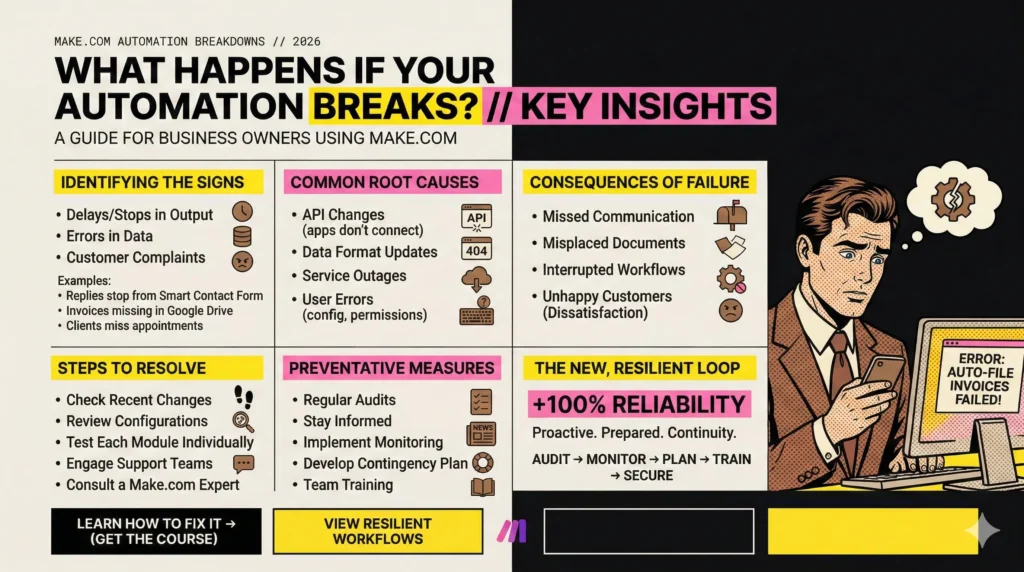
Steps to Resolve Automation Breakdowns
Once you’ve identified the root cause of your automation breakdown, the next step is resolution. The process can seem daunting, especially if you’re not technically inclined, but breaking it down into manageable steps can make it more approachable.
First, examine any recent changes to your systems or software. Updates, whether automatic or manual, might include changes you’ve overlooked. Check the logs and change histories of your automation tools to identify potential causes for the disruption.
Next, review the configurations of your workflows. Returning to the original setup documentation for workflows like the Booking Assistant or the Review Response Bot can help ensure that everything is aligned with the intended design. Pay close attention to the API connections and any dependencies that might have changed.
If the issue persists, test each part of the workflow individually. Isolate each module within the automation to find where the problem lies. For example, if you’re troubleshooting the Auto Blog Writer, you might start by testing the Schedule → Sheets → OpenAI modules independently before moving on to WordPress integration.
Engage with the support teams of the software tools you’re using. Many platforms offer support forums and customer service to help troubleshoot and resolve issues. They might provide insights or updates that haven’t yet been communicated widely.
Lastly, consider consulting with a Make.com expert, especially if the issue involves complex workflows. They can offer a fresh perspective and may have encountered similar issues with other clients, thus providing quicker resolution pathways.
While it might require some effort and patience, following a structured approach to resolving automation failures can restore your systems to full functionality more efficiently.
Preventing Future Automation Failures
Prevention is always better than cure, and when it comes to automation, implementing proactive measures can save you from the headaches of future breakdowns. Here are some strategies you can employ to safeguard your workflows against potential disruptions.
Regularly audit your automation workflows. This involves checking for any updates from the applications you are using and ensuring that each component still functions as expected. It also means validating that your workflows, like the Smart Lead Qualifier or Instant Assessment Report, are processing data correctly and yielding the desired outcomes.
Stay informed about updates and changes in the software tools in your stack. Subscribe to newsletters, participate in forums, and engage in community discussions. Staying in the loop helps you anticipate changes that might affect your automation workflows.
Implement robust monitoring tools that can alert you to any anomalies or disruptions in real time. These tools can provide insights into performance metrics and notify you when a workflow isn’t executing as it should.
Develop a contingency plan. This should outline the steps to take when automation fails, detailing roles and responsibilities within your team. Having a plan in place enables a swift response, minimizing disruption to your business operations.
Finally, invest in training for your team. The more your team understands how your automation works, the better they can manage and troubleshoot any issues that arise. Encouraging a culture of continuous learning around automation technology can fortify your business against unforeseen challenges.
By taking these preventive steps, you can significantly reduce the likelihood of encountering automation failures, ensuring your business runs smoothly and efficiently even in the face of potential disruptions.
Conclusion
In the fast-paced world of business automation, understanding what happens if automation breaks is crucial for maintaining continuity and ensuring that your operations remain seamless. While the prospect of automation failures can seem daunting, being prepared with the right knowledge and strategies can mitigate their impact. By learning to identify the signs of a broken automation, understanding the root causes, and knowing how to resolve and prevent these issues, you equip your business with the resilience needed to thrive in an automated environment.
At La Maquina Studio, we emphasize not just the creation of effective automation workflows but also the importance of preparation and problem-solving. Our courses, such as the ones available at La Maquina Studio Courses, are designed to arm you with the skills necessary to manage your automation confidently. Remember, automation isn’t magic; it requires diligence and expertise to harness its full potential. By staying informed and proactive, you can ensure that your business benefits from all that automation has to offer, without falling victim to its occasional pitfalls.


Susana Toth
Make.com Certified Expert & Founder, La Maquina Studio
Susana Toth is a Make.com Certified Expert and the founder of La Maquina Studio, where she helps small businesses and consultants eliminate repetitive work through smart automation. With 20+ years of experience in web design, business consulting, and digital strategy, she builds practical AI-powered workflows that save hours every week — without writing a single line of code. She writes about Make.com automation, AI integration, and building systems that work while you don’t.
Learn more about me →