
For many business owners, sending quotes manually takes too long. It’s a familiar frustration that eats into precious time, which could be better spent on growing the business or engaging with clients. When you’re swamped with requests and your current process involves hopping from emails to spreadsheets to PDF creation, each step can feel like a time-consuming chore. This happens especially when there’s a high demand for your products or services. The more time you spend on administrative tasks like these, the less time you have to focus on the elements that truly drive your business forward. The good news is that automation can step in to make this tedious process not just faster but significantly more efficient. At La Maquina Studio, we understand this all too well, and that’s why we’ve crafted solutions to this problem. Our Instant Quote Machine workflow, part of the Make.com automation course, is designed to automate the quote creation process, sparing you from repetitive manual tasks.
Table of Contents
Understanding the Problem: Why Sending Quotes Manually Takes Too Long
Let’s break it down. To understand why sending quotes manually takes too long, we need to look at the intricacies of the manual process. Typically, it involves gathering client information, assessing their needs, calculating costs, drafting a proposal, and finally, sending out this information in a professional format. Each step requires attention to detail and carries the risk of human error. For businesses processing several quotes a day, this process can lead to burnout quickly. Not only does it slow down your responsiveness to prospective clients, but it also increases the risk of losing them to faster-moving competitors.
In a manual setup, creating a quote often requires juggling multiple digital tools. You might start with a client’s email inquiry, move to a spreadsheet for cost calculations, and then use a word processor to draft the quote. After that, you convert the document into a PDF and attach it to a new email to send. Each tool has its own learning curve and interface, making the process more cumbersome. There’s also the matter of follow-ups and tracking, which becomes another manual task. These additional steps compound the time and effort required, especially if you’re a small business with limited resources.
Moreover, the manual approach lacks scalability. As your business grows and the demand for your services increases, this process can become a bottleneck, potentially stalling growth. The time consumed can also lead to missed opportunities, as clients may have already moved on by the time your quote reaches them. Therefore, understanding the time and effort involved is key to recognizing the need for a more efficient solution.
The True Cost of Manual Quote Processes on Your Business
When we say that sending quotes manually takes too long, we’re not just talking about time. The real cost extends to several other crucial areas of your business. First, consider the impact on customer experience. In today’s fast-paced digital world, clients expect swift responses and efficient service. A delay in sending quotes can be perceived as a lack of professionalism or interest, potentially damaging your reputation and client relationships. This can be particularly detrimental for small businesses trying to establish themselves in a competitive market.
Another aspect is the emotional and mental toll on your team. Repetitive manual tasks can lead to job dissatisfaction, reducing productivity and increasing turnover rates. This not only affects morale but also brings additional costs in terms of recruiting and training new staff. Instead of focusing on creative or strategic tasks that could benefit from their skills, employees find themselves bogged down with routine work.
The financial implications are significant as well. The time spent on sending quotes manually translates to hours of labor costs that could be better invested elsewhere. Furthermore, the inefficiencies of the manual process can lead to errors in quotes, which, when discovered too late, could result in lost revenue or dissatisfied customers. By automating the quote process, you can reduce these risks and redirect your resources to more value-added activities.
Automating the Quote Process: How Our Instant Quote Machine Saves Time
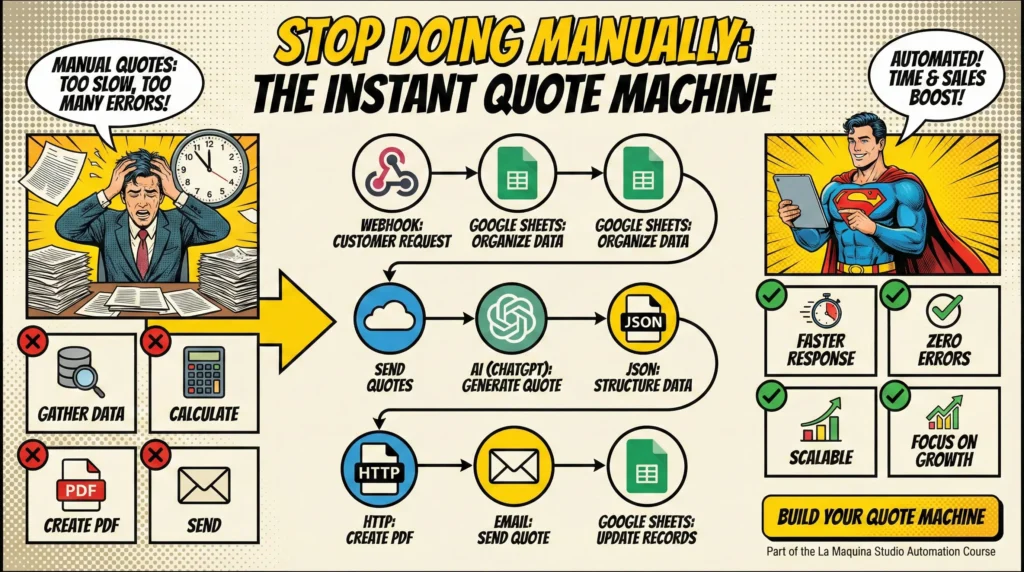
This is where automation steps in as a game-changer. Our Instant Quote Machine workflow, taught in our Make.com automation course, is specifically designed to streamline and optimize your quote process. By harnessing the power of automation, you can eliminate the repetitive tasks that make sending quotes manually take too long. The workflow begins with a webhook receiving customer details, which are then processed and entered into a Google Sheet. From here, OpenAI is used to generate a structured quote, which is automatically converted into a PDF and emailed to the client.
The beauty of this setup lies in its efficiency and accuracy. Automation minimizes human error, ensuring that the quotes generated are consistent and professional. The entire process is triggered automatically, meaning you can handle more quote requests without increasing your workload. This translates to faster response times, which can significantly improve client satisfaction and your competitive edge.
Moreover, the Instant Quote Machine is scalable, adapting easily as your business grows. Whether you’re dealing with ten quotes a week or a hundred, the system handles the workload effortlessly. This scalability is crucial for businesses poised for expansion, as it allows for increased capacity without additional resource strain. The transition to an automated system does involve a learning curve, but the long-term benefits far outweigh the initial effort required.
Steps to Implementing an Automated Quote System
Transitioning from a manual to an automated quote system might seem daunting, but breaking it down into manageable steps can simplify the process. The first step is to evaluate your current process and identify pain points—where is time being wasted, and where do errors frequently occur? This assessment will guide you in designing an automation workflow tailored to your business needs.
Next, familiarize yourself with the tools involved in the workflow. Our Make.com automation course provides comprehensive training on setting up the Instant Quote Machine. You’ll learn how to configure webhooks, integrate Google Sheets, and use OpenAI for quote generation. During this stage, it’s crucial to test the workflow to ensure each component functions as expected. Don’t hesitate to reach out for support if any part of the process is unclear; mastering these tools will pay off in efficiency gains.
Once your workflow is operational, monitor its performance and make adjustments as necessary. Automation is not a set-it-and-forget-it solution. Regular reviews will help you refine the process and adapt to changing business needs. Finally, involve your team in the transition. Training them to use the new system and encouraging feedback can smooth the adjustment period. With everyone on board, the shift from manual to automated processes can be a seamless enhancement to your operations.
In conclusion, recognizing that sending quotes manually takes too long is the first step towards improving your business efficiency. Automation offers a practical, scalable solution that saves time, reduces errors, and improves the customer experience. By implementing the Instant Quote Machine, you can free up valuable resources to focus on strategic growth areas. Embrace the learning curve that comes with automation, and the rewards in terms of productivity and satisfaction can be substantial. It’s time to let go of outdated manual processes and step into a future where your business can operate at its true potential. For more information on automating your business processes with La Maquina Studio, visit our courses page.


Susana Toth
Make.com Certified Expert & Founder, La Maquina Studio
Susana Toth is a Make.com Certified Expert and the founder of La Maquina Studio, where she helps small businesses and consultants eliminate repetitive work through smart automation. With 20+ years of experience in web design, business consulting, and digital strategy, she builds practical AI-powered workflows that save hours every week — without writing a single line of code. She writes about Make.com automation, AI integration, and building systems that work while you don’t.
Learn more about me →