
Welcome to the make.com review 2026! In a rapidly evolving digital landscape, automation tools are becoming indispensable for businesses looking to streamline operations and boost productivity. Make.com, formerly known as Integromat, has established itself as a major player in the automation industry. As a business owner, you might be wondering whether this tool is the right fit for your needs. This review will explore the pros and cons of Make.com, highlight its pricing structure, and provide insights into the various workflows it supports. Our goal is to present an honest, straightforward appraisal that helps you make an informed decision. Whether you’re a small business owner or managing a large corporation, understanding the potential of Make.com is crucial for optimizing your processes.
In this review, we’ll delve into the practical applications of Make.com, referencing workflows we’ve developed at La Maquina Studio. From automating email responses to creating a seamless content repurposing engine, Make.com offers a range of solutions that can redefine how your business operates. However, like any tool, it comes with its learning curves and limitations. By the end of this article, you’ll have a comprehensive understanding of what Make.com brings to the table in 2026 and how it can fit into your business strategy.
Table of Contents
The Pros of Using Make.com in 2026
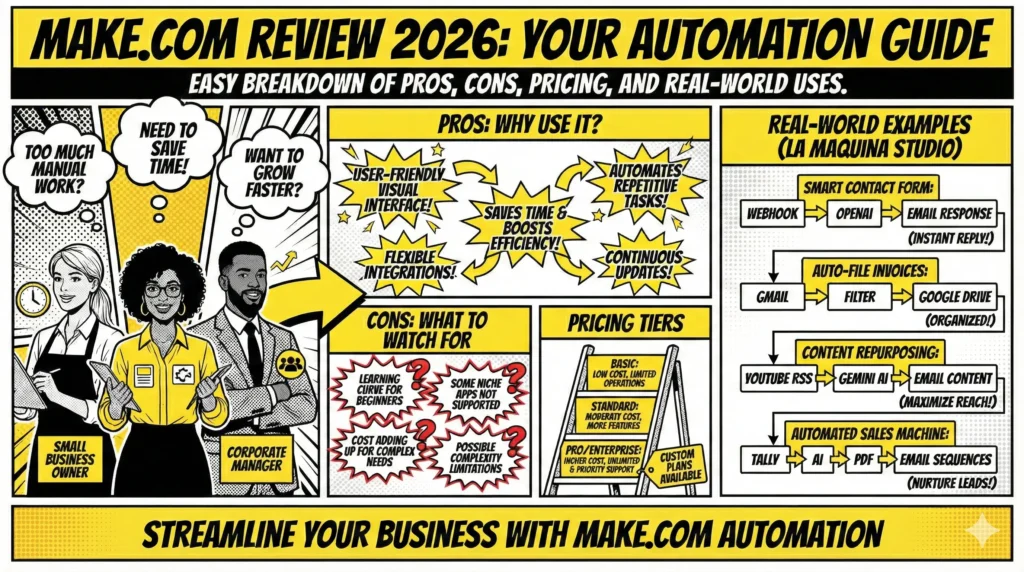
As we dive into the make.com review 2026, it’s important to first highlight the advantages that make this tool a popular choice among businesses. One of the standout features of Make.com is its user-friendly interface. For those new to automation, the platform offers a visual experience that simplifies the process of setting up workflows. You don’t need to be a tech guru to get started, which opens up possibilities for business owners who might otherwise shy away from automation.
Another significant advantage is the flexibility Make.com offers. With its wide range of integrations, you can connect multiple apps and services, creating workflows that suit your specific needs. Whether you’re looking to automate social media posting, manage customer relationships, or streamline internal processes, Make.com provides the tools to do so. This adaptability is particularly beneficial for businesses operating across different industries, each with unique requirements.
The platform also shines in terms of efficiency. Automating repetitive tasks frees up valuable time, allowing you and your team to focus on more strategic activities. As highlighted in our Smart Contact Form workflow at La Maquina Studio, the ability to automate email responses not only saves time but also ensures timely communication with clients. Such efficiencies can significantly enhance customer satisfaction and operational productivity.
Moreover, Make.com continuously updates its capabilities, ensuring that users have access to the latest technological advancements. This ongoing development keeps businesses at the forefront of automation trends, providing them with a competitive edge. By embracing these updates, companies can maintain relevance in an ever-changing market.
The Cons of Make.com in 2026
No make.com review 2026 would be complete without discussing the potential downsides of the platform. While Make.com offers a host of benefits, there are certain areas where it may fall short for some users. One of the primary challenges is the initial learning curve. Although the interface is user-friendly, understanding the nuances of setting up complex workflows can be daunting for beginners. Users often require time to experiment and learn, which can be a deterrent for those seeking immediate results.
Additionally, while Make.com boasts a wide range of integrations, some niche applications may not be supported. This can limit the platform’s utility for businesses that rely heavily on specialized tools not yet integrated. In such cases, businesses may need to look for alternative automation solutions or employ workarounds, which can be both time-consuming and frustrating.
Another potential downside is the cost associated with using Make.com. While the platform offers various pricing tiers, businesses with extensive workflow needs might find the subscription fees adding up. For those just starting with automation, this investment might be difficult to justify without clear projections of return on investment.
Moreover, users sometimes encounter limitations in the complexity of workflows they can create. While basic automations are straightforward, more intricate setups can become cumbersome, requiring advanced problem-solving skills. This complexity can lead to errors or inefficiencies if not managed carefully, impacting the overall effectiveness of automation efforts.
Make.com Pricing Structure in 2026
As we continue with the make.com review 2026, understanding the pricing structure is crucial for businesses considering this tool. Make.com offers a tiered pricing model that seeks to accommodate a range of needs, from small businesses to larger enterprises. The primary goal is to provide flexibility in usage while ensuring that businesses of all sizes can access the benefits of automation.
The entry-level tier, often referred to as the “Basic” plan, provides a limited number of operations per month, making it ideal for small businesses or those just beginning their automation journey. This tier is a cost-effective way to test the waters without a significant financial commitment.
For businesses with moderate automation needs, the “Standard” plan increases the number of operations and offers additional features that enhance the usability of the platform. This plan is well-suited for companies looking to scale their operations without jumping to the highest pricing tier.
At the top end, the “Pro” and “Enterprise” plans cater to businesses with extensive automation needs. These tiers provide unlimited operations and priority support, ensuring that large-scale operations can run smoothly. While these plans come at a premium, they offer the flexibility and support required by larger organizations.
It’s important to note that the pricing model also includes an option for custom plans. This flexibility allows businesses with unique requirements to negotiate terms that best suit their operational needs. However, as previously mentioned, businesses should carefully evaluate their needs and potential ROI to ensure that the cost aligns with their financial strategy.
Real Business Applications and Workflows
In this section of the make.com review 2026, let’s explore practical applications of Make.com through real-world workflows developed at La Maquina Studio. By examining these use cases, we can better understand the platform’s versatility and effectiveness in solving common business challenges.
One of our popular workflows, the “Smart Contact Form,” automates email responses triggered by webhooks and processed through OpenAI. This beginner-level workflow addresses the time-consuming task of manual email replies, allowing businesses to respond swiftly to customer inquiries. By automating these communications, our clients have reported improved response times and customer satisfaction.
The “Auto-File Invoices” workflow is another practical application that resonates with many businesses. By connecting Gmail, using filters, and integrating with Google Drive, this intermediate-level workflow eliminates the manual filing of invoices. This automation ensures that financial documents are organized efficiently, reducing administrative overhead and minimizing errors.
For businesses looking to enhance content management, the “Content Repurposing Engine” translates YouTube RSS feeds into valuable content through Gemini AI, which is then emailed to relevant stakeholders. This advanced workflow streamlines the repurposing process, maximizing content utility and increasing audience reach with minimal effort.
Finally, the “Automated Sales Machine” represents an expert-level workflow designed to nurture leads through a series of automated email sequences. By leveraging Tally, AI, and PDF integrations, this sophisticated workflow comprehensively manages lead interactions, effectively transforming prospects into customers.
Conclusion
As we conclude the make.com review 2026, it’s evident that Make.com is a powerful automation tool that offers significant advantages for businesses willing to embrace its potential. From enhancing operational efficiency to improving customer interactions, the platform provides a wide array of capabilities suitable for various needs.
While Make.com does come with its share of challenges, such as a learning curve and potential pricing concerns, the benefits often outweigh these drawbacks for businesses committed to maximizing their automation efforts. The key to success lies in carefully assessing your business’s specific needs and understanding how Make.com’s workflows can be tailored to address them.
Ultimately, Make.com stands out as a versatile and effective solution for businesses seeking to streamline processes and enhance productivity in 2026. By leveraging the insights and real-world applications discussed in this review, you can make an informed decision about integrating this powerful tool into your business strategy.


Susana Toth
Make.com Certified Expert & Founder, La Maquina Studio
Susana Toth is a Make.com Certified Expert and the founder of La Maquina Studio, where she helps small businesses and consultants eliminate repetitive work through smart automation. With 20+ years of experience in web design, business consulting, and digital strategy, she builds practical AI-powered workflows that save hours every week — without writing a single line of code. She writes about Make.com automation, AI integration, and building systems that work while you don’t.
Learn more about me →