
If you’ve searched for a Make.com Certified Expert, you probably already know what Make.com is – and you’ve already decided that automation is the direction you want to go. The question is whether you need someone to build it for you, or whether you should learn to build it yourself.
I’m going to answer that honestly, because I’m a Make.com Certified Expert (Level 5), and my honest answer is: it depends. And the thing it depends on might surprise you.
Table of Contents
What “Make.com Certified Expert” Actually Means
Make.com runs a certification program with multiple levels. Level 5 is the highest. It’s not a badge you get for watching a few videos – it requires demonstrated knowledge of the platform across a wide range of scenarios: complex multi-step workflows, error handling, data stores, routers, API integrations, AI modules, and more.
What it tells you about someone: they’ve spent significant time inside the platform, building things that actually work. They understand not just what the modules do, but why a workflow breaks, how to prevent it, and what to do when it does.
What it doesn’t tell you: whether they understand your business, your processes, or how to build something that fits the way you actually work. Certification is a floor, not a ceiling. The real skill is translating a messy real-world process into something a machine can handle reliably.
What a Make.com Certified Expert Actually Builds
Let me be specific, because “automation expert” covers a lot of ground.
The workflows I build most often for clients fall into a few categories.
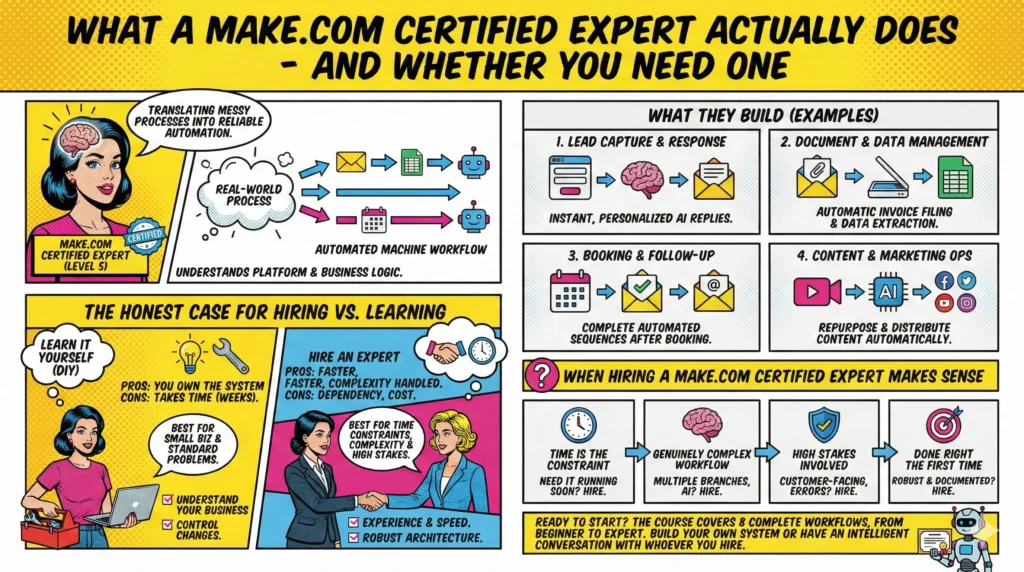
The first is lead capture and response. Your website has a contact form. Someone fills it out. Right now, either you respond manually – hours later, sometimes the next day – or nobody responds until someone remembers to check. An automated workflow captures that submission via webhook, passes the data to an AI model with a prompt written in your voice, and sends a personalized reply within seconds. Every lead, every time, while you’re doing something else.
The second is document and data management. Invoices arriving by email. Contracts that need filing. Submissions that should go into a spreadsheet. These tasks take minutes each time, but they happen constantly, and they’re exactly the kind of thing that accumulates into hours of lost time every month. A Make.com Certified Expert builds a system that handles the detection, extraction, and filing automatically – so you stop touching things that don’t need a human touch.
The third is booking and follow-up sequences. Calendly, or any similar tool, handles the booking itself. What it doesn’t handle is everything that should happen afterwards: the confirmation email, the calendar event, the addition to your marketing list, the follow-up three days later. Without a workflow connecting all of this, a booking is just a 30-minute call that ends and is never followed up on. With one, it’s the start of a relationship that can run for years on autopilot.
The fourth is content and marketing operations. If you publish content regularly – blog posts, videos, social – the distribution and repurposing side of things takes enormous time. A workflow that detects a new video, generates a summary and social posts from the transcript, and distributes them to the right places turns one piece of content into five without you touching it.
These aren’t hypothetical examples. These are workflows I’ve built, tested, and run – in my own business and for clients. The difference between a Make.com Certified Expert and someone who’s watched a few tutorials is that the expert has hit every edge case, debugged every failure, and knows which approaches break in production versus which ones hold up.
The Honest Case for Hiring vs. Learning
Here’s where I’m going to say something that might cost me a client or two: if your business is relatively small, if you have the time to learn, and if the problems you want to solve are fairly standard – you should probably learn to build this yourself.
Not because hiring an expert is a waste of money. But because if you don’t understand what’s running inside your own business, you’re dependent on someone else every time something changes. And things always change. You switch email providers. You add a new service. Your form gains a new field. Every small change requires going back to whoever built it.
When you understand the logic yourself, you own the system. You can adapt it. You can extend it. You can look at a broken workflow at 10pm on a Sunday and fix it yourself without waiting for someone else’s availability.
This is actually why I built a course. It covers the exact workflows I build most often for clients: the contact form automation, the invoice filing system, the booking sequence, the content repurposing engine, the review response bot, the quote generator, the SEO article writer, and a complete automated sales funnel. Built live, from scratch, explained at every step.
Most people who go through it can handle their own automation needs by the end. Some come back afterwards and say: I know what I need now, I just don’t have the time to build it – can you do it for me? That’s a much better starting point for both of us than “I don’t know what I need, please figure it out.”
When Hiring a Make.com Certified Expert Makes Sense
That said, there are clear situations where bringing in an expert is the right call.
When time is the constraint. Learning Make.com properly takes a few weeks of focused effort. If you’re running a business that’s already at capacity and you need a solution running next week, hiring someone is faster.
When the workflow is genuinely complex. A 3-module scenario connecting a form to an email is learnable quickly. A 45-module sales funnel with AI analysis, three routing branches, a data store, multiple PDF outputs, and timed email sequences is a different category of project. The architecture decisions alone – how to structure the data, where to put the error handling, how to make it maintainable – require experience that takes time to develop.
When the stakes are high. If this workflow handles customer-facing communications, payments, or anything where a failure has real consequences, having someone who has debugged these things before is worth the cost.
When you want it done right the first time. An experienced Make.com Certified Expert doesn’t just build the happy path. They build in error handling, they test edge cases, they document what they’ve built so you’re not staring at an undocumented scenario wondering why it stopped working six months later.
What to Look For in a Make.com Certified Expert
Certification aside, here’s what to actually evaluate.
Can they explain what they’re building in plain language? If someone can’t describe what a workflow does without using the names of every module, they probably don’t understand it deeply enough to build something robust.
Do they ask questions about your business before proposing solutions? A good expert wants to understand your actual process – not just map your existing manual steps into Make, but think about whether those steps should exist at all.
Can they show you examples of things they’ve built? Real scenarios, real use cases, real results. Not mockups or screenshots of the Make interface – actual workflows they’ve built and run.
Do they build for maintainability? Ask them what documentation they provide. Ask them what happens if you need to make a change six months from now. The answer tells you a lot.
Do they know when not to automate? This is an underrated quality. Automation is a tool, not a religion. The best experts are the ones who occasionally say: this part shouldn’t be automated – here’s why.
The Workflows Worth Automating First
Whether you hire someone or learn yourself, the starting point is the same: find the task you do most often that requires no judgment.
It’s not the creative work. It’s not the client calls. It’s the thing you do three times a week that always feels exactly the same – and that you quietly dread because it’s not hard, it’s just tedious. The invoice you have to find and forward. The inquiry you have to copy into a spreadsheet. The form response you write in a slightly different way every time even though it’s essentially the same email.
That’s the one. Start there.
The first workflow you build or have built changes something fundamental about how you think about your business. You stop seeing tasks as things that have to be done and start seeing them as things that either require a human or don’t. The ones that don’t get automated. The ones that do get your actual attention.
That shift – from doing everything to designing systems that do it – is what a Make.com Certified Expert helps you make. Whether they make it by building for you, or by teaching you to build for yourself.
Ready to start?
The course covers 8 complete workflows, built from scratch, at every level from beginner to expert. If you want to understand automation well enough to own your own systems – or to have an intelligent conversation with whoever you hire – this is the place to start.
Done. Without You. – Make.com automation for small business owners


Susana Toth
Make.com Certified Expert & Founder, La Maquina Studio
Susana Toth is a Make.com Certified Expert and the founder of La Maquina Studio, where she helps small businesses and consultants eliminate repetitive work through smart automation. With 20+ years of experience in web design, business consulting, and digital strategy, she builds practical AI-powered workflows that save hours every week — without writing a single line of code. She writes about Make.com automation, AI integration, and building systems that work while you don’t.
Learn more about me →