
Is Make.com good for beginners? This is a question I’ve heard many times since launching La Maquina Studio, a dedicated Make.com automation consultancy. As a business owner myself, I understand the trepidation that comes with adopting new tools, especially those promising to revolutionize processes through automation. Make.com can be a powerful ally, particularly for those new to the world of automation. However, like any tool, its value is heavily dependent on how it’s utilized. For beginners, the key is understanding the nature of automation, the patience to climb the learning curve, and the enthusiasm to experiment with various workflows. At its core, Make.com is designed to simplify and enhance the efficiency of business processes, and for those just starting, it offers a range of beginner-friendly features. Yet, the full potential of these processes often only reveals itself with practice and exploration.
Table of Contents
Understanding the Basics: What Makes Make.com Accessible?
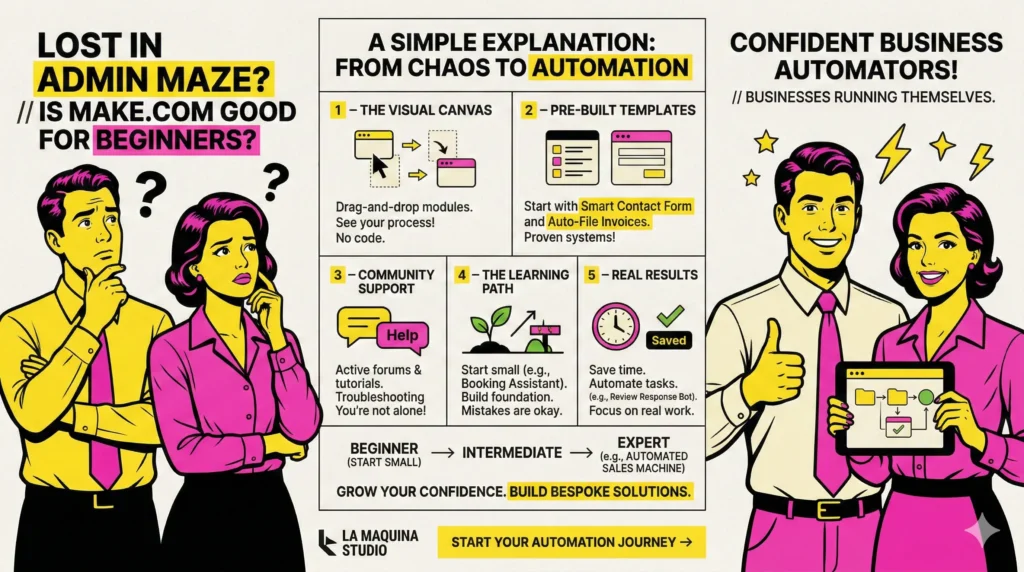
A crucial part of determining if Make.com is good for beginners is evaluating the platform’s accessibility. At La Maquina Studio, we’ve witnessed various levels of users embracing Make.com, and one thing is clear: the platform is fundamentally intuitive. The drag-and-drop interface is a significant advantage, offering a visual representation of workflows, which is particularly beneficial for those who are visually inclined. This feature allows users to map out processes without diving deep into coding intricacies.
Furthermore, Make.com provides pre-built templates and workflows, like the Smart Contact Form and Auto-File Invoices, which are designed for beginners to hit the ground running. These templates act as stepping stones, allowing new users to see firsthand how automation can transform mundane tasks into efficient processes. They reduce the barrier to entry by allowing beginners to start with proven systems and gradually build their own custom workflows as they gain confidence.
Additionally, community support plays a pivotal role in easing new users into the platform. Make.com’s community is robust and active, offering forums, tutorials, and shared experiences that can guide beginners through initial challenges. The platform’s support network is an invaluable resource for troubleshooting and learning, making it less daunting for newcomers. This aspect ensures that users are not isolated in their learning journey, which is crucial when venturing into new technological territories.
The Learning Curve: Challenges and Overcoming Them
While Make.com is indeed good for beginners, it’s essential to recognize that any new software comes with a learning curve. Initially, the abundance of features and possibilities can be overwhelming. At La Maquina Studio, we emphasize the significance of starting small. Engaging with simpler workflows, such as the Smart Contact Form, can help build foundational skills without the intimidation of more complex automations.
One common challenge beginners face is understanding the logic and flow of automation. The idea of connecting different apps and services can seem abstract at first. However, Make.com’s visual approach to workflow creation helps demystify these concepts. By seeing each step laid out as a module in a sequence, users can more easily grasp the mechanics behind automation. Moreover, being patient and allowing time for trial and error is crucial. Mistakes are an integral part of the learning process, and each misstep is an opportunity to deepen one’s understanding.
Another area where beginners can struggle is the integration of AI into their workflows, such as in the Instant Quote Machine. While AI can significantly enhance the capabilities of automation, beginners may find it challenging to set up AI modules effectively. It’s important to approach these with a mindset of experimentation and learning. Resources such as online tutorials and courses, like those offered by La Maquina Studio, provide structured guidance to navigate these initial complexities.
Practical Applications: Making Automation Work for You
Understanding whether Make.com is good for beginners also involves recognizing practical applications that make a tangible impact on business operations. The value of automation is fully realized when it solves real-world problems, and Make.com excels in this aspect by offering versatile workflows that address common business challenges.
For instance, the Booking Assistant is an excellent example of how automation can simplify scheduling and reduce administrative burdens. By automating the booking process, businesses can save time and eliminate the potential for human error in managing appointments. This workflow demonstrates the immediate benefits of automation, showing beginners that even small changes can lead to significant improvements in efficiency.
Another practical application is the Review Response Bot, which automates the task of responding to customer reviews. This not only ensures timely engagement with customers but also helps maintain a consistent brand voice. For beginners, seeing the direct impact of automation on customer interactions can be a powerful motivator to explore more complex workflows. It provides a clear example of how automation can enhance both efficiency and customer satisfaction.
Building Confidence: Growing from Beginner to Expert
As beginners become more comfortable with Make.com, their confidence grows, paving the way for more ambitious projects. This transition is a gradual process, where initial successes encourage further exploration and learning. At La Maquina Studio, we’ve seen many users progress from simple workflows to more advanced automations, such as the Content Repurposing Engine or the Automated Sales Machine.
To facilitate this growth, it’s important for beginners to set achievable goals and gradually increase the complexity of their automations. Starting with familiar challenges allows for the development of problem-solving skills within a known context. As users gain experience, they can begin experimenting with custom workflows, leveraging the full range of Make.com’s capabilities. The transition from beginner to expert is marked by an increasing ability to create bespoke solutions that address unique business needs.
Moreover, engaging with the Make.com community and participating in discussions can further enhance one’s learning journey. By sharing experiences and learning from others, beginners can gain insights that might not be immediately apparent through solo exploration. This collaborative approach not only aids in skill development but also builds a network of support that enriches the overall experience with Make.com.
In conclusion, is Make.com good for beginners? The answer is a resounding yes, with the caveat that beginners should approach the platform with an open mind and a willingness to learn. The journey into business automation is one of discovery, requiring both patience and perseverance. Make.com offers a powerful suite of tools that, when understood and utilized effectively, can transform business processes and open up new possibilities for efficiency and innovation. At La Maquina Studio, we’re committed to guiding beginners through this process, ensuring they have the support and resources needed to harness the full potential of automation. The path from novice to expert is navigable and rewarding, and Make.com provides a vibrant ecosystem in which to embark on this transformative journey.
Check out the courses you can learn in just a few days and implement in your business! Need help? Get in touch with me!


Susana Toth
Make.com Certified Expert & Founder, La Maquina Studio
Susana Toth is a Make.com Certified Expert and the founder of La Maquina Studio, where she helps small businesses and consultants eliminate repetitive work through smart automation. With 20+ years of experience in web design, business consulting, and digital strategy, she builds practical AI-powered workflows that save hours every week — without writing a single line of code. She writes about Make.com automation, AI integration, and building systems that work while you don’t.
Learn more about me →