
Understanding how to use AI to respond to customer inquiries is becoming crucial for businesses looking to improve their customer service efficiency. Automation is not magic; it involves setting up workflows that reduce manual tasks, allowing you to focus on what truly matters—growing your business. At La Maquina Studio, we specialize in creating automated solutions that make business operations smoother and smarter. Today, we’ll explore using AI for automatic response systems, specifically through the lens of a powerful Make.com workflow: the Smart Contact Form. This beginner-friendly workflow integrates seamlessly with OpenAI to manage and respond to customer inquiries automatically. It’s a starting point for businesses eager to embrace the benefits of automation without diving into the deep end immediately. We’ll discuss the necessary steps, potential challenges, and how this automation can transform your customer service experience. Whether you’re new to automation or looking to refine your process, understanding the role AI can play in responding to customer inquiries will be instrumental in optimizing your operations.
Table of Contents
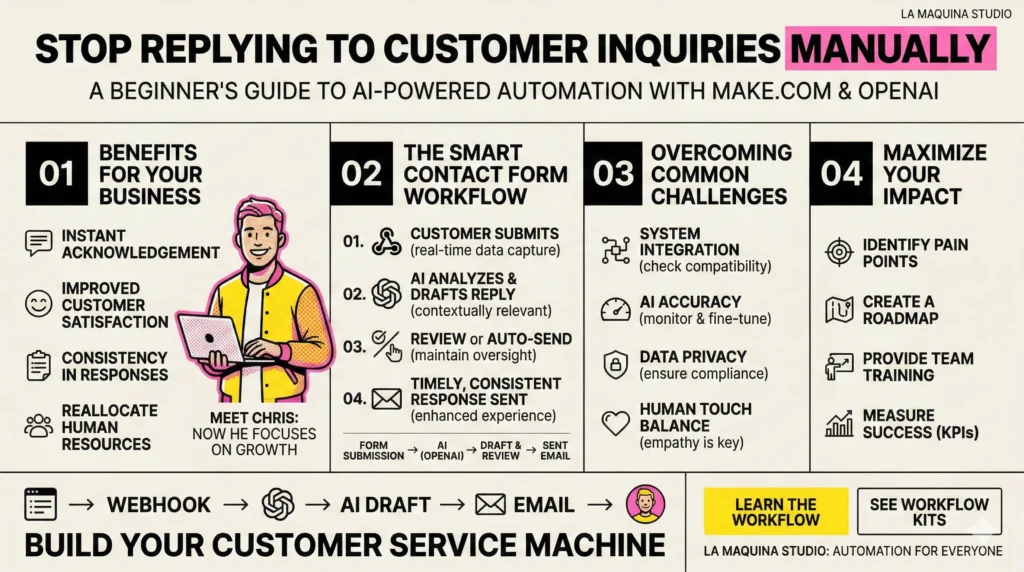
The Benefits of Automating Customer Inquiries
Automating customer inquiries using AI is not just about saving time but about enhancing the quality of your customer interactions. By implementing an automated workflow, you ensure that inquiries are acknowledged promptly, reducing the time customers spend waiting for a response. This instant acknowledgment can significantly improve customer satisfaction, as it reassures clients that their needs are being prioritized. Furthermore, AI-powered systems can handle multiple inquiries simultaneously, ensuring that no customer is left waiting.
One of the primary benefits of such automation is consistency in responses. AI systems can be programmed to provide uniform answers to common questions, maintaining a standard level of service that might be difficult to achieve manually. This consistency ensures that all customers receive the same high-quality service, regardless of when they contact you or who is typically responsible for responding.
Moreover, by automating routine inquiries, human resources can be redirected to more complex tasks that require a personal touch or creative problem-solving. This reallocation of resources can lead to better overall productivity within your team, as staff are no longer bogged down with repetitive tasks and can focus on strategic initiatives that drive business growth.
The Make.com Smart Contact Form workflow exemplifies these benefits. It leverages a webhook to capture incoming inquiries and uses OpenAI to generate immediate, contextually relevant responses. This process not only streamlines your interaction with customers but also provides a scalable solution as your business grows. By automating these initial touchpoints, you can enhance your customer experience while also gathering valuable data on common inquiries and customer needs.
Implementing the Smart Contact Form Workflow
Implementing the Smart Contact Form workflow from Make.com is a straightforward process, even for beginners. This automation is designed to handle the initial response to customer inquiries, using AI to draft and send out emails automatically. The workflow begins with a webhook, a tool that captures data from your contact form submissions in real-time. As soon as a customer submits an inquiry through your website, the webhook triggers the next steps in the automation process.
Once the inquiry is captured, the workflow integrates with OpenAI, a powerful AI tool capable of understanding and generating human-like text. The AI analyzes the inquiry, determines the appropriate response, and drafts an email reply. This integration ensures that responses are not only fast but also relevant and personalized, enhancing the customer experience.
After the AI drafts the response, the workflow routes it to your email system. Here, you can choose to review the response before it is sent or allow the system to dispatch it automatically. This flexibility is crucial for businesses that may want to maintain a level of oversight, especially in the early stages of deployment.
The beauty of this workflow lies in its simplicity and effectiveness. By automating the initial response to customer inquiries, you free up valuable time for your team and ensure that customers receive timely, accurate, and consistent communication. As with any new system, there is a learning curve, but the benefits far outweigh the initial setup effort. With the right configuration, the Smart Contact Form can transform how you handle customer inquiries and streamline your customer service operations.
Overcoming Common Challenges in AI-driven Automation
While there are many benefits to using AI to automate customer inquiries, businesses may face several challenges during implementation. Understanding these challenges can help you better prepare and ensure a smoother transition to automated systems. One common hurdle is integration. Ensuring that your current systems and tools work seamlessly with the Make.com workflow can require some technical knowledge and adjustments. It’s crucial to have a clear understanding of your existing infrastructure and any potential compatibility issues before implementation.
Another challenge is managing accuracy in AI responses. While AI can generate human-like text, it’s not infallible. It’s essential to monitor the responses initially to ensure they align with your brand’s tone and provide accurate information. Regular updates and fine-tuning of the AI’s training data can help improve response accuracy and relevance over time.
Businesses must also consider data privacy and compliance. When using AI to handle customer data, it’s vital to ensure that you’re meeting all necessary legal requirements regarding data protection. Implementing secure data handling practices and being transparent with customers about how their data is used can help maintain trust and compliance.
Lastly, the human touch remains an essential aspect of customer service. While AI can handle routine inquiries efficiently, it cannot replace the empathy and understanding that human interaction provides. Ensuring a balance between automated responses and human intervention is key to maintaining high-quality customer service. By addressing these challenges proactively, businesses can harness the power of AI-driven automation to enhance their customer service operations effectively.
Maximizing the Impact of AI on Customer Service
To truly maximize the impact of AI on customer service, businesses must take a strategic approach to implementation. Start by identifying the specific pain points in your current customer service operations. This will help you understand where AI can be most beneficial and ensure that you’re not automating processes that are best handled by humans.
Once you’ve identified the areas for improvement, create a plan for integrating AI into your existing workflows. This plan should include timelines, milestones, and metrics for success. Having a clear roadmap will help keep the implementation process on track and ensure that you’re meeting your goals.
Training and ongoing support are also critical components of a successful AI implementation. Your team needs to understand how the technology works and how to use it effectively. Regular training sessions and access to support resources can help ensure that your team is confident in using the new system.
Finally, don’t forget to measure the impact of AI on your customer service operations. Use key performance indicators (KPIs) to track the effectiveness of the automation and identify areas for improvement. By continually assessing the impact of AI, you can make data-driven decisions to optimize your customer service operations further.
At La Maquina Studio, we offer resources and guidance to help businesses implement AI-driven automation successfully. Our Make.com courses and automation kits provide the tools and knowledge needed to transform your customer service operations. Whether you’re just starting or looking to refine your existing processes, our expertise can help you achieve your automation goals.
In conclusion, understanding how to use AI to respond to customer inquiries is an essential step for businesses aiming to enhance their customer service operations. By automating routine inquiries with AI, you can improve response times, ensure consistency, and free up valuable resources for more complex tasks. The Make.com Smart Contact Form workflow provides a practical, beginner-friendly solution for businesses looking to embrace automation. Although challenges exist, with careful planning, training, and ongoing support, businesses can overcome these hurdles and maximize the benefits of AI-driven automation. At La Maquina Studio, we’re committed to helping businesses navigate this journey and achieve their automation goals efficiently and effectively. By leveraging our expertise and resources, you can transform your customer service operations and stay ahead in today’s competitive market.
Check out the courses you can learn in just a few days and implement in your business! Need help? Get in touch with me!


Susana Toth
Make.com Certified Expert & Founder, La Maquina Studio
Susana Toth is a Make.com Certified Expert and the founder of La Maquina Studio, where she helps small businesses and consultants eliminate repetitive work through smart automation. With 20+ years of experience in web design, business consulting, and digital strategy, she builds practical AI-powered workflows that save hours every week — without writing a single line of code. She writes about Make.com automation, AI integration, and building systems that work while you don’t.
Learn more about me →