
If you’re running a business in today’s digital landscape, understanding how to automate Google reviews can be a game-changer. In an era where online reputation can significantly impact your bottom line, automating the collection and management of Google reviews isn’t just a convenience—it’s a necessity. For business owners, handling reviews is often a manual and time-consuming process that can detract from focusing on growth and customer satisfaction. This article will guide you through the essential steps to effectively automate Google reviews, leveraging tools like Make.com to streamline your efforts. Whether you’re a small business owner or part of a larger enterprise, automating Google reviews can save you time, reduce errors, and ensure that you’re always in tune with customer feedback. If you’ve been overwhelmed by the repetitive nature of managing reviews, it’s time to consider automation as a viable path forward.
Table of Contents
Understanding the Importance of Google Reviews
Before diving into how to automate Google reviews, it’s important to understand why Google reviews matter so much for your business. In today’s digital age, potential customers often make purchasing decisions based on online reviews. A strong presence of positive reviews can lead to increased trust and credibility, directly impacting your sales and reputation.
Google reviews are often the first thing potential customers see when they search for your business online. They provide social proof and can influence whether someone chooses your services over those of a competitor. Additionally, these reviews play a crucial role in local SEO, helping your business appear more prominently in search results.
Given their significance, managing Google reviews efficiently should be a priority for any business owner. However, manually handling reviews is not only time-consuming but also prone to human errors. Moreover, failing to engage with both positive and negative feedback can result in missed opportunities for improvement and customer engagement. Automation offers an effective solution by making the process more streamlined and efficient.
By automating the review collection process, you can ensure that your business maintains a robust and active online presence. This not only helps in attracting more customers but also keeps your existing customer base engaged. Automation also provides the advantage of responding to reviews in a timely manner, which can significantly enhance customer satisfaction and loyalty.
Setting Up Automation: The Make.com Workflow
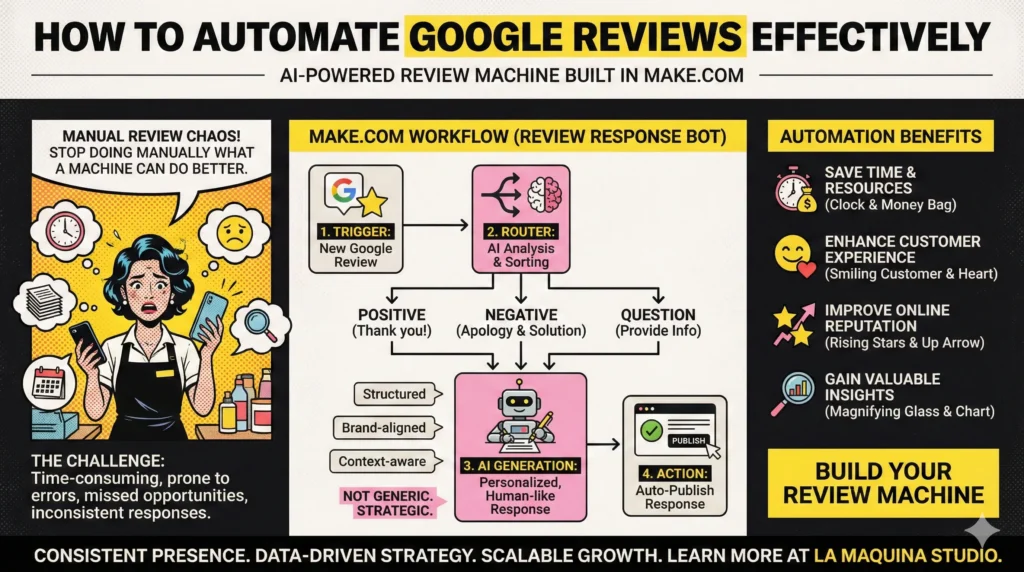
When it comes to learning how to automate Google reviews, Make.com offers a practical and user-friendly solution through its prebuilt workflows. Workflow 5 from La Maquina Studio’s Make.com Automation Course—Review Response Bot—is a valuable resource for business owners looking to streamline their review management process.
This advanced workflow is specifically designed to automate the response to Google My Business reviews. It utilizes the router module to sort reviews into different categories, ensuring personalized and contextually appropriate responses are sent automatically. The AI component in the workflow further enhances the system by generating responses that are not only timely but also nuanced, reflecting the tone and content of each review.
Setting up this workflow requires a bit of initial effort, but the long-term benefits far outweigh the upfront investment. By integrating Google My Business with Make.com, you can automate the collection and response process, freeing up your time to focus on other critical areas of your business. Plus, once set up, the system operates seamlessly with minimal intervention, allowing you to maintain a consistent and professional online presence.
To get started, you need to connect your Google My Business account to Make.com and configure the workflow according to your specific needs, such as defining categories for different types of reviews. Once everything is in place, the automation will run in the background, ensuring that every customer interaction is acknowledged and addressed appropriately.
Overcoming Challenges in Google Review Automation
While automation promises to simplify the management of Google reviews, it’s important to recognize the challenges that can arise during the implementation process. Understanding these obstacles is crucial to successfully automating your review processes.
One of the primary challenges in automating Google reviews is ensuring that the system is set up to handle the wide variety of feedback you might receive. Reviews can range from glowing praise to detailed complaints, and your automated responses need to reflect the appropriate level of engagement for each scenario. This requires careful tuning of the AI and filters used in your automation workflow.
Another challenge is maintaining the human touch in automated responses. Customers appreciate personalized communication, and if your responses appear robotic or indifferent, it may hurt your brand’s reputation. Leveraging AI within the Make.com workflow can help by generating responses that mimic human conversation and address specific points raised in reviews.
Furthermore, it’s essential to regularly review and update your automation settings. Business needs and customer expectations evolve over time, and your automation system should adapt accordingly to remain effective. Regular audits and adjustments ensure that the system continues to meet your objectives and aligns with your brand voice.
Lastly, technical hiccups can pose challenges. Automation tools require a stable Internet connection and depend on the seamless integration of various platforms. Regular maintenance and troubleshooting are necessary to minimize disruptions and ensure the smooth operation of your automated review system.
Maximizing the Benefits of Automated Google Reviews
Once you have set up and fine-tuned your Google review automation system, the next step is to maximize its benefits for your business. Knowing how to automate Google reviews is just the beginning—fully capitalizing on the automation capabilities can significantly boost your business outcomes.
Automating Google reviews not only saves time but also enhances the customer experience. By ensuring prompt responses, you demonstrate to your customers that their feedback is valued, thereby fostering stronger relationships. This proactive engagement can lead to increased customer loyalty and repeat business.
Another significant benefit is the ability to gather and analyze valuable insights from reviews. Automated systems can categorize and analyze feedback, enabling you to pinpoint areas for improvement and capitalize on positive trends. This data-driven approach can inform your business strategy and lead to continual improvement.
Additionally, automation allows you to maintain a consistent online presence, which is critical for brand reputation. Regular interactions with your customers through timely review responses reinforce your commitment to excellence and customer satisfaction. This consistency can set your business apart from competitors who may struggle with manual review management.
Finally, remember that automation is not a set-it-and-forget-it solution. Ongoing monitoring and optimization of your system are crucial to ensure continued success. By staying engaged and making necessary adjustments, you can maintain the efficiency and effectiveness of your automated review management process.
Conclusion
Automating Google reviews can revolutionize how your business manages customer feedback, saving you time and resources while enhancing your online reputation. By leveraging tools like Make.com’s Workflow 5, you can implement a sophisticated system that handles reviews efficiently and effectively.
While the journey of automation comes with its set of challenges, the rewards are significant. From maintaining a consistent online presence to gaining valuable business insights, the benefits of automation are manifold. However, it’s crucial to remain vigilant and ensure your system is continually optimized to adapt to changing business landscapes and customer expectations.
In conclusion, if you’re ready to take your business to the next level, understanding how to automate Google reviews is a step you can’t afford to skip. The time and effort invested in setting up an automated system will pay dividends in enhanced customer satisfaction and business growth. For more information and guidance on automating other aspects of your business, explore the resources available at La Maquina Studio.


Susana Toth
Make.com Certified Expert & Founder, La Maquina Studio
Susana Toth is a Make.com Certified Expert and the founder of La Maquina Studio, where she helps small businesses and consultants eliminate repetitive work through smart automation. With 20+ years of experience in web design, business consulting, and digital strategy, she builds practical AI-powered workflows that save hours every week — without writing a single line of code. She writes about Make.com automation, AI integration, and building systems that work while you don’t.
Learn more about me →