
If you’re a business owner looking to enhance your customer service strategy, learning how to automate customer reviews after service can be a game-changer. The reality is, in today’s digital age, customer reviews can heavily influence your business’s reputation and, consequently, your sales. However, manually requesting reviews can be time-consuming, inconsistent, and, let’s face it, often forgotten in the hustle of daily operations. This is where automation steps in. By leveraging tools like Make.com, you can transform the review collection process into an efficient, streamlined workflow. Specifically, using the Review Response Bot workflow, which integrates Google My Business with AI, businesses can automate this process and ensure that every customer interaction ends with a request for feedback. This not only saves valuable time but also increases the likelihood of receiving consistent reviews, providing a steady influx of fresh feedback to help your business thrive.
From my experience running La Maquina Studio, I’ve learned that introducing automation into your customer service operations can yield substantial long-term benefits. However, it’s also essential to be aware that the journey toward full automation is not without its challenges. It involves a learning curve, especially when dealing with nuanced tasks like soliciting customer reviews. Yet, the rewards of a well-executed automation strategy—consistent and timely customer feedback—far outweigh the initial investment in time and effort. In this article, I will walk you through the process of automating customer reviews after service using the Review Response Bot workflow, addressing common challenges, sharing tips on customization, and demonstrating how this automation can significantly enhance your customer relations.
Table of Contents
The Importance of Customer Reviews
Customer reviews are more than just a string of testimonials—they are a powerful tool that can significantly impact your business’s reputation and credibility. For many potential customers, reading reviews is a critical step in their decision-making process. A business with a robust collection of positive reviews tends to attract more customers, while a business lacking in reviews might inadvertently raise doubts about its credibility. This is why understanding how to automate customer reviews after service is crucial for maintaining an active and positive online presence.
The key here is consistency. Regularly receiving and posting customer reviews can help ensure that the information available about your business is current and relevant. However, manually asking for reviews can be erratic and dependent on memory, which is not the most reliable method. By automating this process, every satisfied customer is given a chance to share their experience immediately after the service is rendered, ensuring a continuous flow of feedback.
Moreover, automation can boost your engagement rates. Automated systems can be set to gently remind customers to leave a review if they haven’t done so within a certain time frame. This not only increases the number of reviews but also encourages customers to engage with your brand even after the service is completed. Such engagement is invaluable; it keeps your business at the forefront of your customers’ minds, prompting them to return in the future or recommend your services to others. In essence, automating your review requests can create a virtuous cycle of feedback and engagement, reinforcing your business’s reputation and encouraging growth.
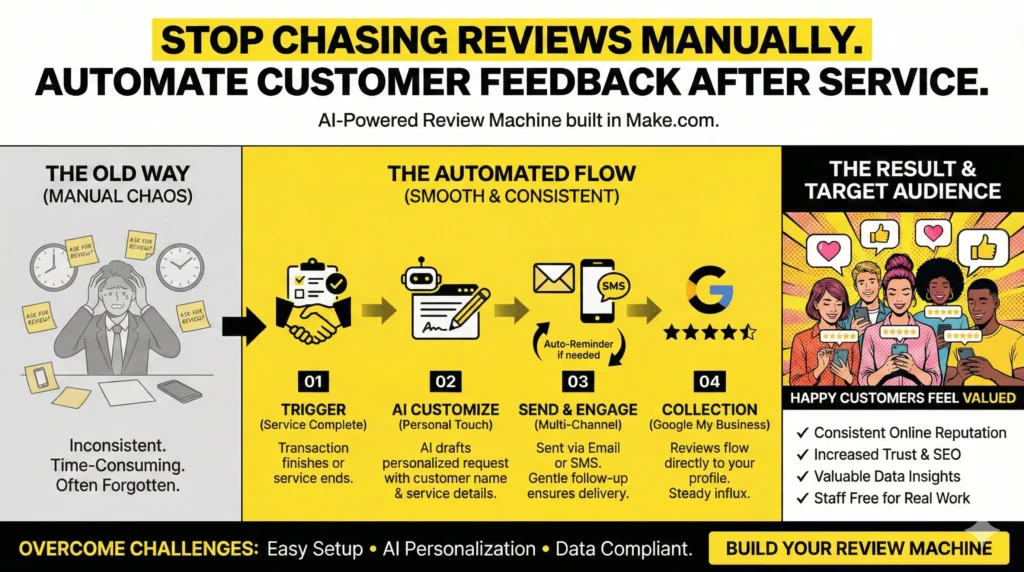
Implementing the Review Response Bot Workflow
To effectively learn how to automate customer reviews after service, it’s essential to familiarize yourself with the right automation tools and workflows, such as the Review Response Bot from Make.com. This advanced workflow is designed to streamline the process, integrating various platforms to ensure that every customer interaction ends with a well-timed request for feedback.
The Review Response Bot workflow operates by linking your Google My Business account with an AI module through Make.com’s automation platform. Here’s a step-by-step breakdown of how it works:
- Trigger: The workflow is initiated after the completion of a customer service interaction. You can set this trigger based on the closing of a transaction, completion of a service, or any other suitable endpoint.
- Routing: Once the trigger is activated, the workflow routes the information to the AI module, which customizes a review request message for the customer. This customization ensures that the request feels personal and considerate, increasing the likelihood that the customer will respond.
- Sending the Request: The personalized review request is sent to the customer via their preferred communication channel, be it email, SMS, or even a direct message through a customer app.
- Follow-up: If the customer does not respond within a predetermined timeframe, a gentle reminder is automatically sent, maximizing the chances of receiving a review.
By automating these steps, businesses not only ensure a higher rate of review collection but also maintain a professional and courteous communication style with their customers. The initial setup requires some time and technical understanding, but once in place, it operates seamlessly, saving hours of manual effort and consistently producing valuable customer feedback.
Overcoming Challenges in Automation
While understanding how to automate customer reviews after service is undoubtedly beneficial, it’s crucial to acknowledge the challenges that come with implementing such automation workflows. As with any technology integration, there are potential hurdles that businesses may encounter, which need to be addressed proactively.
One common challenge is the initial setup and customization. Each business has unique customer interaction patterns, and a one-size-fits-all approach often falls short. Customizing the Review Response Bot to suit your specific business needs requires a careful analysis of your customer interaction points and communication preferences. It might take a few trial-and-error attempts to perfect the setup, but patience is key.
Additionally, there are concerns about maintaining a personal touch in automated messages. Customers are more likely to respond to requests that feel genuine and personalized. To address this, the AI module within the workflow should be configured to pull specific details about the service or interaction, such as the customer’s name, the service provided, and any other relevant details that can make the message feel less robotic and more engaging.
Data privacy and compliance is another critical consideration. Ensure that your automation practices adhere to data protection regulations such as GDPR or CCPA. This involves obtaining explicit consent from customers to send follow-up communications and ensuring that their data is handled securely. These legal considerations are vital in maintaining customer trust and avoiding potential regulatory issues.
Despite these challenges, the benefits of learning how to automate customer reviews after service can far outweigh the initial hurdles. By preparing for these challenges and approaching the setup process with an open mind and a willingness to adapt, businesses can effectively harness the power of automation to enhance their customer feedback processes.
Enhancing Customer Relationships Through Automation
Incorporating automation into your customer service strategy by learning how to automate customer reviews after service can profoundly enhance your customer relationships. Automated review requests are not just about collecting reviews; they are about creating a seamless and positive follow-up experience for your customers.
Firstly, automation ensures that every customer has the opportunity to voice their opinion, thus making them feel valued and heard. This increased engagement can foster a sense of loyalty and satisfaction, encouraging repeat business and referrals. When customers see that their feedback is actively sought and valued, it builds trust and strengthens their relationship with your brand.
Secondly, the feedback collected through automated reviews provides invaluable insights into your business operations. By systematically analyzing this feedback, you can identify trends, recognize areas for improvement, and monitor customer satisfaction over time. This data-driven approach allows businesses to make informed decisions, enhancing service quality and customer experience.
Moreover, by automating the review request process, you free up your team to focus on more complex or personalized customer interactions. This efficiency not only reduces the workload for your staff but also ensures that human resources are dedicated to tasks that truly require their attention and expertise. In turn, this can lead to improved job satisfaction and productivity within your team.
Ultimately, learning how to automate customer reviews after service not only streamlines your operations but also elevates your overall customer experience. By consistently engaging with customers, addressing their feedback, and making informed improvements, you enhance your reputation and foster a loyal customer base.
Conclusion
In conclusion, understanding how to automate customer reviews after service is a critical step for any business looking to enhance its customer engagement and reputation management strategies. While the initial setup of workflows like the Review Response Bot on Make.com requires some investment in time and resources, the benefits of automation are numerous and impactful.
Automating the process of requesting and collecting customer reviews ensures a consistent flow of feedback, which is essential for maintaining a current and positive online presence. It not only saves time and reduces manual workload but also fosters stronger relationships with your customers by making them feel valued and heard. Additionally, the insights gathered from these reviews provide a data-driven foundation for making informed business decisions and improvements.
At La Maquina Studio, we understand the challenges and learning curves involved in implementing automation solutions. However, we also recognize the immense potential for growth and efficiency that these solutions offer. By approaching automation with an open mind and a commitment to continuous improvement, businesses can unlock new levels of success in their customer service operations. So, take the leap, embrace automation, and watch as your customer relationships and business reputation flourish.
Check out the courses you can learn in just a few days and implement in your business! Need help? Get in touch with me!


Susana Toth
Make.com Certified Expert & Founder, La Maquina Studio
Susana Toth is a Make.com Certified Expert and the founder of La Maquina Studio, where she helps small businesses and consultants eliminate repetitive work through smart automation. With 20+ years of experience in web design, business consulting, and digital strategy, she builds practical AI-powered workflows that save hours every week — without writing a single line of code. She writes about Make.com automation, AI integration, and building systems that work while you don’t.
Learn more about me →