
In today’s fast-paced digital landscape, business process automation for small business has become a crucial strategy for staying competitive and efficient. As a small business owner, you might often find yourself juggling multiple tasks, from responding to customer inquiries to managing invoices and scheduling meetings. While these tasks are essential, they can also be time-consuming and distract you from focusing on what really matters: growing your business. This is where automation comes into play, offering a streamlined approach to managing repetitive tasks effortlessly. However, the journey to effective business process automation isn’t a one-size-fits-all solution. It requires a thoughtful approach tailored to your unique business needs.
At La Maquina Studio, we understand the initial hesitation that many small business owners feel about diving into automation. There’s a common misconception that automation is complex, expensive, and reserved for large enterprises. But in reality, it’s surprisingly accessible and can be particularly beneficial for small businesses looking to optimize operations without breaking the bank. Whether it’s setting up a Smart Contact Form to automate email responses or implementing a Booking Assistant to manage your calendar, the possibilities are vast and can significantly alleviate your workload.
In this article, we’ll explore where to start with business process automation for small business, addressing the challenges you might face and offering solutions through practical workflows. By the end, you’ll have a clearer understanding of how automation can transform your daily operations and propel your business forward.
Table of Contents
Identifying Areas for Automation
The first step in implementing business process automation for small business is identifying which areas of your business will benefit the most from automation. This requires a thorough analysis of your current workflows and pinpointing tasks that are repetitive, time-consuming, and prone to human error. By automating these tasks, you free up valuable time for yourself and your team to focus on more strategic activities that require human insight and creativity.
Consider areas like customer service, where a Smart Contact Form can handle initial inquiries and route them to the appropriate departments. This not only speeds up response times but also ensures that your customers receive consistent and accurate information. Similarly, for businesses that deal with frequent bookings and appointments, a Booking Assistant can automate the scheduling process, eliminating the back-and-forth emails and reducing the risk of double bookings.
Another critical area to automate is content management. With a Content Repurposing Engine, you can automatically transform your existing content into different formats, such as converting YouTube videos into blog posts or newsletters. This not only extends the reach of your content but also ensures that you’re consistently engaging with your audience across multiple platforms without the manual effort.
Once you’ve identified the key areas for automation, the next step is to evaluate the tools and technologies that will best meet your needs. Keep in mind that you don’t need to automate everything at once. Start small, with one or two processes, and gradually expand as you become more comfortable with the technology.
Choosing the Right Tools and Technology
When it comes to selecting the right tools for business process automation for small business, it’s essential to consider platforms that are user-friendly, cost-effective, and capable of scaling as your business grows. Make.com is an excellent choice for small businesses looking to dip their toes into automation without a significant upfront investment.
At La Maquina Studio, we leverage Make.com’s intuitive interface and powerful integrations to create tailored automation solutions that address the specific needs of small businesses. For instance, if your business struggles with manually filing invoices, the Auto-File Invoices workflow can help streamline this process by automatically sorting invoices from your Gmail into organized folders in Google Drive. This not only saves time but also reduces the risk of errors and ensures that all financial documents are easily accessible.
For businesses in the e-commerce sector, automating customer reviews can be a game-changer. The Review Response Bot can automate responses to Google My Business reviews, ensuring that your customers feel heard and valued without you having to spend hours crafting individual replies. This not only enhances your brand’s reputation but also improves customer satisfaction.
It’s important to remember that while the tools are powerful, there is a learning curve involved. However, with the right guidance and resources, such as the courses offered by La Maquina Studio, you can quickly get up to speed and start reaping the benefits of automation.
Implementing Automation Workflows
Once you’ve chosen the right tools and identified the areas you want to automate, the next step is implementing automation workflows. This involves mapping out each step of the process you want to automate and configuring the necessary components to ensure a seamless flow of information.
For example, if you’re looking to automate lead nurturing, the Automated Sales Machine workflow can be a powerful solution. This expert-level workflow guides you through the process of capturing leads via a Tally form, using AI to assess and categorize them, generating personalized PDF offers, and then sending out tailored email sequences. The result is a fully automated sales funnel that operates 24/7, allowing you to focus on closing deals rather than chasing leads.
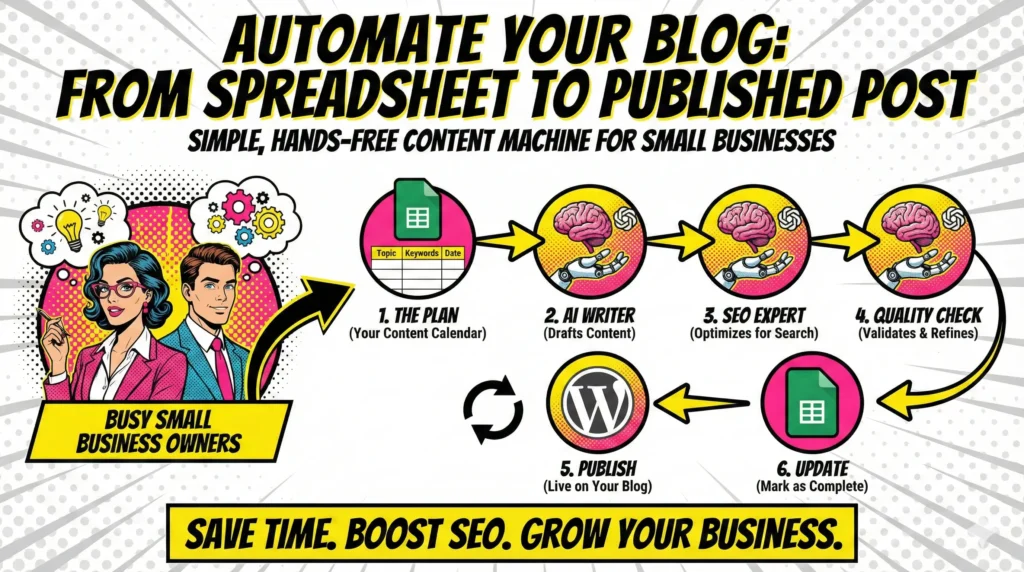
In the content creation space, the Auto Blog Writer workflow can automate the generation of blog content, from ideation to publication. By scheduling regular prompts in Sheets, feeding them into OpenAI for content creation, and then publishing the final product on WordPress, you can maintain a consistent content calendar without the need for a dedicated writing team.
Implementing these workflows requires careful planning and testing to ensure they function as intended. It’s also crucial to regularly review and refine them to adapt to changing business needs and technological advancements.
Overcoming Common Challenges
Embarking on the journey of business process automation for small business is not without its challenges. One of the most common hurdles is the resistance to change, often rooted in the fear of replacing the human touch with impersonal technology. To overcome this, it’s essential to communicate the benefits of automation to your team and involve them in the implementation process.
Another challenge is the initial investment of time and resources required to set up automation workflows. While the long-term benefits are significant, the upfront effort can be daunting. However, starting with straightforward workflows, like the Instant Quote Machine, can help you build confidence and demonstrate quick wins that justify further investment.
Technical issues and integration problems can also arise, particularly if you are trying to connect disparate systems. Ensuring that your chosen tools are compatible and can easily integrate with existing systems is crucial for a smooth transition. Seeking expert guidance, such as the support offered by La Maquina Studio, can help you navigate these complexities and prevent potential roadblocks.
Finally, it’s important to continuously monitor and assess the performance of your automated workflows. This involves setting clear metrics for success and regularly reviewing these against your business goals. Doing so will allow you to make necessary adjustments and ensure that your automation strategy remains aligned with your overall business objectives.
In conclusion, business process automation for small business offers a pathway to greater efficiency, reduced costs, and enhanced productivity. While the journey may seem challenging, the benefits far outweigh the initial effort required. By starting small, choosing the right tools, and continuously refining your approach, you can harness the power of automation to transform your business operations and achieve sustainable growth.


Susana Toth
Make.com Certified Expert & Founder, La Maquina Studio
Susana Toth is a Make.com Certified Expert and the founder of La Maquina Studio, where she helps small businesses and consultants eliminate repetitive work through smart automation. With 20+ years of experience in web design, business consulting, and digital strategy, she builds practical AI-powered workflows that save hours every week — without writing a single line of code. She writes about Make.com automation, AI integration, and building systems that work while you don’t.
Learn more about me →